
Estimate AI video editing costs using seats, credits, exports and revisions. Compare the total cost of a finished video before subscribing. Keep an untouched copy of a representative clip. Apply the effect to a short sample, compare it in motion with the original, and check edges, audio sync and export quality. Record the settings that produced an acceptable result.
Cost comparison: Editing a minute of existing footage and generating a minute of new footage are different jobs. Compare costs within the same workflow. Credit expiry and whether failed attempts consume credits depend on the provider and plan.
Research guide. Vendor information and third-party reports are distinct from our own test results. See how we evaluate tools. We may earn a commission from qualifying purchases through affiliate links. Affiliate disclosure.
TL;DR:
- Re-renders and multiple attempts significantly increase overall costs, often tripling the expense for complex, high-quality videos.
- Check expiry, rollover, refunds and failed-generation charges for the exact credit pack or subscription you are considering. Do not assume prepaid credits remain available indefinitely.
- Cost estimates vary widely from $0.50 for simple clips to over $30 per minute for complex generative workflows, depending on iteration frequency.
- Most platforms charge for re-renders and failed generations, so actual project expenses usually surpass the initial listed rates.
- Trial projects and tracking your actual re-render habits are essential before committing to a subscription or large credit pack.
Table of Contents
- How AI Video Editor Pricing Models Actually Work
- How Do You Estimate Your Real Per-Video Cost?
- Comparing Pricing Across Popular AI Video Editors
- How Do You Choose an AI Video Editor Based on Your Budget?
- Use the directory to compare workflow options, then confirm current features and terms with the provider.
- What Happens If You Cancel or Want a Refund?
- The Real Lesson in Vendor Pricing Pages
- Compare Verified AI Video Editor Pricing Before You Commit
- Sources
- FAQ
How AI Video Editor Pricing Models Actually Work
Every AI video editor pricing page boils down to one of three structures, and mixing them up is how creators end up with a $200 surprise on their card.
Subscription plans bundle a monthly credit allowance with seats, storage, and feature access. InVideo’s tiers illustrate this well: the Plus plan runs $17 a month (billed $200 yearly) for 75 credits monthly, while Max jumps to $85 a month for 390 credits. Generative hits $170 a month for 800 credits, according to InVideo’s pricing page. Synthesia follows a similar shape, with a Starter tier at $29 a month and Creator at $89 a month, both drawing from a shared credit pool that covers avatars, dubbing, and other generative features, per Synthesia’s pricing page. Once you burn through the included credits, you either buy top-ups or wait for the monthly reset.
Check expiry, rollover, refunds and failed-generation charges for the exact credit pack or subscription you are considering. Do not assume prepaid credits remain available indefinitely.
Pay-as-you-go ties billing directly to compute or API usage, common in raw model access rather than polished editor interfaces.
A few billing details change your real cost more than the sticker price does:
- Annual billing typically knocks 15% to 30% off the monthly rate on subscription tiers.
- Team seats are often priced per user on top of the base plan, not folded into it.
- Credit rollover policies vary. Some subscriptions void unused credits at month’s end; prepaid packs from Eddie and Shorz do not.
- Enterprise tiers (Synthesia included) usually require a custom quote rather than a published rate.
How Do You Estimate Your Real Per-Video Cost?
Vendor pricing pages tell you the sticker price. They rarely tell you what a finished video actually costs once you factor in mistakes, retries, and export settings. Here’s a repeatable way to do that math yourself.
- Define the final output. Length, resolution, and whether it needs avatars, voiceover, or heavy generative b-roll. A 30-second vertical clip and a 5-minute generative explainer live in completely different cost brackets.
- Estimate your action count. Count generation calls, edit passes, and exports, then add a realistic number of re-renders. First attempts rarely ship.
- Apply the rate. Multiply your estimated actions by the vendor’s credit cost or published per-minute rate.
Here’s what that looks like in practice:
A 30-second social clip with light AI editing and one round of captions might run $0.50 to $2 total on a subscription plan like InVideo’s Plus tier, assuming no re-renders. A 2-minute tutorial with a talking-head avatar and moderate B-roll generation, using Shorz’s guide of roughly 9 credits per second for AI-generated video, lands closer to $5 to $15 once you include one retry. A 5-minute fully generative piece with multiple scene regenerations is where costs escalate.
Statistic Callout: Analysts and vendor blogs peg AI generation costs at roughly $0.50 to $30 per minute depending on model choice and resolution. The wide spread exists almost entirely because of iteration count. Going from one try to five tries on a generative shot doesn’t add cost linearly. It can multiply the per-clip price several times over before you land on a usable take.
Storage overages, stock-asset licensing, and extra team seats are the quiet line items that inflate a bill nobody planned for. Check those caps before you commit to a tier.
Comparing Pricing Across Popular AI Video Editors
Here’s how six representative platforms stack up on the numbers that actually affect your monthly bill.
Check expiry, rollover, refunds and failed-generation charges for the exact credit pack or subscription you are considering. Do not assume prepaid credits remain available indefinitely.
For occasional creators posting a handful of clips a month, prepaid packs from Eddie or Shorz tend to waste less money than a subscription with unused credits. Regular creators publishing weekly benefit more from a mid-tier subscription like InVideo’s Max plan, where the per-credit cost drops as volume rises. Agencies managing multiple clients usually need the seat controls and custom contracts that come with enterprise-tier deals, where storage and team access matter more than the headline price. You can browse deeper reviews of these categories in TechVideoBlog’s AI video editors directory.

How Do You Choose an AI Video Editor Based on Your Budget?
Start with your actual usage pattern, not the plan that looks cheapest on the pricing page. A few questions decide which model fits:
- How many minutes of finished video do you produce monthly, and how often do you need a full re-render?
- Do you need team seats, single sign-on, or shared brand assets?
- How much cloud storage will a month of raw footage and exports actually consume?
- Does the output need commercial licensing on stock assets or AI-generated voices?
Low volume (1 to 4 videos a month, mostly short clips): a free tier or a $10 to $20 prepaid credit pack from Eddie or Shorz usually covers it. Medium volume (weekly output, some team collaboration): budget $30 to $90 a month on a mid-tier subscription like InVideo’s Max or Synthesia’s Creator plan. High volume agencies running multiple clients and heavier generative work should expect $200 to $1,000+ monthly, often on custom enterprise terms.
Before signing up, ask vendors directly for a sample credit burn on a typical project, confirm what license you get on any stock footage or AI voices, and ask what a top-up costs versus upgrading a tier.
Pro Tip: Run a small prepaid credit pack or free trial for two weeks before committing to a subscription. Track exactly how many credits your real workflow burns, then compare that number against the subscription’s monthly allowance instead of guessing.
How to Evaluate This Workflow
Keep an untouched copy of a representative clip. Apply the effect to a short sample, compare it in motion with the original, and check edges, audio sync and export quality. Record the settings that produced an acceptable result.
This is a suggested evaluation process, not a report of a completed TechVideoBlog benchmark.
What Happens If You Cancel or Want a Refund?
Cancellation terms vary more across AI video platforms than most creators expect, and reading the fine print before subscribing beats fighting for a refund after the fact.
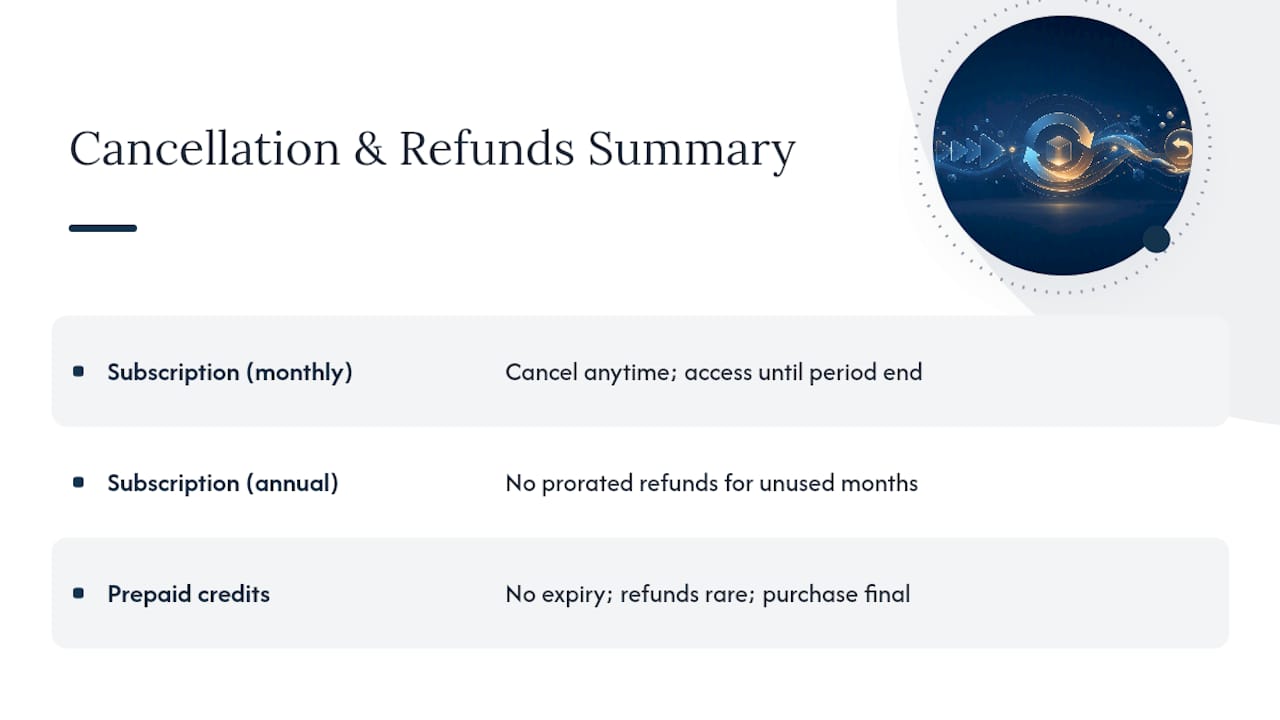
Subscription platforms like InVideo and Synthesia typically let you cancel anytime, with access continuing through the end of the current billing period rather than an immediate cutoff. Annual plans are the riskier commitment: canceling early on a plan billed yearly (InVideo’s $200/year Plus tier, for instance) usually does not trigger a prorated refund for unused months, since the discount you received was priced into that annual commitment.
Prepaid credit packs from Eddie and Shorz work differently because there’s no subscription to cancel in the first place. You bought a fixed block of credits, and since those credits don’t expire, there’s nothing to lose by pausing usage. Refunds on unused credit packs are rare across the category. Most vendors treat a completed credit purchase as final, similar to buying stock footage or a font license.
A few practical habits reduce cancellation friction. Downgrade a tier before your renewal date rather than after, since most platforms bill in advance. Export and back up any avatars, voice clones, or brand assets before canceling. Some platforms restrict access to custom-trained assets the moment a subscription lapses. And if you’re testing a new tool, start with a monthly plan or a small credit pack rather than an annual commitment. It costs a little more per month, but it caps your downside while you confirm the tool fits your workflow.
The Real Lesson in Vendor Pricing Pages
Most guides to AI video editor pricing treat the vendor’s published rate as the answer. It isn’t. The actual number that matters is your burn rate on real projects, and that number is almost always higher than the pricing page implies because nobody’s first render is their last.
The conventional advice, pick the plan with the most credits for your budget, gets the order of operations backwards. You should measure your iteration habits first, then match a pricing model to that behavior. A creator who nails scenes on the first or second try is genuinely well served by a subscription’s bundled credits. A creator who regenerates five times per clip will burn through the same subscription in half the time and feel cheated, when the real problem was the workflow, not the plan.
If there’s one thing worth prioritizing before comparing another spec sheet, it’s this: run a small trial and count your actual re-renders before you commit to twelve months of anything. The credit math on a vendor’s homepage is a starting estimate, not a forecast.
Compare Verified AI Video Editor Pricing Before You Commit
Use the directory to compare workflow options, then confirm current features and terms with the provider.

If you’re weighing a subscription against a prepaid credit pack, or trying to figure out whether an open-source option like CutAI fits your workflow better than a cloud tool, the AI video editors directory breaks down pricing, output quality, and ease of use side by side. Creators leaning toward free or low-cost options first can also check the free AI video editors roundup before spending a dollar. For a broader look at how editors stack up against generator-focused platforms, browse the AI video generators category. Start there, run the numbers against your own workflow, and pick a plan based on what you’ll actually spend, not what the homepage promises.
Sources
- Pricing | invideo AI
- Synthesia Pricing – Compare Free and Paid Plans
- Eddie AI Pricing | Pay-as-you-go credits
- Video Editor That Edits For You
- How Much Does AI Video Generation Actually Cost? (2026 Guide)
FAQ
How Much Does an AI Video Editor Typically Cost Per Month?
Subscription plans usually start between $17 and $30 a month for entry tiers, with mid-range plans costing more per month, based on published rates from InVideo and Synthesia.
What’s the Difference Between Credits and Minutes in AI Video Pricing?
Credits are a flexible currency that different actions (renders, avatars, voiceovers) consume at different rates, while minutes refer specifically to finished video length; Synthesia uses both terms somewhat interchangeably across its tiers.
Are Pay-As-You-Go Credit Packs Cheaper Than Subscriptions?
Check expiry, rollover, refunds and failed-generation charges for the exact credit pack or subscription you are considering. Do not assume prepaid credits remain available indefinitely.
Can I Avoid AI Video Editing Costs Entirely?
Open-source, local-first tools like CutAI let you edit without cloud fees since processing happens on your own machine, though setup takes more technical effort than a browser-based subscription.
Do AI Video Editors Charge Extra for Re-Renders?
Yes, effectively: most platforms charge per generation attempt, so a failed or unsatisfying render still consumes credits, which is why iteration count is the biggest driver of real cost beyond the advertised rate.