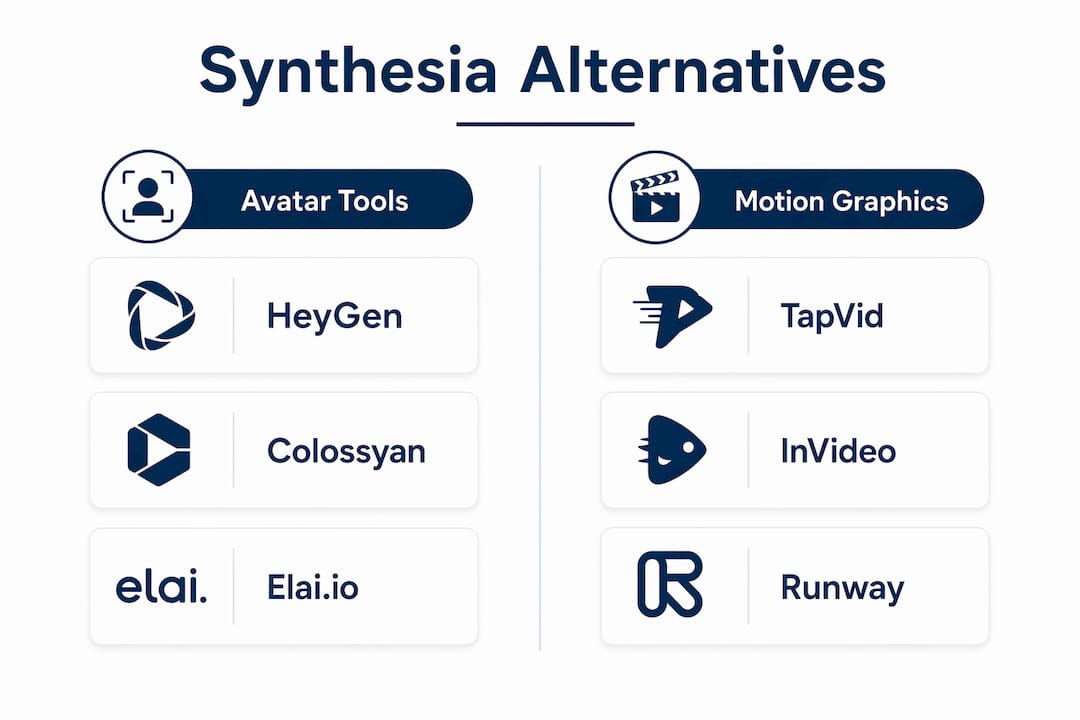
If your team needs avatar-first training video at scale, HeyGen and Colossyan are the two tools to trial first. For motion graphics and cinematic B-roll without a talking head, InVideo and TapVid are the category-different picks. Techvideoblog’s hands-on reviews and verified pricing cover all of them, grouped by what they actually produce rather than by avatar count or headline language numbers.
The right framing here matters. AI video tools fall into three technical categories: avatar-presenter platforms, motion-graphics and cinematic generators, and full timeline editors. Treating them as interchangeable is the most common procurement mistake teams make.
Quick shortlist by job-to-be-done:
- Training and L&D: Colossyan (branching, SCORM export, quiz support) or Elai.io (document-to-video, LMS-friendly)
- Sales and marketing avatars: HeyGen (realistic avatars, many templates, CRM-friendly workflows)
- Motion graphics and demos: TapVid (prompt-driven, no per-minute caps) or InVideo (cinematic model access)
- Timeline editing and social: Veed (full in-browser timeline, caption tools)
- Screen recording and walkthroughs: Camtasia (precision screen capture, mature editing)
- Budget and experimentation: Vidnoz (daily free generation) or Akool (100 free credits, no card required)
- Open-source path: Openthesia (self-hosted, extra setup required)
Test-first rule: If your primary job is training, trial Colossyan. If it’s marketing video, start with HeyGen. Both offer free tiers or trials that let you run the full create-edit-export sequence before committing.
Table of Contents
- How do the top Synthesia alternatives compare side by side?
- Vetted picks: mini reviews grouped by category
- How to choose the right Synthesia alternative for your team
- What free and open-source options actually give you
- What testing and research reveal about cost traps and integrations
- Key Takeaways
- The mistake most teams make when picking an AI video tool
- Techvideoblog’s AI video directory cuts through the tool overload
- Useful sources and further reading
How do the top Synthesia alternatives compare side by side?
Pricing shape and revision workflow are the two dimensions that most affect total cost of ownership. A “credits/minute” model means every re-render of a small text edit costs real money. A flat monthly plan with unlimited renders is structurally cheaper for iterative workflows. Read the table with that distinction in mind.
| Tool | Best For | Pricing Shape | Avatar Support | Timeline Editing | Free Tier | API Access |
|---|---|---|---|---|---|---|
| Synthesia | Enterprise multilingual training | Flat monthly (minutes cap) | Yes, over 500 avatars | Limited | No free plan | Enterprise tier |
| HeyGen | Sales and marketing avatars | Flat monthly tiers | Yes, 500+ avatars | Basic | 3 free videos/mo | Business tier |
| Colossyan | L&D, SCORM, branching | Flat monthly | Yes, multi-avatar scenes | Basic | 14-day trial | Enterprise |
| Veed | Social content, captioning | Flat monthly | Limited avatar | Full timeline | Free plan (watermark) | Yes |
| Runway | Generative scene editing | Credit-based tiers | No talking head | Scene-level | Free credits | Yes |
| Camtasia | Screen recording, demos | One-time or subscription | No | Full timeline | 14-day trial | No |
| Lumen5 | Blog-to-video repurposing | Flat monthly | No | Assembly-based | Free plan | Limited |
| Pictory | Script/blog-to-video | Flat monthly (minutes) | No | Assembly-based | Free trial | Limited |
| InVideo | Prompt-to-cinematic clips | Flat monthly tiers | No | Assembly/prompt | Free plan | Yes |
| TapVid | Motion-graphics explainers | Flat monthly | No | Motion-graphics | Free tier | Yes |
| Doodly | Whiteboard explainers | One-time purchase | No | Storyboard | No | No |
| Akool | Creative experimentation | Credit-based | Yes | Basic | 100 free credits | Yes |
| Elai.io | Document-to-training video | Flat monthly | Yes | Basic | Free trial | Creator tier |
| KreadoAI | Multilingual voice coverage | Flat monthly | Yes | Basic | Free tier | Yes |
| Vidnoz | Budget avatar testing | Flat monthly | Yes, 1,800+ | Basic | 1 min/day free | Limited |
| Openthesia | Open-source experimentation | Free/self-hosted | Limited | Manual | Fully free | Self-managed |
| Arcade Creator Studio | Product demos and walkthroughs | Flat monthly | No | Capture-based | Free plan | Yes |
Common trade-offs to watch:
- Re-render costs: Platforms that charge per minute will bill you again for a corrected script. Test this during your trial before committing.
- Free-tier limits: Free tiers frequently carry watermarks, low-resolution outputs, or tight minute limits that make them unsuitable for consistent production. Use them to evaluate workflow, not output quality.
- API unlock thresholds: HeyGen’s API starts at Business tier. Elai.io includes public API at Creator level. That gap matters if automation is part of your plan.
Vetted picks: mini reviews grouped by category
Avatar and talking-head platforms
HeyGen is the most direct Synthesia competitor for sales and marketing teams. It offers 500+ avatars, 400+ templates, and natural lip-syncing across 100+ languages. The free plan lets you create a small number of videos monthly with limited duration, no credit card required. Watch for: API access is gated to Business tier, so automation workflows cost more than the entry plan suggests. For a detailed head-to-head, Techvideoblog’s HeyGen vs. Synthesia comparison covers avatar realism, pricing, and API access side by side.

Colossyan is the strongest pick for L&D teams. Tools built for L&D include branching scenarios, quizzes, and SCORM export — features that matter for enterprise training even when avatar realism is comparable across platforms. Colossyan supports multiple avatars in a single scene, real-time rendering, and high-definition export. The 14-day free trial is long enough to run a full create-edit-export test.
Elai.io converts PowerPoint and PDF files directly into narrated training videos, which makes it the fastest path from existing slide decks to LMS-ready content. SCORM export and interactive video features are included. Custom avatar creation is available for a one-time $500 fee. API access starts at Creator tier, which is more accessible than HeyGen’s Business-tier gate.
KreadoAI leads on voice and language coverage, with 40,000+ AI voices across 140+ languages. For global teams producing localized content at volume, that range is a genuine differentiator. Avatar quality is functional rather than cinematic.
Vidnoz gives you one minute of free video creation per day with access to 1,800+ avatars at 720p. Videos carry watermarks on the free plan, and the interface is less polished than premium options. The daily allotment makes it the most practical free tool for ongoing experimentation rather than a one-time trial.
Akool offers 100 free credits with no credit card required, covering face swap, video translation, and avatar generation. It suits experimental workflows where you want to test creative models before committing to a paid plan.
Motion-graphics and cinematic generators
These tools are a separate product category from avatar-first platforms. Using them as a direct Synthesia replacement causes a process-outcome mismatch. Use them when your output is a demo, explainer, or B-roll clip rather than a talking-head presenter video.
TapVid generates motion-graphics explainers from prompts without per-minute caps, which makes it cost-predictable for high-volume explainer production. No talking head is involved, so it’s not a substitute for avatar-first workflows.
InVideo offers access to advanced generative models (Sora 2 Pro, Kling 3.0) on premium tiers, producing cinematic B-roll and scene-driven clips from text or URLs. The free plan is functional for testing. For e-commerce teams, Techvideoblog’s e-commerce AI video guide covers prompt-to-video tools in that context.
Runway focuses on scene-level generative editing with creative plug-ins for cinematic output. It’s credit-based, so high-volume production costs scale quickly. Best suited to creative marketing teams that need visual effects or generative scene transitions rather than presenter-style video.
Doodly takes a different approach entirely: hand-drawn whiteboard animations built from a storyboard. It’s a one-time purchase rather than a subscription, which makes it cost-predictable. Output style is niche but effective for illustrated explainers.
Full timeline editors
Veed is the strongest browser-based timeline editor on this list. Full in-browser timeline editing, robust caption tools, and quick social exports make it the right pick for content teams that need editorial control without installing software. The free plan includes watermarks; paid plans start at accessible monthly rates.
Camtasia is the established choice for high-precision screen recording and manual editorial control, with audio-sync tools and custom asset integration that avatar-first platforms lack. It’s the right tool for software demos and walkthroughs where frame-accurate editing matters. Available as a one-time purchase or subscription.
Lumen5 and Pictory both automate the assembly of stock footage from scripts or blog URLs. Neither offers timeline editing in the traditional sense. Lumen5 is optimized for repurposing long-form content into social clips; Pictory handles large stock footage assembly and blog-to-video pipelines. Both charge per minute or per video on entry plans, so watch the credit model carefully.
Pro Tip: For L&D teams, check Techvideoblog’s education-focused AI video guide before finalizing a shortlist. It covers LMS integration and SCORM compatibility in more depth than general roundups.
How to choose the right Synthesia alternative for your team
Pick by output format, not by avatar count. That’s the decision rule. A tool with 1,000 avatars is useless if your team needs timeline editing or SCORM export. Start by answering: what does the finished video look like, and where does it live?
Must-have criteria checklist:
- Output format match: Talking head, motion graphics, screen recording, or assembled stock footage? Confirm the tool produces your format natively.
- Revision workflow: Does a text edit require a full re-render? If yes, what does that cost in credits or time?
- LMS and SCORM support: Required for training teams. Colossyan and Elai.io both include it; most marketing tools do not.
- API access and at which tier: Automation at scale requires API. Confirm the tier before signing, not after.
- SSO and enterprise features: Data retention, team seats, and SSO matter for enterprise procurement. Synthesia and Colossyan both address this; most budget tools do not.
- Cost-per-minute model clarity: Flat monthly plans with unlimited renders are structurally cheaper for iterative workflows than per-credit models.
- Export formats: H.264, MP4, SCORM package, or social-optimized sizes? Confirm before trialing.
Questions to ask vendors during trials:
- What happens to my video if I change one sentence in the script? Does it re-render the full clip or just the affected segment?
- Is API access included at the tier I’m evaluating, or is it an upgrade?
- What are your data retention and privacy policies for uploaded scripts and avatar recordings?
- Do you support SCORM 1.2 and SCORM 2004, or only one version?
Red flags:
- Hidden credit costs for re-renders not disclosed in the pricing page
- API locked to enterprise tier with no published pricing
- No export to standard formats (H.264, MP4)
- Free trial that doesn’t allow a full create-edit-export sequence
What free and open-source options actually give you
Free tiers are often tokenized with watermarks, low resolution, and tight minute caps that make them impractical for sustained professional workflows. Use them to evaluate the interface and revision workflow, not to judge output quality.
Genuinely free or open-source options:
- Vidnoz: 1 minute/day, 1,800+ avatars, 720p, watermarked. Best for daily experimentation without a budget.
- Akool: 100 free credits, no credit card. Covers face swap, video translation, and avatar generation. Good for testing creative model capabilities.
- HeyGen: 3 free videos per month, up to 3 minutes each. The most feature-complete free tier among avatar tools.
- Veed: Free plan with watermark. Full timeline editor accessible without paying, which is rare.
- Openthesia: Fully open-source, self-hosted. Expect limited polish and significant setup work compared with any SaaS option. Useful for teams that need offline inference or want to avoid cloud data exposure.
Setup expectations for Openthesia: Local install requires model downloads and a machine with adequate GPU memory. Openthesia is useful as a low-cost option for experimentation, but the gap in polish and reliability compared with SaaS is real. Plan for setup time measured in hours, not minutes.
Pro Tip: Prefer open-source or local inference when your scripts contain sensitive information (legal, medical, HR content) that you cannot send to a third-party cloud. For those workflows, a local AI deployment on a dedicated machine gives you full data control that no SaaS free tier can match.
What testing and research reveal about cost traps and integrations
The most consistent finding across hands-on tests is that platforms charging per minute require full re-renders for small script edits, which multiplies costs in iterative workflows. A team that revises scripts three times per video on a per-credit platform pays three times the generation cost. Flat monthly plans with unlimited renders avoid this entirely.
Concrete cost signals from available data:
- Synthesia’s entry plan includes a limited monthly video output, which may be restrictive for teams producing multiple clips.
- Vidnoz’s free plan gives 1 minute per day, making it the most generous daily free allotment among avatar tools.
- Elai.io’s custom avatar creation is a one-time $500 fee with no recurring cost, which is structurally cheaper than enterprise avatar licensing at most competitors.
- KreadoAI includes unlimited avatar cloning starting at $25/month (billed annually).
Integration gaps are the second most common surprise. Revenue teams should prioritize platforms that integrate with CRM tools or support personalized video workflows rather than generalist avatar tools that don’t connect to Salesforce or Outreach. Teams that need high-precision screen recording and manual editorial control often find that specialist non-AI-only platforms offer audio-sync tools and custom asset integration that avatar-first platforms simply lack.
Pro Tip: During your free trial, deliberately make a small text edit to an existing video and observe what happens. Does the platform re-render the full clip, or just the changed segment? That single test reveals more about total cost of ownership than any pricing page.
Key Takeaways
The best Synthesia alternative for your team is determined by output format first: avatar-first tools for training, motion-graphics generators for demos, and timeline editors for marketing storytelling.
| Point | Details |
|---|---|
| Pick by output format | Match the tool to your video type: talking head, motion graphics, screen recording, or stock assembly. |
| Test the revision workflow | A small text edit that triggers a full re-render signals a hidden cost trap; test this during every free trial. |
| Check API and SCORM tier | API and SCORM access are often gated to higher tiers; confirm before signing, not after. |
| Free tiers evaluate workflow only | Watermarks and minute caps make free tiers unsuitable for production; use them to test the interface and export path. |
| Techvideoblog for verified pricing | Techvideoblog’s AI video tool directory provides hands-on workflow tests and verified pricing across all tools on this list. |
The mistake most teams make when picking an AI video tool
The pattern that shows up repeatedly in procurement decisions is choosing a tool based on avatar count or headline language numbers, then discovering three months in that the revision workflow is expensive or the LMS integration doesn’t exist. Avatar count is a marketing metric. Revision cost and export format are operational metrics.
The second mistake is skipping the re-render test during the trial. Most teams create a video, approve it, and move on. The cost trap only appears when you edit. A team that runs a 3-step trial sequence — create an avatar or scene clip, make a text edit and observe the re-render behavior, then export to the target format — surfaces every significant operational issue before signing a contract.
The third mistake is treating motion-graphics tools and avatar tools as substitutes. They are not. A team that needs a talking-head presenter for compliance training and buys InVideo or Runway will produce the wrong output format entirely. The category distinction matters more than any feature comparison within a category.
The fix is straightforward: define your output format before you open a trial account, run the 3-step test sequence on every finalist, and confirm API and SCORM access at the tier you intend to buy.
*— H
Techvideoblog’s AI video directory cuts through the tool overload
Sorting through 17 AI video platforms is genuinely time-consuming, and pricing pages rarely tell you what happens when you edit a video or try to export to SCORM. Techvideoblog’s directory solves that with verified pricing, hands-on workflow test notes, and side-by-side comparisons built around real production scenarios rather than vendor marketing copy.

Two things Techvideoblog provides that pricing pages don’t: a clear breakdown of which tier unlocks API and LMS features for each tool, and workflow test notes that document re-render behavior and export format support. Those two data points alone prevent the most common procurement mistakes.
Your next step: run the 1-hour pilot from the checklist in the selection section above, then check the Techvideoblog tool directory for tool-specific trial notes and current verified pricing before you commit to a plan.
Useful sources and further reading
- Top Synthesia Alternatives and Competitors (G2) — Community reviews and category comparisons across AI video generators
- 8 Synthesia Alternatives Compared by Use Case (2026) — Use-case-grouped analysis covering API tiers and output format distinctions
- 8 Synthesia Alternatives in 2026 (Fiverr) — Pricing and revision workflow analysis including cost trap documentation
- 6 Best Synthesia Alternatives, Free and Paid (Vidmetoo) — Hands-on notes on HeyGen, Akool, Colossyan, Elai.io, KreadoAI, and Vidnoz
- Top AI Video Alternatives (ngram.com) — L&D-focused analysis covering SCORM, branching, and free-tier limitations
- Techvideoblog Synthesia Review — Verified pricing and enterprise feature breakdown for direct comparison
- Techvideoblog AI Avatar Tools Directory — Avatar-specific comparisons with affiliate links and category filtering
- Techvideoblog AI Video Tools for Agencies — Revision-workflow and operational cost analysis for larger teams