Video frame interpolation (VFI) synthesizes new in-between frames from existing ones to raise a video’s frame rate, smooth motion, or create slow motion. For most creators, the practical verdict is this: start with a GUI tool like Topaz Video AI for fast results, reach for RIFE when you need near-real-time open-source performance, and reserve diffusion or transformer-based models for the highest fidelity when compute is not a constraint.
- Fast GUI results: Topaz Video AI or SVP SmoothVideo Project handle most creator workflows without touching code.
- Near-real-time open-source: RIFE achieves 30+ FPS at 720p on a consumer GPU (tested on a 2080Ti), making it the go-to for batch pipelines.
- Maximum fidelity: FILM on TFHub or diffusion-based methods score highest on benchmarks like Vimeo-90K and Middlebury, at the cost of heavier compute.
Key Takeaways
The most effective approach to video frame interpolation is matching the method family to your content type and compute budget, then validating with a short test clip before committing to a full render.
| Point | Details |
|---|---|
| Match method to content | Fast action needs hybrid or CNN models; slow/static content works with almost any approach. |
| Test clip first | Run a 5-second clip from the hardest section of your footage before batch rendering. |
| GPU memory limits resolution | Tile or patch 4K footage to avoid out-of-memory errors; Topaz handles this automatically. |
| Benchmarks vs. real footage | LPIPS correlates better with perceived quality than PSNR; always test on your own material. |
| Techvideoblog for tool selection | The Techvideoblog directory provides hands-on GPU, pricing, and quality notes for interpolation-capable tools. |
Table of Contents
- What video frame interpolation actually does
- A taxonomy of core VFI approaches
- Where VFI fits in real projects
- Tools available today: a practical comparison
- How to choose a tool and run your first interpolation
- Common artifacts and how to fix them
- How VFI quality is measured
- Running interpolation: GUI path and Colab path
- Where VFI research is heading
- Techvideoblog: where to compare tools before you commit
- Sources
- FAQ
- The case for testing before trusting benchmarks
What video frame interpolation actually does
VFI generates intermediate frames that never existed in the original recording. The goal is to increase temporal resolution, which is the density of frames over time, rather than spatial resolution (pixel count). A 30 FPS clip converted to 60 FPS through interpolation contains 30 real frames and 30 synthesized ones per second. Perceptually, motion appears smoother and judder drops noticeably, though the effect depends heavily on content type and the method used.
Primary goals of VFI:
- FPS upsampling: convert 24/30 FPS footage to 60, 120, or higher for modern displays
- Slow-motion creation: stretch a 60 FPS clip to apparent 240 FPS without a high-speed camera
- Temporal smoothing: reduce judder in archival or compressed footage
- Temporal densification: produce dense frame sequences for downstream tasks like novel view synthesis or video compression
VFI appears in four main deployment forms: TV motion-smoothing chips (the notorious “soap-opera effect”), media player plugins like SVP, editor plugins such as Adobe After Effects Pixel Motion, and research models accessed through Colab notebooks or command-line tools.
A taxonomy of core VFI approaches
The AceVFI survey covers more than 250 papers and organizes methods into two paradigms: Center-Time Frame Interpolation (CTFI), which generates the midpoint frame, and Arbitrary-Time Frame Interpolation (ATFI), which can generate a frame at any temporal position between two inputs. Within those paradigms, seven method families dominate:
Optical flow / motion compensation estimates per-pixel motion vectors between frames and warps pixels to the target time. Accurate for rigid, predictable motion; breaks down at occlusion boundaries.
Kernel-based methods predict a spatially adaptive convolution kernel for each output pixel, blending source pixels without explicit flow. Preserves structure well but can produce blur when motion is large.
Phase-based methods decompose frames into phase components across spatial frequencies and shift phases to interpolate. Fast and artifact-free on small motions; degrades on large displacements.
Hybrid methods combine flow estimation with kernel or feature warping to balance accuracy and structural fidelity. Most modern production-grade models fall here.
CNN/learned-flow models (including RIFE) use neural networks to predict flow or synthesis weights end-to-end, trained on large video datasets. Faster than transformers; slightly weaker on complex occlusions.
Transformer-based approaches apply attention across spatial and temporal dimensions, capturing long-range dependencies that CNNs miss. Higher fidelity on complex scenes; significantly heavier compute.
Diffusion/generative models treat frame synthesis as a conditional generation problem. They produce the highest perceptual fidelity on hard cases but require the most GPU memory and inference time.
| Method family | Accuracy | Structure preservation | Typical artifacts | Compute / latency |
|---|---|---|---|---|
| Optical flow | High on rigid motion | Moderate | Ghosting at occlusions | Low–medium |
| Kernel-based | Medium | High | Blur on fast motion | Medium |
| Phase-based | Low on large motion | High | Ringing, breakdown | Low |
| Hybrid (flow + kernel) | High | High | Minimal when tuned | Medium–high |
| CNN / learned flow (RIFE) | High | Medium–high | Occasional smearing | Low (real-time capable) |
| Transformer | Very high | High | Rare; compute-limited | High |
| Diffusion / generative | Very high (perceptual) | Very high | Hallucination risk | Very high |
A practical signal: fast, rigid motion (sports, vehicles) favors flow or hybrid methods. Complex non-linear motion with heavy occlusion (crowd scenes, foliage) benefits from transformer or diffusion approaches, if you can afford the compute. Static or slow-moving content (talking heads, interviews) works well with almost any method, including phase-based.
Where VFI fits in real projects
Primary use cases:
- Slow-motion video: stretch 60 FPS drone footage to 240 FPS equivalent for cinematic highlights
- Display FPS matching: convert 24 FPS film to 60 FPS for high-refresh monitors without judder
- VR and gaming reprojection: synthesize intermediate frames to reduce perceived latency in headsets
- Bandwidth-efficient streaming: transmit fewer frames and reconstruct the rest on the client side
- Archival restoration: smooth degraded or frame-dropped historical footage
- Novel view synthesis: densify temporal sequences for 3D reconstruction pipelines
Sports broadcasting is the clearest real-world case. A slow-motion replay of a penalty kick, shot at 60 FPS, can be interpolated to 240 FPS or higher for broadcast, revealing motion detail that the original camera missed. Archival restoration is the opposite problem: footage shot at 16 FPS in the early 20th century gets interpolated to 24 or 30 FPS to feel natural on modern screens.
Content type matters more than most creators expect. A talking-head interview at 30 FPS interpolates to 60 FPS with almost any tool and looks clean. A fast-action skateboarding clip with motion blur, rapid direction changes, and partial occlusions will expose every weakness in a flow-based model. Choose your method after watching a 10-second test clip, not before.
Pro Tip: Before committing to a full render, export a 5-second clip from the hardest section of your footage (the fastest motion, the most occlusion) and run it through your chosen tool first. That single test will tell you more than any benchmark score.
Tools available today: a practical comparison
VFI tools split into five categories: cloud/online AI services, desktop GUI apps, editor plugins, open-source models with Colab or CLI workflows, and pre-trained TFHub models. The table below covers the six tools you are most likely to encounter.
| Tool | Best for | Speed / inference | Output quality / artifact risk | GPU memory | Ease of use | Cost |
|---|---|---|---|---|---|---|
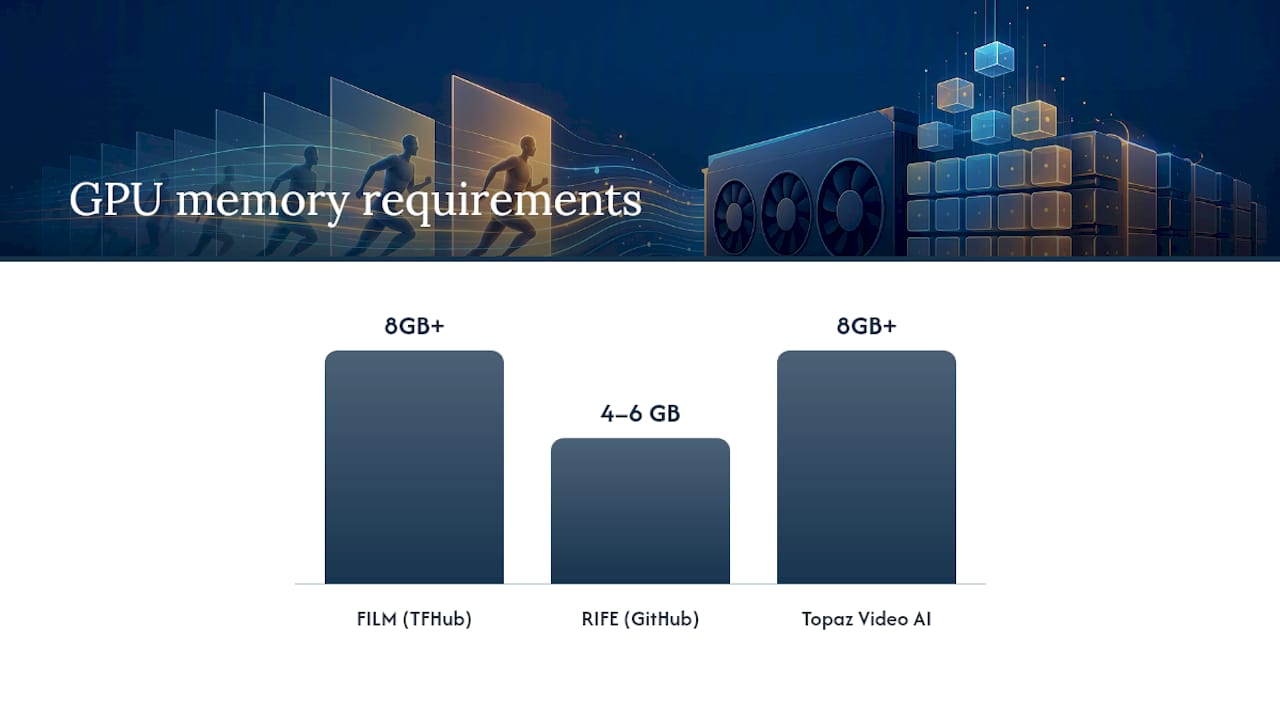
| FILM (TFHub) | Highest fidelity, research baseline | Slow (batch only) | Excellent / low artifact risk | High (8GB+ recommended) | Colab / code | Free |
| RIFE (GitHub) | Near-real-time batch, open-source pipelines | 30+ FPS at 720p on 2080Ti | Very good / occasional smearing | Medium (4–6GB) | CLI / moderate | Free |
| SVP SmoothVideo Project | Real-time playback in media players | Real-time | Good / soap-opera effect possible | Low–medium | GUI / easy | Free + Pro tier |
| Topaz Video AI | GUI batch processing, 4K upscaling | Medium (batch) | Very good / preset-dependent | High (8GB+) | GUI / easy | Commercial |
| Adobe After Effects (Pixel Motion) | Editor-integrated, timeline workflows | Slow (frame-by-frame) | Moderate / ghosting on fast motion | Medium | GUI / easy | Subscription |
| FFmpeg (minterpolate filter) | Scripted pipelines, format conversion | Medium | Moderate / motion blur artifacts | Low | CLI / technical | Free |
A few pricing and workflow notes worth knowing:
- RIFE and FILM are free and open-source; running them requires a Python environment and a CUDA-capable GPU.
- Topaz Video AI is a one-time purchase with an annual update option; it handles tiling for high-resolution footage automatically.
- SVP’s free tier covers real-time playback; the Pro version adds higher-quality interpolation modes.
- FFmpeg’s
minterpolatefilter is the fastest path for scripted pipelines but produces noticeably lower quality than learned models. - Adobe After Effects Pixel Motion is already in your subscription if you use Creative Cloud, making it the zero-extra-cost option for timeline-based work.
For creators who want to compare AI video tools across categories beyond interpolation, Techvideoblog’s curated directory covers tested options with verified pricing.
How to choose a tool and run your first interpolation
The right tool depends on five variables: desired fidelity, target FPS multiplier, whether you need real-time or batch output, available GPU memory, and content type. Work through this checklist before you start:
- Define your target FPS multiplier. 2× (30→60) is the easiest case. 4× or 8× multipliers (for slow motion) demand more compute and produce more artifacts.
- Check your GPU. RIFE runs on 4GB VRAM at 720p. FILM and Topaz Video AI want 8GB or more for 1080p. For 4K, plan for tiling.
- Decide on real-time vs. batch. SVP handles real-time playback; everything else is batch.
- Assess content complexity. Fast action → hybrid or CNN model. Slow/static → any method works.
- Set a quality floor. If ghosting is unacceptable (product demos, archival work), use FILM or Topaz. If speed matters more, use RIFE.
GPU memory and tiling: processing 4K footage in one pass will exhaust most consumer GPUs. The standard fix is to process footage in tiles or patches, stitching results together after inference. Topaz Video AI handles this automatically. For RIFE and FILM, you can lower the internal processing resolution or split frames manually before inference.
A short, efficient workflow:
- Export a 5-second test clip from the most demanding section of your footage.
- Run it through your chosen tool at default settings.
- Preview the output at full resolution and look for ghosting, smearing, and flicker.
- Adjust the model preset or interpolation factor if artifacts appear.
- Batch render the full clip with your final settings.
- Reassemble frames to video using FFmpeg or your editor, and re-attach the original audio track.
Pro Tip: When reassembling interpolated frames with FFmpeg, use -r to set the output frame rate explicitly and -c:a copy to pass the original audio through without re-encoding. Audio sync will drift if you let FFmpeg infer the frame rate from the frame sequence.
Understanding where interpolation fits in a broader digital video workflow helps you avoid common encoding mistakes when handing off interpolated files to editors or delivery platforms.
Common artifacts and how to fix them
Every VFI method produces artifacts under the right (wrong) conditions. Knowing the failure mode before you render saves hours.
- Ghosting / double images: the most common artifact. Caused by inaccurate optical flow at occlusion boundaries, where a foreground object moves to reveal background pixels the model has never seen. Fix: use a hybrid or kernel-based model, or manually rotoscope the problem region and process it separately.
- Motion blur and smearing: flow-based models sometimes produce blurred streaks when motion is too fast for the estimated flow field. Fix: lower the interpolation factor (try 2× instead of 4×) or switch to a kernel-based model.
- Temporal flicker: inconsistent brightness or color between synthesized frames, especially visible in flat regions. Fix: apply a temporal smoothing pass in post, or use a model with explicit temporal consistency constraints like FC-VFI, which introduces Temporal Fidelity Modulation to address exactly this problem.
- Wrong object warping: the model moves an object in the wrong direction because the flow estimate is ambiguous. Common with rotating objects or symmetric patterns. Fix: no clean algorithmic fix; manual masking or a different model is usually required.
- Soap-opera effect: technically not an artifact but a perceptual consequence of high-frame-rate playback. Motion looks unnaturally fluid, like a daytime TV production. Fix: reduce the FPS multiplier, or apply a slight motion blur in post to restore cinematic feel.
- Hallucination (diffusion models): generative models occasionally invent texture or detail that was not in the source. Fix: reduce the diffusion guidance strength or fall back to a flow-based model for that segment.
How VFI quality is measured
Researchers use three primary metrics to compare methods:
- PSNR (Peak Signal-to-Noise Ratio): measures pixel-level accuracy in decibels. Higher is better. Sensitive to small errors but does not correlate well with perceived quality on complex motion.
- SSIM (Structural Similarity Index): compares luminance, contrast, and structure between predicted and ground-truth frames. Better than PSNR for structural fidelity, still imperfect on texture-rich content.
- LPIPS (Learned Perceptual Image Patch Similarity): uses a neural network to measure perceptual distance. Lower is better. Correlates more closely with human judgments of quality than PSNR or SSIM.
Standard benchmark datasets:
- Middlebury: the foundational optical flow benchmark; used to evaluate motion estimation accuracy, which is the core component of most VFI pipelines.
- Vimeo-90K: 90,000 video triplets used for training and testing interpolation models; the most common training set for learned methods.
- SNU-FILM: four difficulty levels (Easy, Medium, Hard, Extreme) designed to stress-test models on fast and complex motion.
- UCF101: an action-recognition dataset repurposed for VFI testing on real-world motion categories.
Academic benchmarks measure performance on clean, well-lit, moderate-motion clips. Real-world footage — compressed, noisy, with mixed lighting and fast action — consistently produces worse numbers than benchmark scores suggest. Always run your own test clip.
The gap between benchmark PSNR and perceived quality on real footage is wide enough that LPIPS has become the preferred metric in recent papers, though even it struggles with temporal consistency across multiple synthesized frames.
Running interpolation: GUI path and Colab path
GUI / cloud quick-start (Topaz Video AI or SVP):
- Import your source clip and set the target FPS (e.g., 2× for 30→60, 4× for 30→120).
- Choose a model preset (motion-optimized for action, standard for general content).
- Preview a short segment before committing to a full render.
- Export with your delivery codec (H.264 for web, ProRes for editing).
Colab / code path (FILM):
The FILM TFHub tutorial provides a complete, runnable Colab notebook. The high-level sequence is:
- Load the pre-trained FILM model from TFHub.
- Pad and align input frame pairs to the model’s expected dimensions.
- Apply recursive midpoint interpolation: generate the midpoint frame, then interpolate between each original and the midpoint to achieve 2×, 4×, or 8× output.
- Export the frame sequence and assemble to video.
For RIFE, the GitHub repository documents command-line usage with a --scale parameter that lets you reduce internal resolution when GPU memory is tight. RIFE also supports arbitrary-timestep output, so you are not limited to power-of-two multipliers.
FFmpeg assembly tip:
ffmpeg -framerate 60 -i frame_%04d.png -c:v libx264 -crf 18 -pix_fmt yuv420p output.mp4— set-framerateto your output FPS, not the source FPS, and always re-attach audio separately with-c:a copyto avoid sync drift.
Many creators also find that automating the editing workflow around interpolation, including batch export and frame assembly, saves significant time when processing multiple clips.
Where VFI research is heading
The field has moved decisively away from pure optical-flow methods toward hybrid and generative architectures. Three directions define current research:
- Transformer-based VFI: attention mechanisms capture long-range spatial dependencies that CNN-based flow estimators miss, improving results on complex scenes with multiple independently moving objects.
- Diffusion-based VFI: treating interpolation as conditional image generation. FC-VFI demonstrates 4× and 8× interpolation at resolutions up to 2560×1440, introducing Temporal Fidelity Modulation Reference (TFMR) to maintain structural detail and temporal consistency across synthesized frames.
- Hybrid architectures: combining explicit motion estimation (for accuracy) with learned structural modules (for fidelity). Most production-grade tools in 2026 use some form of this approach.
| Architecture trend | Fidelity | Speed | Memory demand | Best current use |
|---|---|---|---|---|
| CNN / flow (RIFE-class) | Good | Real-time capable | Low–medium | Batch pipelines, real-time playback |
| Transformer | Very good | Slow | High | Complex scenes, research |
| Diffusion (FC-VFI class) | Excellent | Very slow | Very high | Slow-motion, archival, high-end production |
| Hybrid (flow + structural) | Very good | Medium | Medium–high | General production workflows |
Scale management is an active research problem. Processing 4K or 8K footage with transformer or diffusion models requires tiling strategies that split frames into overlapping patches, run inference per patch, and blend boundaries. Temporal fidelity modulation, as introduced in FC-VFI, is one approach to keeping synthesized frames consistent across patches and time steps. Expect this area to mature quickly as GPU memory capacity grows.
Key research directions to watch: event-camera-guided interpolation (using hardware sensors to capture true per-pixel motion), neural video codecs that use VFI as a decoding step, and real-time diffusion inference through distillation.
Techvideoblog: where to compare tools before you commit
Choosing between RIFE, FILM, Topaz Video AI, and the rest is faster when someone has already run the tests. Techvideoblog covers AI video editors and interpolation-capable tools with hands-on workflow tests, verified pricing, and GPU requirement notes, so you can skip the trial-and-error phase and go straight to the tool that fits your project.

The directory includes side-by-side comparisons across the dimensions that matter for interpolation work: output quality on fast-motion clips, GPU memory requirements, batch processing speed, and cost per workflow. Whether you are a creator producing YouTube Shorts or a researcher benchmarking methods, the reviews are written from real workflow experience, not marketing copy. Start with the AI video tools directory to find the right tool for your frame rate goals, then check the GPU and pricing notes before downloading anything.
Sources
- AceVFI: A Comprehensive Survey of Advances in Video Frame Interpolation
- Middlebury optical flow benchmark
- ECCV2022 – RIFE (Real-Time Intermediate Flow Estimation) GitHub
FAQ
What is video frame interpolation?
Video frame interpolation synthesizes new frames between existing ones to increase a video’s frame rate or create slow motion. It works by estimating motion between two frames and generating a plausible intermediate image.
Should frame interpolation be on or off?
For cinematic content, turn it off. TV motion smoothing creates the soap-opera effect that makes film look like daytime television. For sports, gaming, or high-action content where smoothness matters more than cinematic feel, it can help.
Does frame interpolation actually increase FPS?
It increases the frame count and playback frame rate, but the new frames are synthesized, not captured. The result looks smoother, though it is not the same as footage recorded at a higher frame rate.
What is the best frame interpolation method?
For real-time or near-real-time use, RIFE is the strongest open-source option. For maximum fidelity in batch workflows, FILM and diffusion-based models like FC-VFI score highest on standard benchmarks including Vimeo-90K and SNU-FILM.
Is frame interpolation noticeable?
On fast-motion content, yes, especially when artifacts like ghosting or smearing appear. On slow or moderate motion, well-tuned interpolation is often imperceptible, particularly at 2× multipliers.
The case for testing before trusting benchmarks
The benchmark numbers in VFI papers are real, but they measure performance on curated, clean video clips under controlled conditions. Real footage is messier: compressed, noisy, shot with mixed lighting, and full of the fast, ambiguous motion that breaks optical flow estimators. My honest view is that the test-clip step is not optional. Run your hardest 10 seconds through any tool before you commit to a full render, and weight what you see over any PSNR score. The gap between a model that scores well on Vimeo-90K and one that handles your specific footage well is often larger than the gap between method families. For deeper tool comparisons with real workflow notes, the Techvideoblog AI video tools directory is the fastest place to narrow your shortlist.