Compare speaker diarization tools for transcripts and recordings. Check overlapping speech, speaker labels and integration requirements. Use the same passage or recording in each candidate tool. Include proper names, pauses and difficult words. Compare the result at matched listening levels, note corrections, and check the permissions that apply to the output.
Research guide. Vendor information and third-party reports are distinct from our own test results. See how we evaluate tools. We may earn a commission from qualifying purchases through affiliate links. Affiliate disclosure.
Speaker diarization answers a specific question: who spoke when. That sounds simple until you’re building a call center analytics pipeline that has to separate six overlapping voices in real time, or a podcast tool that needs to track the same host across a 90-minute episode. The tool you pick depends almost entirely on two axes: whether you need streaming or batch processing, and whether you want a cascaded pipeline you can tune piece by piece or an end-to-end model that just works out of the box.
Here’s the shortlist, with the one thing each tool does better than the rest:
- pyannote , best for research experiments and domain-specific fine-tuning, with modular pretrained pipelines on Hugging Face.
- NVIDIA NeMo , best for GPU-heavy production workloads that need both cascaded and end-to-end options in one framework.
- Microsoft Azure Speech Service , best for teams that want a managed, documented real-time diarization SDK without building their own infrastructure.
- Kaldi , best for teams building custom ASR pipelines from scratch who need decades of proven recipes.
- SpeechBrain , best for researchers who want ASR, speaker recognition, and diarization in one PyTorch toolkit.
- Deepgram , best for high-throughput cloud transcription with diarization bundled into an enterprise-grade API.
- AssemblyAI , best for developers who want to prototype fast with a straightforward REST API.
- Falcon Speaker Diarization , best for on-device or edge deployments where audio can’t leave the device.
Use the directory to compare workflow options, then confirm current features and terms with the provider.
Key Takeaways
Choosing the right speaker diarization tool comes down to matching your latency budget and deployment constraints to a tool’s architecture, then verifying accuracy on your own audio rather than a vendor’s benchmark.
| Point | Details |
|---|---|
| Match architecture to constraints | Pick streaming tools like Azure Speech Service or DIART-based builds for live use; batch tools like pyannote for archives. |
| Measure DER and JER yourself | Run any shortlisted tool against your own audio sample, not just published AMI or VoxConverse numbers. |
| Choose cascaded for flexibility | Pick cascaded pipelines (VAD, embeddings, clustering) when speaker count or session length varies unpredictably. |
| Choose end-to-end for simplicity | Pick models like MOSS-Transcribe-Diarize when you want one unified model and long-form context matters most. |
| Cross-reference before committing | Use a resource like TechVideoBlog’s directory to compare pricing and SDK maturity before a full integration. |
Table of Contents
- Comparing the Leading Speaker Diarization Tools and APIs
- Streaming Diarization vs Batch Processing: Which Do You Need?
- How Do You Measure Diarization Accuracy on Your Own Data?
- What Should You Ask Before Choosing a Diarization Tool?
- Cascaded vs End-to-End Diarization: Which Architecture Fits?
- What Do Real Deployments Reveal About These Tools?
- Picking a Proof of Concept That Actually Tells You Something
- Where to Compare Diarization Tools Before You Build
- Authoritative Docs, Repos, and Benchmarks to Bookmark
- Sources
- FAQ
Comparing the Leading Speaker Diarization Tools and APIs
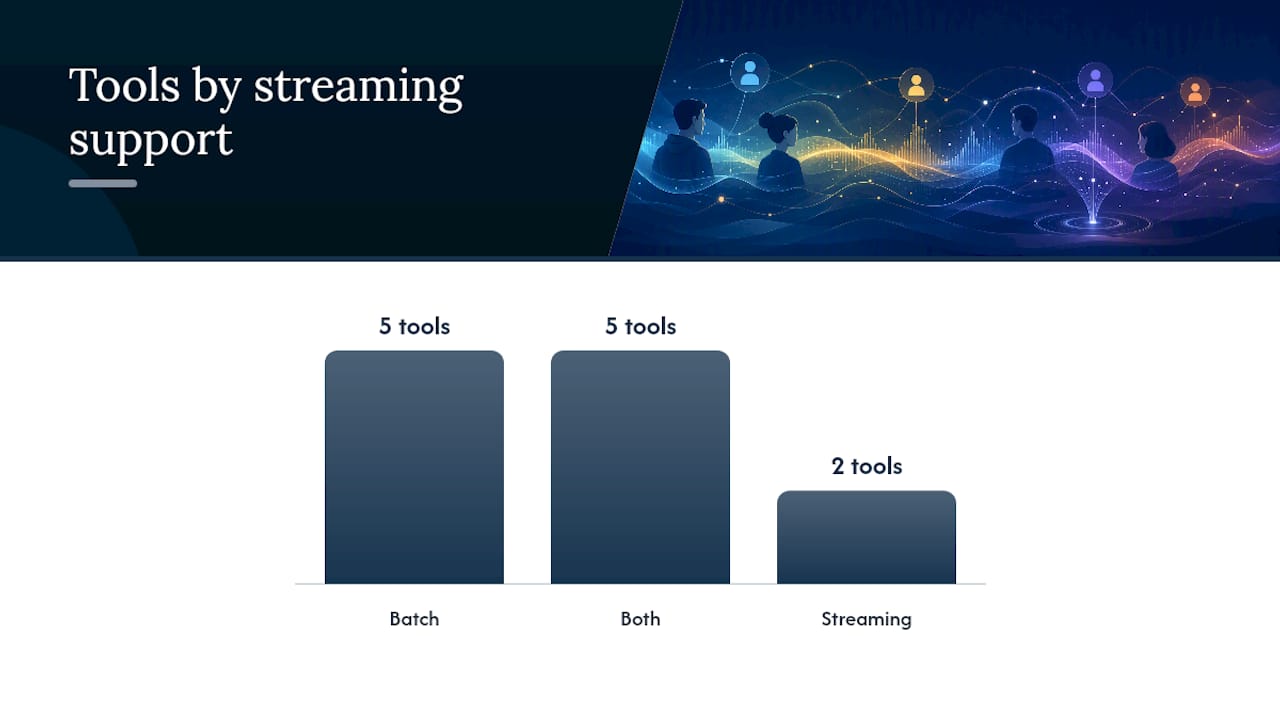
The table below groups the sixteen most-referenced diarization tools by the dimensions that actually change your architecture: whether they stream, whether you own the model weights, and what they cost to run at scale.
| Tool | Best For | Streaming or Batch | Open-Source or Commercial | License / Deployment |
|---|---|---|---|---|
| pyannote | Research and fine-tuning | Batch | Open-source | Self-hosted, cloud or on-prem |
| NVIDIA NeMo | GPU production pipelines | Both | Open-source | Self-hosted, GPU-optimized |
| Azure Speech Service | Managed real-time streaming | Streaming | Commercial | Cloud SDK |
| Kaldi | Custom ASR/diarization pipelines | Batch | Open-source | Self-hosted |
| SpeechBrain | Integrated research toolkit | Batch | Open-source | Self-hosted |
| Deepgram | High-throughput cloud transcription | Both | Commercial | Cloud API |
| AssemblyAI | Fast API prototyping | Both | Commercial | Cloud API |
| ElevenLabs Scribe | Creator transcripts with speaker tags | Batch | Commercial | Cloud API |
| Speechmatics | Multi-language enterprise coverage | Both | Commercial | Cloud, some on-prem |
| Falcon Speaker Diarization | On-device/edge privacy | Streaming | Commercial SDK | On-device |
| Gladia | API-based transcription with diarization | Both | Commercial | Cloud API |
| UIS-RNN | Research clustering module | Batch | Open-source | Self-hosted |
| Simple Diarizer | Lightweight prototyping | Batch | Open-source | Self-hosted |
| Rev AI | Transcription with speaker labels | Batch | Commercial | Cloud API |
| Descript | Editing workflow with speaker detection | Batch | Commercial | Cloud/desktop app |
| OpusClip | Clip generation with speaker awareness | Batch | Commercial | Cloud app |
A few things stand out once you sort tools this way rather than by marketing claims:
- pyannote and NVIDIA NeMo are the only two entries that give you full model transparency, which matters if you need to explain a diarization error to a compliance team.
- UIS-RNN and Simple Diarizer are lightweight clustering modules rather than full pipelines. Pair them with a separate embedding model if you go this route.
- Descript and OpusClip treat diarization as a feature inside a larger editing workflow, not a standalone service, so they fit content teams better than backend engineers.
- Commercial APIs like Deepgram, AssemblyAI, and Speechmatics bundle diarization into per-minute transcription pricing, which hides GPU inference costs that open-source tools make you pay for directly.
The hidden costs rarely show up in a pricing table. GPU inference for NeMo’s end-to-end models scales with session length, so a batch job processing eight-hour broadcast archives costs meaningfully more than five-minute meeting clips. Commercial APIs often cap the number of simultaneous speakers they’ll reliably separate, buried in a support document rather than the pricing page. Before you commit, ask every commercial vendor directly what their per-minute rate does to a 10,000-hour monthly workload, because that’s where surprises live.
Streaming Diarization vs Batch Processing: Which Do You Need?
Streaming diarization processes audio as it arrives, labeling speakers within a fraction of a second to a few seconds of them talking. Batch diarization processes a complete recording after the fact, trading speed for the ability to look at the whole conversation before assigning speaker labels. If you’re building live captioning or a call center assist tool, you need streaming. If you’re processing podcast archives or legal depositions overnight, batch usually wins on accuracy per dollar.
The latency budgets differ by an order of magnitude. A live customer support tool typically needs sub-second to two-second latency to feel responsive. DIART, the incremental online diarization framework, documents adjustable latency between roughly 500 milliseconds and 5 seconds depending on how you configure its rolling buffer. Batch jobs, by contrast, can take minutes per hour of audio and nobody notices, because the output isn’t gating a live conversation.
The core tradeoff is accuracy versus latency, and it shows up in three specific ways:
- Speaker identity consistency , streaming systems have to commit to a speaker label before they’ve heard the whole conversation, so early errors can persist.
- Chunking artifacts , fixed-window batch processing can split a single utterance across two chunks and misattribute the boundary.
- Statefulness , incremental algorithms need to carry speaker embeddings across chunks, which adds memory and engineering overhead that a stateless batch job avoids entirely.
Two implementation patterns dominate here. Block-based processing splits audio into fixed windows (say, 2 to 5 seconds), runs diarization on each block, and stitches results together. It’s simpler to build and debug, but you’ll see accuracy dips at block boundaries where a speaker change happens mid-window. Incremental or online algorithms, like the approach DIART implements, maintain a running speaker model and update it continuously as new audio arrives. NVIDIA’s own NeMo documentation recommends leaning toward this kind of adaptive approach when your speaker count or session length varies unpredictably, since a fixed pipeline struggles to generalize across those conditions.
Pro Tip: Measure end-to-end streaming latency, not just model inference time. Include audio buffering, network round-trip to your API, and post-processing in your latency budget. A model that infers in 200 milliseconds can still deliver a 2-second user-perceived delay once you count everything around it.
A minimal streaming architecture looks like this: microphone or call audio feeds a rolling buffer, which passes fixed-length windows to a voice activity detector, which forwards speech segments to a speaker embedding model, which updates an incremental clustering step, which emits speaker-labeled text to your application in near real time. Each arrow in that chain adds latency, so profile every stage individually before blaming the diarization model for a slow user experience.
How Do You Measure Diarization Accuracy on Your Own Data?
Diarization Error Rate is the industry-standard metric, and it combines three failure types into one percentage: missed speech, false alarm speech, and speaker confusion, where the system attributes a segment to the wrong speaker.
Compare diarization error rate (DER) and Jaccard error rate (JER) using the same evaluation conditions, including overlap handling. JER compares reference and system speaker segments using their intersection and union. The dscore metric definitions explain the distinction.
Run your evaluation against the datasets the research community actually uses for comparability:
- AMI , meeting recordings with multiple speakers in a room, good for testing performance in office and conference scenarios.
- VoxConverse , audio pulled from YouTube videos, useful for testing robustness against real-world noise and varied recording quality.
- CALLHOME , phone conversations, the standard reference for two-party call center and customer service scenarios.
- DIHARD , deliberately difficult, diverse audio designed to stress-test systems across domains, useful once your candidate tools already look solid on AMI and VoxConverse.
Your evaluation checklist should include a sampling plan (pull audio that matches your actual production domain, not just public benchmarks), a standard annotation format like RTTM (Rich Transcription Time Marked) so your ground truth is comparable across tools, a defined tolerance window (typically 250 milliseconds) for scoring boundary timing, explicit rules for how you handle overlapping speech in your scoring, and enough test samples to draw a statistically meaningful conclusion rather than judging a tool off three lucky recordings.
Not every tool publishes benchmark numbers you can compare directly, which itself is useful information.
VoxCeleb is worth bookmarking separately. It’s primarily a speaker recognition dataset, but its scale makes it a common reference point for embedding models that feed into diarization pipelines, and several tools in this list report speaker embedding performance against it.
What Should You Ask Before Choosing a Diarization Tool?
Start with your project constraints, not the vendor’s pitch deck. Build your decision checklist around four questions: What’s your latency tolerance? What languages and accents does your audio actually contain? Does the audio need to stay on-device for privacy or compliance reasons? And what’s your realistic monthly audio volume, in hours, once you’re in production?
Once you know your constraints, take these questions into every vendor conversation or open-source evaluation:
- Do you offer a streaming SDK, or only batch processing through a REST endpoint?
- Can I inspect or fine-tune the underlying model, or is it a fully opaque API?
- How often do you update your models, and will an update silently change my accuracy numbers?
- What are your support SLAs, and do they cover diarization specifically or just transcription?
- Do you offer on-premises or on-device deployment if my data can’t leave our infrastructure?
Watch for red flags that separate serious vendors from marketing pages. Vague accuracy claims without a stated DER or a named benchmark dataset are the biggest one. No mention of overlap handling at all is another, since it means the vendor either hasn’t measured it or doesn’t want to share the number. Missing latency metrics on a “real-time” product should stop you cold. And pay-per-minute pricing with no visible cap on simultaneous speakers can turn a promising pilot into an unpredictable bill once you scale past a handful of test recordings.
Different use cases map cleanly to different tool types. Meeting transcription tools benefit from cascaded pipelines like NeMo’s modular approach, since meeting audio varies wildly in speaker count. Podcast and long-form content work well with either pyannote or end-to-end models, since sessions are pre-recorded and speaker count is usually fixed. Call centers need streaming SDKs like Azure Speech Service or DIART-based custom builds. Broadcast and archival work favors batch tools with strong overlap handling, since crosstalk is common in panel discussions and interviews.
Cascaded vs End-to-End Diarization: Which Architecture Fits?
Cascaded pipelines give you modular control and easier debugging. End-to-end models simplify deployment and can outperform cascaded systems on long-form audio where speaker turns and context matter more than individually tuned components.
A cascaded pipeline chains three separate stages: voice activity detection, speaker embedding extraction, and clustering. Because each stage is a separate model, you can swap a struggling embedding model without retraining the whole pipeline, and you can instrument each stage individually when something goes wrong in production. NVIDIA’s own guidance leans toward this pattern for scenarios with variable session length or speaker counts, precisely because that flexibility pays off when your production traffic doesn’t look like your test set.
End-to-end models, by contrast, learn the whole diarization task jointly in a single network. MOSS-Transcribe-Diarize, an open-source end-to-end model released under Apache 2.0, is built specifically for long-form multi-speaker transcription and outputs a compact, speaker-tagged transcript in one pass. That’s a meaningfully simpler deployment story than wiring together three separate models, and the rise of self-supervised pretraining approaches has made these unified models increasingly competitive without requiring the huge labeled datasets they once did.
Cascaded systems let you optimize individual parts, VAD, embedding extraction, clustering, independently, which tends to help in enterprise settings where speaker count and session length vary unpredictably. End-to-end models are simpler to deploy and unify the output, which favors teams that want one model to maintain rather than three.
Here’s the practical breakdown of when each wins:
- Cascaded wins on: debugging clarity, per-component tuning, flexibility when speaker count is unknown ahead of time.
- Cascaded loses on: deployment complexity, since you’re maintaining three models instead of one, and latency overhead from chaining stages.
- End-to-end wins on: deployment simplicity, unified output format, and performance on long-form audio where the model can use full-session context.
- End-to-end loses on: interpretability, since a wrong speaker assignment is harder to trace back to a specific failure point.
Hybrid approaches exist too. Some teams run an end-to-end model for the initial pass and fall back to a cascaded pipeline’s clustering stage when the end-to-end model reports low confidence on a segment, capturing the deployment simplicity of one approach with the tunability of the other where it matters most.
What Do Real Deployments Reveal About These Tools?
The gap between a tool’s documentation and its behavior in production shows up fastest in overlap-heavy audio. Teams building call center analytics on Deepgram or AssemblyAI consistently report that diarization accuracy holds up well on clean two-party calls but degrades once a third voice, a supervisor joining briefly, or background chatter enters the recording. That’s not a flaw unique to either API. It’s the overlap-handling limitation that shows up across nearly every commercial diarization product that doesn’t explicitly advertise overlap-aware segmentation.
On the open-source side, pyannote users building domain-specific applications, medical transcription, legal depositions, non-English podcasts, routinely find that the pretrained pipeline needs fine-tuning before it matches production requirements. That’s expected: pyannote’s own documentation frames its pretrained models as a starting point for domain adaptation, not a finished product. Teams that skip the fine-tuning step and deploy the base pipeline directly tend to see accuracy plateau below what the published benchmark numbers suggest.
Descript and OpusClip users, largely content creators rather than backend engineers, report a different kind of friction: diarization works well enough for editing workflows, splitting a podcast into speaker-labeled segments for a rough cut, but isn’t precise enough for use cases needing exact speaker attribution, like generating per-speaker analytics for an advertiser report. That’s a reasonable tradeoff for their audience. It becomes a problem only when teams try to repurpose a creator-focused tool for a compliance or analytics use case it wasn’t built for.
Falcon Speaker Diarization’s on-device positioning draws a specific kind of adopter: teams in healthcare or finance who can’t send audio to a cloud API at all. The tradeoff they consistently accept is a smaller, less flexible model in exchange for data never leaving the device, which is a fair trade when the alternative is a compliance violation.
Picking a Proof of Concept That Actually Tells You Something
Most teams evaluating diarization tools skip the proof of concept and go straight to a vendor’s marketing page, then wonder six months later why production accuracy doesn’t match the sales demo. Don’t do that. Pull 15 to 20 recordings that actually resemble your production audio, not a clean benchmark clip, and run at least one cascaded candidate (pyannote or NeMo’s cascaded mode) alongside one end-to-end candidate (NeMo’s end-to-end model or MOSS-Transcribe-Diarize) against the same audio. Score both on DER and JER, and separately log the end-to-end latency if streaming matters to you. Two weeks of honest testing against your own audio will tell you more than any vendor comparison page, including this one.
Open-source toolkits make sense when you have engineering capacity to fine-tune models and you need transparency into how a decision was made, which matters in regulated industries or research contexts where you’ll need to explain your methodology. Commercial APIs make sense when you need to ship fast and your audio is close enough to general-purpose speech that a pretrained commercial model handles it well without customization. Neither choice is inherently better. The mistake is picking one without testing the other against your specific audio first.
If you’re still narrowing the field, TechVideoBlog’s directory is a reasonable starting point for cross-referencing pricing and feature claims before you invest engineering time in a full evaluation.
Where to Compare Diarization Tools Before You Build
Reading vendor documentation only gets you halfway there. What actually separates a good pick from a costly rework is seeing pricing, SDK maturity, and real output quality side by side, which is exactly the gap TechVideoBlog’s directory was built to close for anyone evaluating AI-driven audio and video tools.

Authoritative Docs, Repos, and Benchmarks to Bookmark
Bookmark these before you start testing, since most of your evaluation work will send you back to one of them repeatedly:
- NVIDIA NeMo Speaker Diarization documentation , the reference for both cascaded and end-to-end deployment guidance.
- pyannote-audio GitHub repository , the main open-source toolkit for modular diarization research.
- MOSS-Transcribe-Diarize on GitHub , a current open-source end-to-end model worth benchmarking against cascaded pipelines.
- DIART documentation , the primary source for streaming latency numbers and incremental clustering implementation details.
- Azure Speech Service real-time diarization quickstart , the fastest path to a working managed streaming SDK.
- VoxCeleb dataset , the standard reference for speaker embedding performance at scale.
Consult the NeMo docs and DIART documentation first if streaming is your priority; go to pyannote’s repo and the VoxCeleb dataset page first if you’re building a benchmark suite from scratch.
Sources
- Pyannote
- Speaker Diarization , NVIDIA NeMo Framework User Guide
- OpenMOSS / MOSS-Transcribe-Diarize , GitHub
- Diart documentation
- Real-time diarization quickstart – Speech service , Microsoft Docs
- Survey of modern ASR toolkits and techniques , arXiv
FAQ
What Is the Best Diarization Tool for Real-Time Applications?
Azure Speech Service and DIART are the strongest starting points for real-time work, since both document adjustable latency and provide streaming SDKs rather than batch-only APIs.
What’s the Difference Between DER and JER?
DER measures overall speaker labeling errors including missed speech, false alarms, and speaker confusion, while JER specifically scores how well a system handles overlapping speech between multiple speakers.
Is Open-Source or Commercial Better for Speaker Diarization?
Open-source tools like pyannote and NVIDIA NeMo give you model transparency and fine-tuning control, while commercial APIs like Deepgram and AssemblyAI trade that control for faster integration and managed infrastructure.
Can Diarization Tools Run Fully On-Device?
Yes, Falcon Speaker Diarization is built specifically for on-device and edge deployment where audio privacy or latency requirements rule out sending data to a cloud API.
Where Can I Compare Diarization Tools Side by Side?
Use the directory to compare workflow options, then confirm current features and terms with the provider.