Pick Riverside when studio-quality recorded files are the goal. Pick Zoom when guest familiarity and zero-friction joining matter more than audio fidelity. That single axis, quality versus convenience, decides the choice for most podcasters and video creators.
- Quality-first: Riverside records each participant locally on their own device, capturing up to 4K video and 48kHz uncompressed WAV audio regardless of internet conditions. The final file reflects what the microphone captured, not what survived the stream.
- Familiarity-first: Zoom is software most guests already have installed. The join flow takes seconds, and that frictionless experience has real production value when you’re booking nontechnical guests who won’t troubleshoot a new platform.
- Exception: If a guest flatly refuses any new tool, or if the session is a live team meeting rather than a recorded show, Zoom is the practical answer.
Table of Contents
- How do Riverside and Zoom compare side by side?
- How does Riverside’s local recording differ from Zoom’s stream capture?
- What audio and video specs actually matter for podcast production?
- Does Riverside’s built-in editing save real time over third-party tools?
- Which platform handles live streaming and webinars better?
- How easy is it to onboard guests on each platform?
- What does each platform cost, and what does the free tier actually give you?
- When should you pick Riverside, and when does Zoom make more sense?
- How Techvideoblog tested Riverside vs Zoom
- Key Takeaways
- The real trade-off most creators don’t talk about
- Find hands-on tool reviews and verified pricing at Techvideoblog
- Sources and further reading
How do Riverside and Zoom compare side by side?
The table below maps both platforms against the dimensions that matter most in a recording workflow. All pricing reflects current U.S. plans.
| Dimension | Riverside | Zoom |
|---|---|---|
| Recording method | Local ISO on each device; progressive cloud upload | Stream-based cloud recording |
| Audio quality | 48kHz uncompressed WAV, separate tracks per guest | Compressed AAC/MP4; single mixed track by default |
| Video quality | Up to 4K, separate ISO video per participant | Up to 1080p (720p on free tier) |
| Separate/ISO tracks | Yes, per participant | No (requires third-party workarounds) |
| Editing & transcription | Built-in AI editor, text-based editing, auto-clips, transcripts | No native editor; third-party required |
| Live streaming/webinars | Up to 10,000 viewers; multistreaming on paid plans | Webinars via Zoom Webinars add-on; large audience caps |
| Guest onboarding | Browser-based, no download required | App install typical; browser option available |
| Free tier | Limited recording hours; watermarked exports | 40-minute meeting cap; cloud recording limited |
| Storage & export | Cloud storage included; WAV, MP4, MP3 export | Cloud recording storage; MP4/M4A export |
| Max recorded guests | Up to 10 simultaneous recorded participants | — |
Riverside’s single biggest advantage: Every participant’s audio and video is captured locally, so a guest’s spotty Wi-Fi never degrades your final file.
Zoom’s single biggest advantage: Guests join in seconds with a tool they already know, which removes the single most common pre-recording friction point.
How does Riverside’s local recording differ from Zoom’s stream capture?
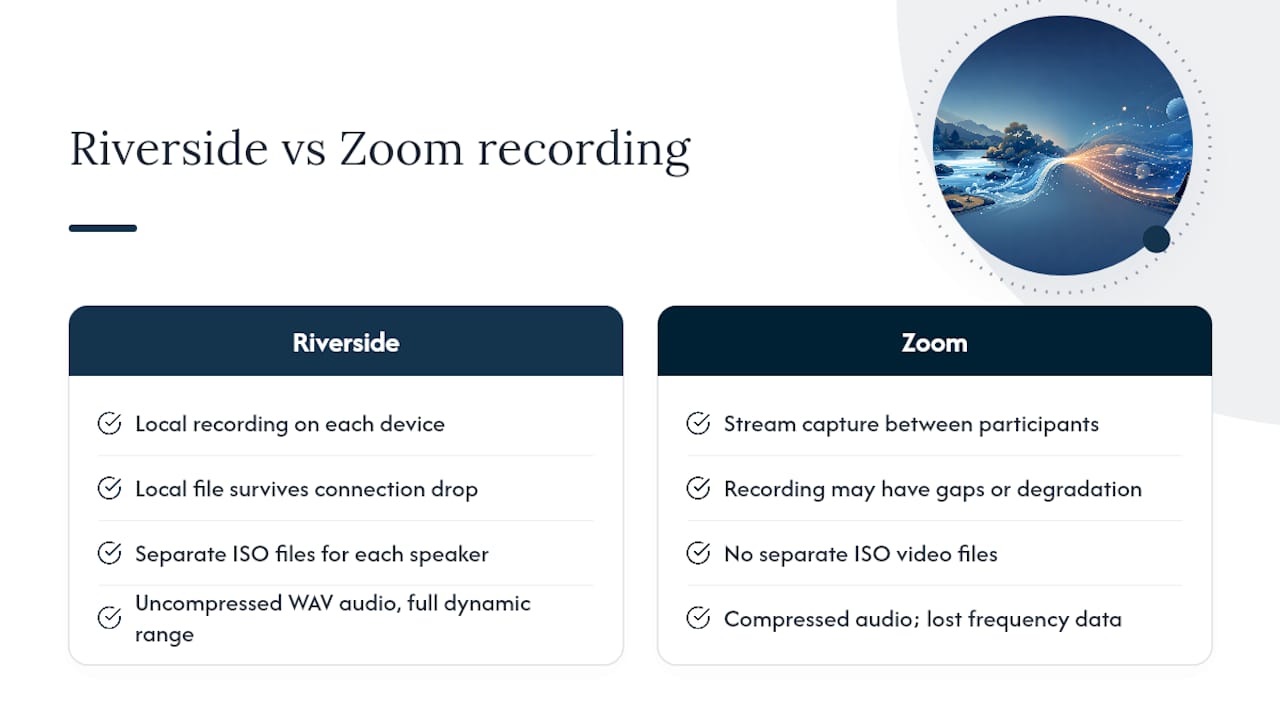
The core technical split is straightforward. Riverside records locally on each participant’s device and uploads files progressively to the cloud, so even if the internet drops mid-session, the local file keeps recording. Zoom captures the compressed video stream as it travels between participants and saves that stream to the cloud. What you get from Zoom is a recording of the call, not a recording of each person’s raw input.
In practice, that difference shows up in three ways during post-production. First, a Riverside file is recoverable after a connection drop because the local track never stopped. A Zoom recording of the same session would have a gap or a degraded segment. Second, Riverside’s separate ISO video files let an editor reframe each speaker independently, apply color grading per track, and cut between angles without quality loss. Third, the uncompressed WAV audio from Riverside gives a mixing engineer full dynamic range to work with, while Zoom’s compressed audio has already discarded frequency data that can’t be restored.
The practical framing: Riverside is a tool that captures recordings. Zoom is a tool that hosts conversations. Both do their job well. The question is which job you’re hiring the platform to do.
Pro Tip: If you must record on Zoom, set the audio to “Original Sound” in Zoom’s audio settings and ask guests to use wired headphones. This reduces echo processing and preserves slightly more frequency range, though it won’t recover the separate-track or sample-rate advantages Riverside provides.
What audio and video specs actually matter for podcast production?
Specs only matter when they change what you can do in post. Here are the ones that do.
Key specs compared
| Spec | Riverside | Zoom |
|---|---|---|
| Audio sample rate | 48kHz | 16–32kHz (compressed) |
| Audio format | Uncompressed WAV | AAC/MP4 (lossy) |
| Bit depth | 24-bit | 16-bit compressed |
| Video resolution | Up to 4K | Up to 1080p (720p free) |
| Frame rate | — | Up to 30fps |
| ISO video tracks | Yes, per participant | No |
Independent reviewers consistently find that Riverside outperforms Zoom in every quality-focused category for podcast recording, with local ISO recording as the primary reason.
Does Riverside’s built-in editing save real time over third-party tools?
For solo creators, the answer is yes, with caveats. Riverside’s AI-powered Co-Creator editor handles transcription, text-based editing, auto-clip generation, and show notes inside the same browser tab where you recorded. You don’t export a file, open a second application, and re-import. That single-workflow advantage cuts the number of tool handoffs from three or four down to one.
What Riverside includes natively:
- Automatic transcription (used as the edit timeline)
- Text-based editing (delete words in the transcript to cut audio/video)
- Auto-clip generation for short-form content
- AI-generated show notes and chapter markers
- Direct export to MP3, WAV, and MP4
What Zoom requires you to add:
- A separate transcription tool (Otter.ai, Descript, or Rev)
- A DAW or NLE for audio/video editing (Adobe Audition, DaVinci Resolve, Final Cut Pro)
- A repurposing tool for clips (AI repurposing tools like Opus Clip or Descript)
- Manual upload and sync between each tool
Example workflow: record to published episode
- Transcribe: — Riverside auto-generates on upload (minutes); Zoom requires export then upload to a third-party service (15–30 minutes)
Pro Tip: Riverside’s text-based editor is fast for removing filler words and long pauses, but it won’t replace a full DAW for complex multi-track mixing. If your show involves music beds, sound design, or more than two speakers, plan to export the ISO tracks and finish in Logic Pro, Reaper, or Adobe Audition regardless of which recording platform you use.
For creators focused on YouTube Shorts or short-form repurposing, Riverside’s auto-clip feature alone can justify the subscription cost.
Which platform handles live streaming and webinars better?
The two platforms serve different live-event needs, and the distinction matters before you commit to either for audience-facing work.
Riverside’s live and webinar capabilities:
- Supports up to 10 on-screen participants and up to 10,000 viewers on paid plans
- Multistreaming to platforms like YouTube and LinkedIn on paid tiers
- Livestream resolution up to 1080p on paid plans
- Records the webinar simultaneously in up to 4K for post-production use
- Registration and attendee tracking available
- Producer Mode lets an off-camera team member manage layouts, mic levels, and guest settings without appearing on screen
Zoom’s live and webinar capabilities:
- Zoom Webinars is a separate paid add-on with its own pricing tier
- Supports large attendee counts (up to 10,000 with the right plan)
- Familiar interface reduces attendee friction for corporate or educational events
- No native multistreaming to social platforms without third-party tools
- Recording quality is stream-dependent and capped at 1080p
For creators running recorded interview shows who also want to stream live occasionally, Riverside handles both in one platform. For organizations already running Zoom Meetings who need a webinar add-on with minimal retraining, Zoom Webinars fits that existing stack. AI tools for webinar repurposing can extend either platform’s output into clips and highlight reels after the event.
How easy is it to onboard guests on each platform?
Guest friction is the most underrated production variable. A guest who can’t figure out the join link costs you 10–15 minutes of session time and raises their stress level before the interview starts.
Riverside guest flow:
- Click a link, open in Chrome or Edge, grant mic and camera permissions
- No account required, no download required for guests
- Mobile recording supported (iOS and Android apps available)
- Browser-based recording means most guests are live in under two minutes
Zoom guest flow:
- Most guests already have Zoom installed, which makes joining fast
- Browser join available but often prompts an app install
- Mobile app is widely familiar
- Guest experience is consistent because the interface hasn’t changed significantly in years
Guest prep checklist (works for both platforms)
- Confirm the guest has a dedicated external microphone or quality headset (built-in laptop mics produce noticeably worse audio)
- Ask them to use wired headphones to prevent echo
- Request a quiet room with minimal background noise
- Run a 5-minute test call 24 hours before the session
- Share a one-page PDF with the join link, browser recommendation, and mic/camera permission steps
Pro Tip: Send guests a short Loom video (under 90 seconds) showing exactly how to open Riverside, grant permissions, and check their audio level. This single step cuts pre-session tech support calls by a significant margin, particularly for guests over 50 or those who rarely do video calls.
The honest trade-off: Riverside’s browser flow is genuinely simple, but “no download required” still means a new URL and new permission prompts for guests. Zoom’s familiarity advantage is real for guests who join calls weekly. Audio professionals recommend using Riverside-like platforms for quality-first shows and defaulting to Zoom only when guest familiarity is the primary constraint.
What does each platform cost, and what does the free tier actually give you?
Pricing structures differ enough that the right choice depends on your recording volume and whether you need multitrack output.
Riverside pricing (U.S., current plans):
- Free tier: Limited recording hours per month, watermarked video exports, standard quality only
- Standard plan: Unlocks higher recording hours, removes watermarks, and enables separate track exports
- Pro plan: Full 4K video, 48kHz WAV, unlimited recording hours, and AI repurposing features
- Billing available monthly or annually (annual saves roughly 20–30% depending on the plan)
Zoom pricing (U.S., current plans):
- Free tier: 40-minute cap on group meetings, limited cloud recording storage, 720p video
- Pro plan: Removes the 40-minute cap, adds cloud recording storage, and unlocks 1080p
- Business/Enterprise: Adds larger meeting caps, admin controls, and Zoom Webinars as an add-on
- Zoom Webinars is priced separately from the base meeting plan
Side-by-side pricing comparisons confirm that Riverside’s free tier is more restrictive on recording hours but more generous on output quality per session, while Zoom’s free tier is more restrictive on meeting length but has no quality watermark.
Pro Tip: If you record one or two episodes per week, map your monthly recording hours before choosing a plan. A 45-minute interview twice a week is roughly 6 hours of raw recording per month. Check whether the Standard plan covers that volume before defaulting to Pro, since the AI repurposing features on Pro are only worth the extra cost if you’re actively publishing clips.
When should you pick Riverside, and when does Zoom make more sense?
Feature-matrix comparisons consistently show Zoom optimized for meeting stability and accessibility while Riverside is optimized for studio-quality capture and editing workflows. Here’s how that maps to specific formats:
- Interview podcast (audio-only or video): — Riverside. Separate WAV tracks per guest, 48kHz capture, and text-based editing make post-production faster and the output noticeably cleaner.
- One-on-one coaching session recording: Zoom for low-stakes notes; Riverside for sessions you plan to repurpose into coaching video content.
Hybrid workflow note: Some producers record on Riverside for quality and use Zoom for pre-interview guest prep calls. That combination gives you the familiarity benefit during the low-stakes conversation and the quality benefit when the record button matters.
How Techvideoblog tested Riverside vs Zoom
Every comparison on Techvideoblog is built from a structured recording test, not marketing copy. Here’s the setup used for this comparison.
Recording setup
- Export formats captured: — Riverside WAV (per track), Riverside MP4 (per track), Zoom MP4 (mixed), Zoom M4A (audio only)
What the tests showed
- Riverside’s WAV tracks showed a consistently lower noise floor and full dynamic range compared to Zoom’s compressed output
Testing note: Audio quality differences between platforms are most audible on consumer-grade USB microphones, not high-end condensers with preamps. If your guests are recording on laptop mics, the platform choice matters less than the mic choice. Upgrade the microphone first.
Limitations to note:
Readers can replicate these tests by recording a 10-minute session on both platforms under identical mic and network conditions, then importing both files into Audition or Reaper for a direct waveform comparison.
Key Takeaways
Riverside is the stronger choice for creators who need studio-quality local recordings, separate ISO tracks, and built-in AI repurposing; Zoom remains the practical fallback when guest familiarity is the binding constraint.
| Point | Details |
|---|---|
| Local vs stream recording | Riverside captures ISO files locally per device; Zoom records the compressed stream, which degrades with connection issues. |
| Audio quality gap | Riverside delivers 48kHz uncompressed WAV with separate tracks; Zoom outputs compressed audio in a single mixed file. |
| Built-in editing advantage | Riverside includes AI transcription, text-based editing, and auto-clips; Zoom requires third-party tools for every post-production step. |
| Guest friction trade-off | Zoom’s familiarity reduces pre-session friction; Riverside’s browser flow is simple but still new to most guests. |
| Techvideoblog’s verdict | For podcasters and video creators, Riverside is the recommended platform; Zoom is the right call only when guest familiarity outweighs output quality. |
The real trade-off most creators don’t talk about
The Riverside vs Zoom debate gets framed as a quality argument, and technically it is. But the more honest framing is about where you want to spend your production energy.
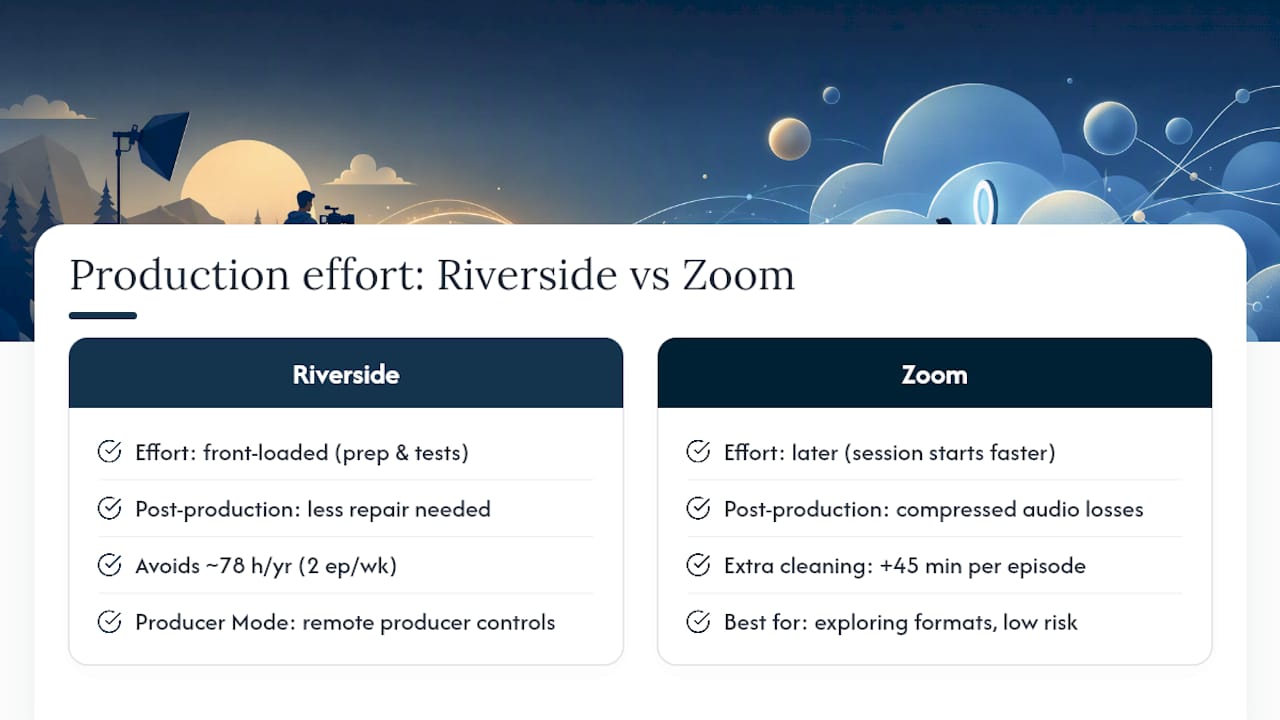
Riverside shifts effort earlier in the process. You invest time in guest prep, browser testing, and mic checks before the session. In return, you get files that require less repair work in post. Zoom shifts effort later. The session starts faster, but you spend more time in Audition or Descript cleaning up compressed audio, and you can’t recover what the compression already removed.
What gets underestimated is the cumulative cost of that post-production repair work. A creator publishing two episodes per week who spends an extra 45 minutes per episode cleaning Zoom audio is losing 78 hours per year to a problem that a platform switch largely solves. That’s not a small number.
Producer Mode on Riverside adds another layer worth mentioning. For creators who work with a production assistant or editor, Producer Mode lets that person manage guest mic levels, camera layouts, and teleprompter content from off-screen. That’s a professional workflow feature that Zoom simply doesn’t have an equivalent for in a recording context.
The one place Zoom genuinely wins, beyond guest familiarity, is for creators who are still figuring out their format. If you’re not sure whether you’ll publish the recording, run a live event, or just use it for internal notes, Zoom’s flexibility and zero-commitment free tier make it the lower-risk starting point. Once you know the recording is the product, the platform switch to Riverside pays for itself quickly.
Find hands-on tool reviews and verified pricing at Techvideoblog
Choosing between Riverside and Zoom is one decision. Knowing which AI video editors, caption generators, and repurposing tools fit your workflow after that choice is a separate set of decisions, and that’s exactly what Techvideoblog is built to answer.

Techvideoblog publishes workflow-tested reviews with verified U.S. pricing across every major creator tool category, from recording platforms to AI caption generators to short-form repurposing tools. Every review is built from real recording setups, not vendor spec sheets. Browse the full tool directory to find the right stack for your specific format, whether that’s a weekly interview show, a live webinar series, or a short-form clip workflow.
Sources and further reading
- Riverside vs Zoom – Learn the Differences
- Riverside: HD Podcast & Video Software | Free Recording & Editing
- Webinar Software: Record, Edit & Repurpose Easily | Riverside
- Riverside vs Zoom
- Riverside vs Zoom: Pricing, Features & Verdict
- Riverside vs. Zoom vs. In-Studio: A 2026 Decision Tree
- Riverside vs Zoom: Compare Use Cases, Features, Pricing + Checklist
- Riverside business — Producer mode and team features