For most podcasters, the right pick comes down to how much control you want to give up: chat-based editors like Notevibes and Zencastr cut cleanup time to minutes, transcript-first tools like Descript and Riverside give you precise text editing, and browser-based suites like Adobe Podcast handle speech enhancement without any software install. Pick based on your workflow, not the hype.
TL;DR:
- Chat-based editors like Notevibes and Zencastr are ideal for solo hosts seeking quick, automated cleanup without manual waveform editing.
- Transcript-based tools such as Descript and Riverside excel at editing long-form episodes and remote interviews with multitrack support.
- Studio-grade options like ElevenLabs Studio and Adobe Podcast offer advanced features like voice regeneration and noise reduction, suitable for high-quality productions.
- Evaluating tools requires testing real episodes, focusing on transcript accuracy, export options, multitrack support, and data retention policies.
- Switching to AI editing can reduce editing time from over an hour per hour of raw audio to as little as 10-15 minutes, with human review for tone and story.
Table of Contents
- What Is the Best AI for Podcast Editing?
- Which AI Podcast Editors Are Worth Trying First?
- How Do These AI Podcast Editors Compare?
- How Do You Choose the Right AI Podcast Editor?
- What Does AI Actually Do During Podcast Editing?
- How TechVideoBlog Tests AI Podcast Editors
- Is It Safe to Upload Podcast Audio to AI Editing Tools?
- How Steep Is the Learning Curve on These Tools?
- Where Do You Get Help When the AI Gets It Wrong?
- Does Multitrack Recording Matter for Remote Interviews?
- A Podcaster’s Real Experience Switching to AI Editing
- Compare AI Podcast Editors Faster With TechVideoBlog
- Sources
- FAQ
What Is the Best AI for Podcast Editing?
The honest answer is that “best” splits into categories, and the category you need depends on how hands-on you want editing to be. If you record solo and just want clean audio out fast, a chat-driven tool like Zencastr’s Producer or Notevibes will strip filler words, level your track, and hand you a publish-ready file with almost no manual work. If you run an interview show with two or more remote guests, you need multitrack recording before you need any AI polish, which points you toward Riverside or Descript.
There’s also a third path worth naming here since it rarely gets its own category in comparison roundups: studio-grade AI suites like ElevenLabs Studio and Adobe Podcast, which lean on speech models sophisticated enough to regenerate a flubbed line or strip room echo that basic noise gates miss. And if your podcast lives inside a hosting platform already, Blubrry’s AI tools bolt planning and clip generation directly onto your existing publishing pipeline.
A comparison table and a short buying checklist follow, but the shortlist itself rarely changes: match the tool to the workflow, not the other way around.
Which AI Podcast Editors Are Worth Trying First?
Eight tools dominate the current field, and each earns its spot for a different reason. None of them are interchangeable, even though marketing copy often makes them sound that way.
- Resound strips filler words, long silences, and repeated phrases automatically, then exports a mixed and mastered file in WAV, MP3, or AAF. Best for solo hosts who want one upload to produce one finished episode.
- ElevenLabs Studio pairs AI voice regeneration with noise reduction and stem separation inside an agentic editor that can rewrite a flubbed line without a re-record, per ElevenLabs’ own feature page. Best for creators who need surgical fixes without re-recording.
- Notevibes runs on a chat interface: you type what you want changed, and its neural chain handles cuts, EQ, and loudness normalization behind the scenes. Best for editors who dislike timeline scrubbing.
- Blubrry Podcast AI adds planning, transcription, show notes, and clip creation on top of hosting, with plans starting near $20 a month. Best for shows that want AI tools bundled with distribution.
- Zencastr offers a chat-based Producer that auto-chapters episodes and generates show notes and clips straight from the raw recording. Best for shows that publish clips as often as full episodes.
- Adobe Podcast runs Enhance Speech in the browser to remove noise and echo, plus transcript-based editing and captioning. Best for creators who want studio-quality audio with zero software install.
- Riverside records each speaker on a separate track remotely, then links that audio to an editable transcript. Best for interview shows with guests scattered across time zones.
- Descript treats your podcast like a document: delete a sentence in the transcript, and the audio cut follows. Best for hosts who repurpose long episodes into short clips constantly.
None of these charge nothing forever, but most offer either a free tier or a trial window long enough to test one real episode before you commit.
How Do These AI Podcast Editors Compare?
The differences that actually matter are workflow style and export flexibility, not just which tool has the flashiest AI label.
| Tool | Best for | Key AI features | Workflow style | Price / trial | Export & integrations |
|---|---|---|---|---|---|
| Resound | Fast, single-file cleanup | Filler and repeat detection, auto mix/master | Upload and process | Free trial available | WAV, MP3, AAF |
| ElevenLabs Studio | Surgical voice fixes | Voice regeneration, noise reduction, stem separation | Agentic timeline editor | Free tier plus paid plans | See vendor for full export list |
| Notevibes | No-timeline chat editing | Chat-driven cleanup chain, loudness normalization | Chat/agent interface | See vendor | Versioned exports, A/B rollback |
| Blubrry Podcast AI | Hosting-bundled AI features | Transcription, show notes, clip creation | Dashboard-integrated | Plans from around $20/month | RSS, hosting-native publishing |
| Zencastr | Chat-based full production | Auto chaptering, show notes, clip generation | Chat/agent interface | Free tier plus paid plans | MP3/WAV, direct publishing |
| Adobe Podcast | Browser speech enhancement | Enhance Speech, transcript editing, captions | Browser-based | Free tier available | Web export, Studio integrations |
| Riverside | Remote multitrack interviews | Separate-track recording, transcript-linked edits | Timeline plus transcript | Free trial available | Multitrack exports, direct publishing |
| Descript | Text-based editing and repurposing | Overdub, text-edit-to-audio sync, clip export | Transcript-first document editor | Free tier plus paid plans | MP3/WAV, captions, clip formats |
Multitrack export and transcript accuracy separate the tools built for interview shows from the ones built for solo cleanup. If you need both, Riverside and Descript currently cover that overlap better than the chat-only editors.
How Do You Choose the Right AI Podcast Editor?
Run through these criteria before you commit a subscription to any single tool:
- Transcript accuracy. Upload a real episode, not a demo file, and check how the transcript handles crosstalk, accents, and background noise.
- Automation level. Decide whether you want the AI to make the call on cuts (Resound, Zencastr) or just flag issues for you to approve (Descript, Riverside).
- Multitrack export. If you record remote interviews, confirm the tool exports separate tracks, not just a flattened mix.
- Loudness normalization. Check whether the tool applies broadcast-standard LUFS targets automatically or leaves that step to you.
- Collaborative seats. If a producer or co-host also needs edit access, confirm the pricing tier that unlocks multiple users.
- Price per episode. Divide the monthly cost by how many episodes you actually publish. A $20 plan is cheap for a weekly show and expensive for a monthly one.
Before you pay for anything, run a trial episode through the full pipeline: upload, let it process, edit the transcript for one factual correction, and export a file you could actually publish. That single test exposes more than any feature list.
Pro Tip: Time the AI processing step on your actual file length, not a short demo clip. A tool that takes twelve minutes to process a ten-minute episode will not scale once your show grows to forty-five minutes.
Watch for a few red flags: no multitrack export option, no editable transcript, or vague file-size and minute limits buried in the pricing page. Any of those three will cost you more time than the AI saves.
What Does AI Actually Do During Podcast Editing?
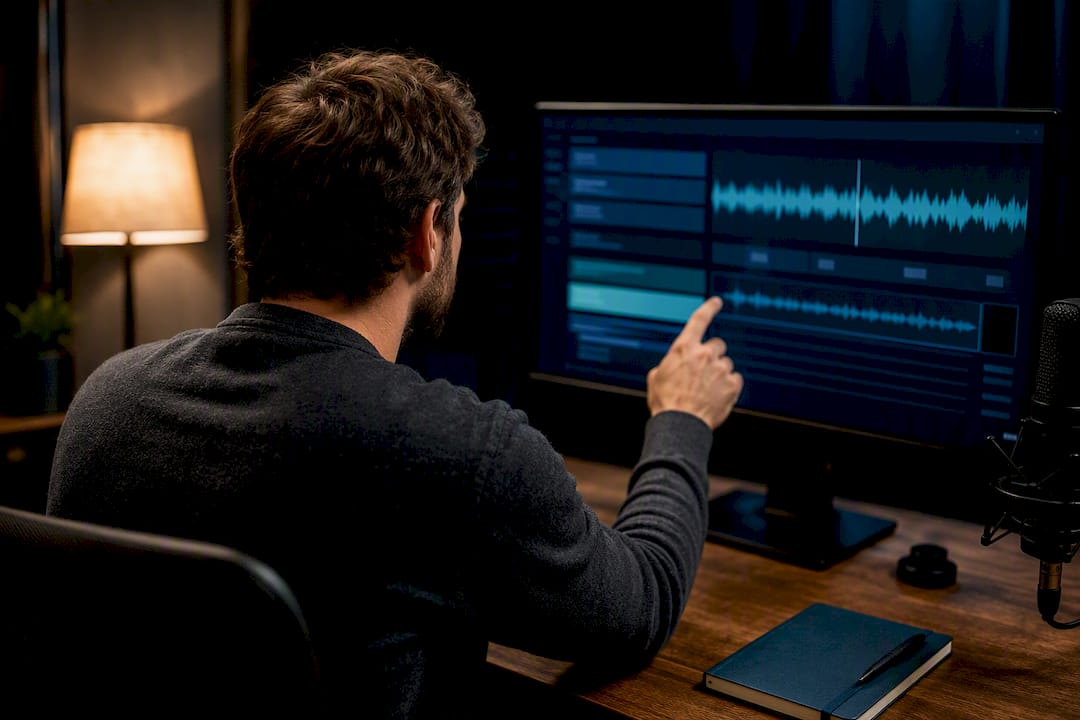
Transcript-based editing is the feature that changes everything else about the workflow. Once your audio has an accurate transcript, deleting a sentence in the text deletes the matching audio, which is how Descript and Riverside let you edit a podcast the way you’d edit a Word document. Filler-word detection and silence trimming ride on top of that same transcript, flagging every “um” and dead pause so you don’t have to scrub a waveform by ear.
Noise removal and LUFS normalization solve a different problem: consistency. A guest recording on a laptop mic and a host on a studio condenser will sound wildly different without correction, and manual EQ matching used to eat an hour per episode. Adobe Podcast’s Enhance Speech and Resound’s auto mix/master both target this exact gap.
Voice cloning and dubbing, the feature ElevenLabs Studio leans on hardest, let you regenerate a flubbed line instead of re-recording the whole segment. The trade-off is worth naming plainly: a regenerated line can sound slightly flat compared to a natural take, and using it to alter what a guest actually said raises an ethical line most shows should not cross. Use it for stumbles, not rewrites.
A typical AI-assisted workflow looks like this: raw multitrack file in, automated noise removal and filler detection pass, human review of the transcript for tone and story cuts, then export to a publish-ready format.
- Upload raw recording (multitrack if remote)
- Run AI cleanup pass (noise, fillers, silence)
- Review and adjust in transcript view
- Export to MP3/WAV and push to hosting
The time savings show up in the review step, not the upload step. A cleanup pass that once took 60 to 90 minutes of manual editing per hour of raw audio often compresses to a 10 to 15 minute review once the AI pass has already handled the mechanical cuts.
How TechVideoBlog Tests AI Podcast Editors
We test every tool the same way: upload a real episode, time how long processing takes, check output quality against the raw file, and confirm pricing matches what the vendor actually advertises rather than what a landing page implies. No sponsored placements skew the order.
For a solo host, Resound or Zencastr gets you a publish-ready file fastest. For an interview show, Riverside’s multitrack recording paired with transcript editing beats any single-track tool. For a repurposing-first creator turning one episode into a dozen clips, Descript’s text-to-clip workflow saves the most time downstream. Check our tested AI video tools for podcasters for the full breakdown by workflow.
Is It Safe to Upload Podcast Audio to AI Editing Tools?
Uploading a raw interview to a cloud-based AI editor means handing over audio of a real person’s voice, and sometimes sensitive things they said off the cuff. That’s worth pausing on before you commit to any single platform.
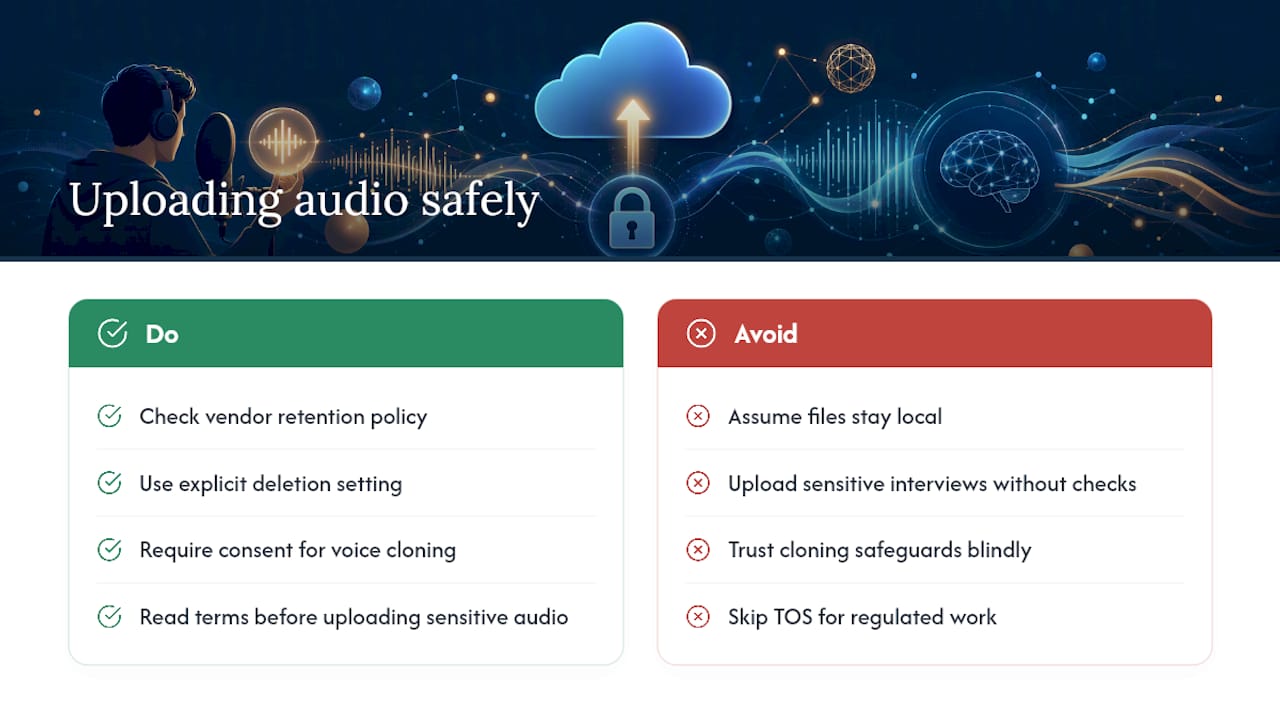
Most AI podcast editors process audio on their own servers to run transcription and noise models, which means your file leaves your machine the moment you upload it. Check each vendor’s retention policy before you commit: some tools delete raw files after processing completes, others keep them to improve their models unless you opt out. If you record sensitive interviews, look specifically for a data retention or deletion setting rather than assuming a default.
Voice cloning tools carry an extra layer of risk worth naming directly. Any platform that can regenerate a voice from a sample could, in theory, be misused to create audio a guest never actually recorded. Reputable tools like ElevenLabs Studio require consent-based voice setup for cloning features, but you’re still trusting the platform’s safeguards, not verifying them yourself.
If you interview guests under a nondisclosure agreement or in regulated fields like healthcare or legal work, read the vendor’s terms of service for data processing before uploading anything. A five-minute read now beats a compliance problem later.
How Steep Is the Learning Curve on These Tools?
Chat-based editors have the shortest ramp-up by design. Notevibes and Zencastr’s Producer work by typing a plain-language request, so if you can describe what you want changed, you can use the tool on day one. There’s no timeline to learn and no keyboard shortcuts to memorize.
Transcript-first tools like Descript and Riverside take a little longer to click, mostly because the mental model is unfamiliar at first. You’re not scrubbing a waveform, you’re editing text, and that reframe takes maybe one full episode before it feels natural. Once it does, most editors report it’s faster than timeline editing for cutting content, just not for fine audio work like precise fades.
Studio suites sit in the middle. Adobe Podcast’s Enhance Speech is close to a one-click tool, but its full Studio features add more controls that take longer to explore. ElevenLabs Studio’s agentic editing has the steepest curve of the group simply because it does the most: voice regeneration and stem separation are powerful, but neither is intuitive without watching a tutorial first.
The practical rule: budget one real episode’s worth of trial time before judging any tool’s learning curve. A five-minute demo video never shows you the friction that shows up on your third edit.
Where Do You Get Help When the AI Gets It Wrong?
AI tools miss things: a filler-word detector that cuts a legitimate pause, a transcript that mangles a guest’s name, a mix that over-compresses a laugh. Knowing where to get unstuck matters as much as picking the tool itself.
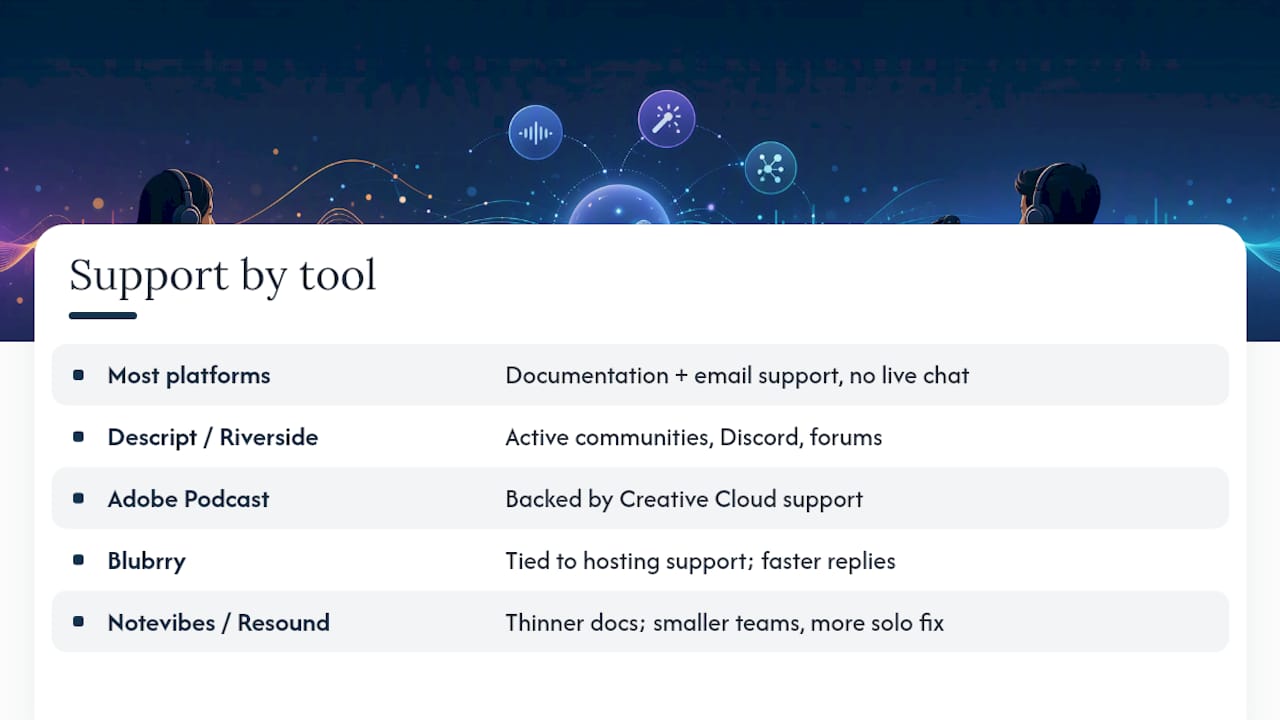
Most of these platforms lean on documentation and email support rather than live chat, especially on lower-tier plans. Descript and Riverside both maintain active user communities, Discord servers and forums where creators trade workflow tips faster than official support tickets move. Adobe Podcast benefits from Adobe’s broader support infrastructure, which helps if you’re already inside the Creative Cloud ecosystem.
Smaller, newer tools like Notevibes and Resound have thinner support documentation simply because they’re younger products with smaller teams. That’s not necessarily a dealbreaker, but it does mean you’re more likely to be troubleshooting alone if something breaks mid-edit. Blubrry’s support ties into its hosting customer service, which tends to respond faster since podcast hosting support has existed longer than AI editing support has.
Before committing to a paid plan, search for the tool’s name alongside “reddit” or “community” and see what real users are troubleshooting. A support gap you find during a trial is far cheaper than one you find during a launch week crisis.
Does Multitrack Recording Matter for Remote Interviews?
If your show has ever had a guest’s laptop mic clip during a laugh or a Wi-Fi stutter chop out a sentence, you already know why multitrack recording matters. Recording each speaker on a separate track means you can fix one person’s audio without touching anyone else’s.
Riverside built its entire product around this: every participant records locally on their own device, then the tracks sync afterward, so a bad connection during the call doesn’t ruin the final audio quality. That separation is also what makes AI cleanup more effective, since noise reduction applied to a single voice track outperforms noise reduction applied to a blended stereo mix.
Descript also supports multitrack import, useful if you record separately but want to edit as if it were one document. Tools built around a single-file, chat-driven workflow, like Zencastr’s Producer or Notevibes, work best for solo shows or already-mixed files rather than raw multitrack interview sessions, though Zencastr’s own recording feature does capture separate tracks before handing off to its AI cleanup.
If your show is even occasionally an interview format, multitrack support isn’t optional. Losing it means losing your only real recovery option when one guest’s audio comes in rough.
A Podcaster’s Real Experience Switching to AI Editing
Swapping from manual timeline editing to a transcript-first AI tool typically cuts a two-hour edit down to about thirty minutes of actual review. The time saved doesn’t come from skipping quality control, it comes from skipping the mechanical part of finding every filler word by ear.
Do an AI pass first, then a human pass for tone and story. The AI catches the noise. You catch what actually makes the episode good.
— H
Compare AI Podcast Editors Faster With TechVideoBlog
Techvideoblog gets you past the guesswork of trial-and-error subscriptions by putting hands-on reviews, verified pricing, and real workflow tests in one place, so you know exactly how Resound handles filler words or how Riverside’s multitrack export actually performs before you spend a dollar.

The directory covers the full production stack too, not just editing: check the best AI tools for podcast clips if repurposing is your main goal, or browse tested AI video tools for podcasters for workflow notes across the whole category. Every listing gets filtered by real feature data, not marketing copy, so you can compare pricing tiers and trial limits side by side before committing. Visit Techvideoblog and filter by podcast-editing features to see which tool actually fits your show’s workflow, then start a trial on the one that matches your criteria.
Sources
- The best AI audio models in one powerful agentic editor
- AI Audio Editor — Edit Audio by Chatting | Notevibes
- Podcast AI Tools – Blubrry Podcasting
- AI Podcast Editor by Chat | Zencastr
FAQ
Which AI Software Is Best for Podcast Editing?
There’s no single best tool. Chat-based editors like Notevibes and Zencastr win on speed for solo cleanup, while transcript-first tools like Descript and Riverside win on control for interview shows and repurposing.
How Much Does a Podcast With 5,000 Listeners Make?
Podcast revenue depends heavily on the ad model, sponsor rates, and niche, and there’s no single verified figure that applies across shows at that download range. Most monetization at that size comes from direct sponsorships rather than programmatic ad networks, which typically require far larger audiences.
Does Joe Rogan Edit His Podcasts?
Joe Rogan’s show is produced with a professional editing team rather than AI-only tools, reflecting the long-form, conversational format of his episodes. Most independent podcasters use AI tools specifically because they don’t have access to a full production team.
What Is the Best App to Edit Podcasts With AI?
For most creators starting out, Descript offers the most approachable entry point because it treats editing as a text-editing task, while Riverside is the stronger pick if your show regularly features remote guests.
How Does AI Speed Up Podcast Editing Compared to Manual Editing?
AI handles the mechanical work, filler-word detection, silence trimming, and noise removal, automatically, which often cuts a 60 to 90 minute manual cleanup pass down to a 10 to 15 minute review once the automated pass is done.