For most creators, DeepMotion is the fastest entry point into markerless AI motion tracking, converting a single smartphone clip into FBX or BVH in minutes. Rokoko Vision 3.0 is the pick when you need a clear upgrade path to inertial hardware. Runway wins for compositing and timeline effects without any 3D export. QuickMagic handles quick video-to-motion batch jobs with solid preset coverage.
A few things worth knowing before you pick:
- Techvideoblog tested each tool against standardized phone clips and verified export compatibility with Blender and Unity.
- OpenCap’s PLOS research confirms that smartphone-based markerless capture can hit measurable kinematic accuracy, with average improvements of roughly 3.4° when predicted anatomical markers are used over sparse video keypoints.
- Google’s motion-filtering guidance shows that camera placement and background clutter materially affect detection reliability, which is why controlled framing matters even for casual shoots.
Quick picks:
- DeepMotion — fastest browser-based body-to-3D workflow for game and character animation.
- Rokoko — best markerless-to-hardware upgrade path for production-grade precision.
- Runway — best for motion-tracked compositing and creative effects inside a timeline editor.
- QuickMagic — best for batch video-to-motion conversion with multiple skeleton presets.
Key Takeaways
The strongest single-camera markerless tools for creators are DeepMotion and Rokoko, with Runway serving a separate compositing use case that does not overlap with 3D mocap export.
| Point | Details |
|---|---|
| Best quick markerless workflow | DeepMotion delivers the fastest browser-based body-to-3D pipeline with clean FBX/BVH export for Mixamo and Unity. |
| Best upgrade path | Rokoko Vision 3.0 pairs markerless capture with optional inertial hardware for finger and face precision when the project demands it. |
| Finger/face still needs hardware | No current markerless single-camera tool produces production-grade finger or facial data; plan for Smartgloves or manual keyframing. |
| Test before you buy | Run a 15-second clip in your actual shooting conditions and verify the FBX export in Blender before committing to any paid plan. |
| Techvideoblog’s role | Techvideoblog provides hands-on workflow tests, verified pricing, and side-by-side comparisons of AI motion tools so you can skip the trial-and-error phase. |
Table of Contents
- How do these AI motion-tracking tools compare at a glance?
- What does each tool actually do in a real workflow?
- How do you choose the right AI motion-tracking tool for your pipeline?
- How Techvideoblog tested and measured these tools
- The gap between what AI mocap promises and what production actually needs
- What Techvideoblog covers that these tools don’t
- Sources
- FAQ
How do these AI motion-tracking tools compare at a glance?
| Tool | Best For | Capture Types | Export Formats | Input Requirements | Latency Mode | Pricing Shape | Ease of Use | API / Dev Access |
|---|---|---|---|---|---|---|---|---|
| DeepMotion | Quick body-to-3D for game/character animation | Full-body, multi-person | FBX, BVH, MP4 preview | Smartphone, webcam, single camera | Batch (cloud) | Free tier; paid plans from ~$19/mo | Very easy, browser-based | Yes (API available) |
| QuickMagic | Fast video-to-motion with preset exports | Full-body | FBX, BVH, GLB | Smartphone, webcam | Batch | Free trial; paid tiers | Easy, upload-and-go | Limited |
| Kling / ImagineArt | Stylized motion transfer to images/characters | Single-character motion transfer | Image/video output | Reference video + static image | Batch | Credit-based / subscription | Easy, no 3D pipeline needed | Limited |
| Runway | Motion-tracked compositing and creative effects | 2D point tracking, layer linking | Video/project export | Any video source | Near real-time in editor | Free tier; Pro from ~$15/mo | Moderate, timeline-based | Limited |
| Rokoko | Markerless capture with hardware upgrade path | Full-body (finger/face via hardware add-ons) | FBX, BVH, USD | Smartphone, webcam | Batch (cloud) | Free tier; paid plans | Moderate | Yes (SDK/API) |
Key trade-offs to know:
- Markerless convenience vs. finger/face precision: every tool above handles full-body well, but finger and facial capture still requires dedicated hardware (Rokoko Smartgloves, for example) for production-grade fidelity.
- Single-camera occlusion is a real limitation. When a limb passes behind the torso, all single-camera solvers guess. Multi-person capture degrades further when subjects overlap.
- Developer access varies significantly. DeepMotion and Rokoko publish API/SDK documentation. Runway and Kling are primarily GUI tools with no published motion-data export pipeline for 3D engines.
What does each tool actually do in a real workflow?
DeepMotion
DeepMotion is a cloud-based AI motion capture platform that converts video into 3D animation directly in the browser, with no software installation required. It targets game developers and character animators who need a fast body-to-3D pipeline.
- Inputs: Smartphone (front or rear), webcam, action camera; single-camera recommended for best results.
- Capture types: Full-body, multi-person (up to two subjects in some plans).
- Exports: FBX, BVH, MP4 preview; integrates with Unity, Unreal, Blender, and Mixamo retargeting.
- Pros: Browser-based with no GPU requirement on your end; fast turnaround on short clips; clean FBX output for Mixamo retargeting.
- Cons: Finger and facial capture not supported; occlusion artifacts on complex movements; processing time scales with clip length.
- Pricing: Free tier available; paid plans start around $19/month. API access is documented for developers.
QuickMagic
QuickMagic focuses on speed. Upload a clip, pick a skeleton preset, and download motion data in FBX, BVH, or GLB format. It suits creators who need to batch-process reference footage without spending time on per-clip settings.
- Inputs: Smartphone, webcam; single-subject clips work best.
- Capture types: Full-body.
- Exports: FBX, BVH, GLB; compatible with Blender, Maya, and Unity pipelines.
- Pros: Minimal setup; multiple skeleton presets reduce retargeting friction; fast batch processing.
- Cons: Less control over solver settings; no finger or face data; developer API documentation is limited.
- Pricing: Free trial available; paid tiers for higher volume. Check the site for current plan pricing, as tiers update frequently.
Kling / ImagineArt
Kling, accessible through ImagineArt, takes a different approach entirely. Rather than exporting motion data to a 3D engine, it transfers motion from a reference video onto a static image or character, producing an animated video output. This is motion transfer, not mocap export.
- Inputs: A reference video clip plus a static source image.
- Capture types: Single-character motion transfer; no multi-person or skeletal data export.
- Exports: Animated video (not FBX/BVH); no 3D engine integration.
- Pros: No 3D pipeline knowledge required; fast results for stylized or social content; strong for character animation in 2D/image contexts.
- Cons: Not a mocap tool for game or film pipelines; no skeletal data; limited to single-character output.
- Pricing: Credit-based and subscription models through ImagineArt.
Runway
Runway’s motion tracking feature is built for video editors, not 3D animators. You click a subject in the timeline, Runway tracks it, and you link text, graphics, or effects layers to that tracked point. It is compositing-grade motion tracking, not skeletal mocap.
- Inputs: Any video source; no specific hardware requirement.
- Capture types: 2D point tracking and layer linking; no skeletal or 3D data.
- Exports: Video project export; no FBX or BVH output.
- Pros: Extremely fast for creative effects; no 3D knowledge needed; integrates naturally into a video editing workflow.
- Cons: Not a motion capture tool for 3D engines; no body keypoint data; limited to 2D compositing use cases.
- Pricing: Free tier available; Pro plan starts around $15/month.
Rokoko
Rokoko Vision 3.0 rebuilt its markerless AI solver for cleaner motion data and positions the web-based platform as a full motion production workflow, including editing, retargeting, and export. The real differentiator is the upgrade path: when markerless accuracy isn’t enough, you add Rokoko’s inertial suit or Smartgloves without switching platforms. Finger tracking is not supported in the markerless tier; the Smartgloves add-on covers that gap.
- Inputs: Smartphone, webcam; single-camera markerless.
- Capture types: Full-body markerless; finger and face precision via hardware add-ons.
- Exports: FBX, BVH, USD; integrates with Blender, Unity, Unreal, Maya.
- Pros: Clean solver output; built-in motion editor; hardware upgrade path for production fidelity; strong documentation and community.
- Cons: Full-body markerless has the same single-camera occlusion limits as competitors; finger/face precision requires paid hardware.
- Pricing: Free tier available; paid plans for higher volume and features. SDK and API documented for developers.
Typical workflow for any of these tools:
- Shoot a clip on a smartphone or webcam (controlled lighting, clear background, subject fully in frame).
- Upload to the platform and select capture settings or skeleton preset.
- Review the processed motion in the web editor; apply smoothing and fix obvious jitter.
- Retarget to your character rig in Blender, Unity, or Unreal using the FBX/BVH export.
- Run finger and facial fixups manually or via hardware capture if your pipeline requires them.
For studio-level production context, Sorcery shows how motion technologies are applied in real game development environments.
How do you choose the right AI motion-tracking tool for your pipeline?
Work through these questions before committing to a subscription:
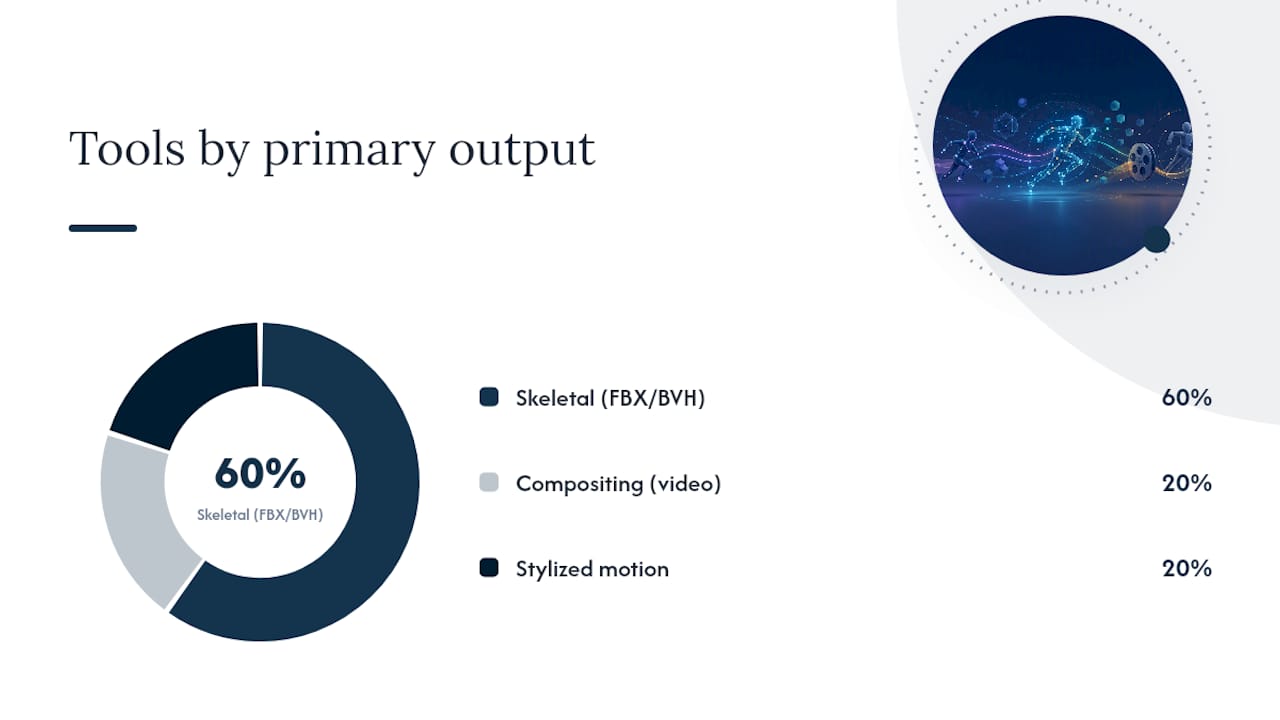
- What is your end output? If you need skeletal data in FBX or BVH for a game engine or Blender, you need DeepMotion, QuickMagic, or Rokoko. If you need compositing effects in a video timeline, Runway is the right fit. If you want stylized motion transfer for social content, Kling covers that.
- Do you need finger or face data? No current markerless single-camera tool delivers production-grade finger or facial capture. Plan for hardware (Rokoko Smartgloves) or manual keyframing if your character needs it.
- Batch or real-time? All five tools above are batch processors. Real-time integration for game engines or live performance requires a different class of tool or a hardware suit.
- Multi-person capture? DeepMotion supports limited multi-person capture. Most tools degrade when subjects overlap; test with your actual footage before buying.
- Data privacy? All five tools above upload video to cloud servers. If your footage is sensitive or proprietary, review each vendor’s upload and retention policy before testing. For fully local processing, open-source stacks like motion-ai on GitHub demonstrate edge-based motion detection pipelines that keep video off the cloud.
- API or SDK access? DeepMotion and Rokoko publish developer documentation. For enterprise-scale deployment patterns, Microsoft’s Azure AI documentation is a common reference for production vision integrations.
Red flags in marketing copy:
- No export format list published (you can’t verify engine compatibility).
- No demo download or sample output available.
- Missing or vague privacy/data retention policy.
- API described as “coming soon” with no documentation link.
Questions to ask during a trial:
- What is the processing time per minute of footage on my plan tier?
- Does the export retarget cleanly to a standard Mixamo or Rigify skeleton?
- What happens to my uploaded video after processing?
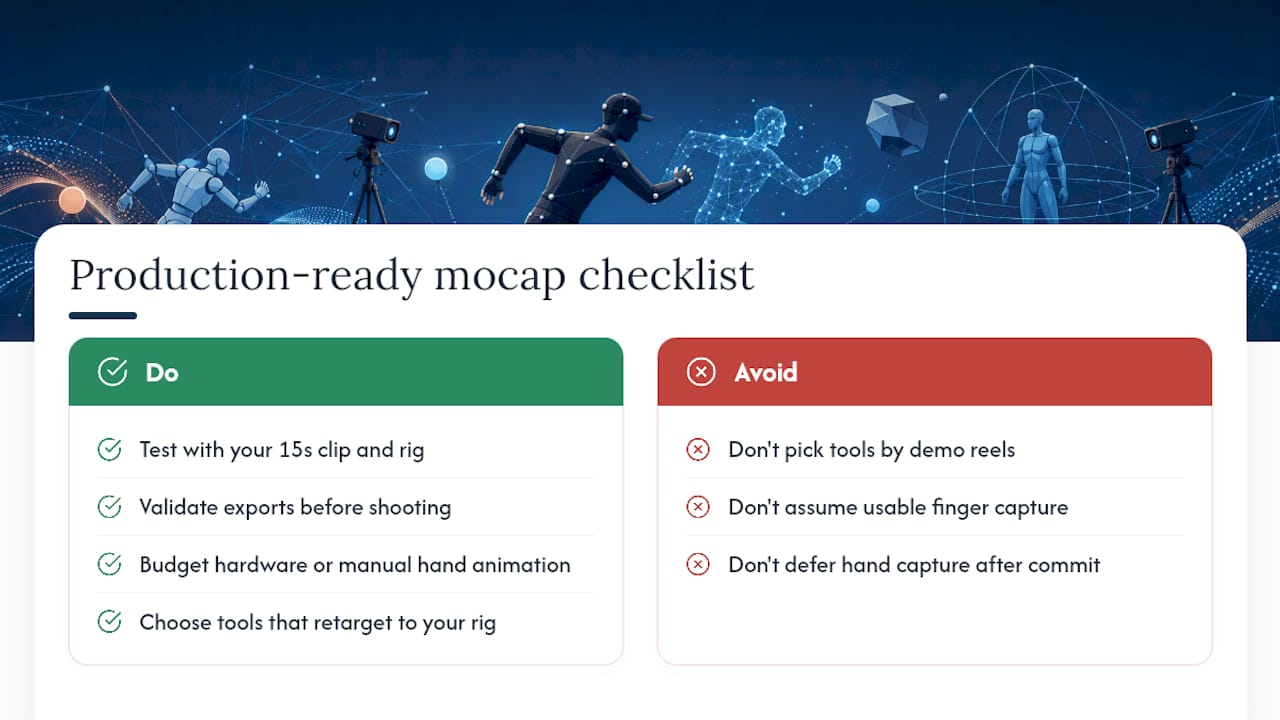
Pro Tip: Before buying any plan, shoot a 15-second test clip in your actual shooting conditions (same room, same lighting, same subject distance) and run it through the free tier. Check the FBX export in Blender before you pay. This single test will surface occlusion problems, jitter, and retargeting issues faster than any spec sheet.
Google’s camera placement guidance reinforces this: a still camera with a clear subject view and minimal background motion consistently produces cleaner tracking results across all AI solvers.
How Techvideoblog tested and measured these tools
Test protocol: Techvideoblog ran each tool against a standardized set of clips: one smartphone front-camera clip, one rear-camera clip, one webcam clip, and one moving-camera clip, all featuring a single actor in controlled indoor lighting. Post-processing steps were kept identical across tools. Each FBX/BVH export was retargeted to a Mixamo skeleton in Blender and a Humanoid rig in Unity to verify pipeline compatibility.
Metrics used:
- Keypoint stability — visual consistency of joint positions across frames, assessed qualitatively.
- Temporal jitter — frame-to-frame noise in joint rotation data, assessed qualitatively.
- Finger/face fidelity — whether the tool produced usable finger or facial keypoint data (binary: yes/no for markerless tier).
- Processing time per minute of footage — measured in minutes from upload to downloadable export.
- Retargeting ease — number of manual correction steps needed to get a clean walk cycle on a standard Mixamo skeleton.
OpenCap’s validated research provides an independent benchmark: multi-view smartphone capture with biomechanical modeling can improve kinematic accuracy by an average of 3.4°, with gains of 4.9–32.6° for specific degrees of freedom. Single-camera tools like those above do not use multi-view or physics-based modeling, so their accuracy sits below that validated baseline.
Limitations: Techvideoblog did not test large-scale biomechanical force estimation, muscle activation analysis, or ground reaction force outputs. Tools like MYoACT Engine target that research and clinical tier and require a separate evaluation framework.
The gap between what AI mocap promises and what production actually needs
Most coverage of AI motion tracking focuses on the entry experience: upload a clip, get a skeleton, done. That framing is accurate for a demo. It is incomplete for a production pipeline.
The real decision point is not which tool produces the cleanest keypoints on a controlled test clip. It is which tool’s output survives retargeting to your actual character rig, in your actual shooting conditions, with the fidelity your project requires. A walk cycle that looks clean in a web preview can fall apart the moment you retarget it to a non-standard skeleton or push it into a scene with fast footwork or close-up hand work.
The conventional advice is to pick the tool with the best-looking demo reel. That is the wrong filter. Demo reels are shot in optimal conditions with professional actors and post-processed before you see them. The test that matters is your own 15-second clip, your own rig, your own export pipeline.
Finger and face capture deserve a separate, honest assessment. Every markerless tool on this list produces no usable finger data in its base tier. That is not a knock on any specific product; it reflects the genuine limits of single-camera pose estimation at this stage. If your character needs expressive hands, budget for hardware or manual animation time. Treating that as a future problem to solve after you’ve committed to a platform is the most common and most expensive mistake in this category.
For creators building AI-driven coaching or training videos, the same principle applies: validate the export against your target rig before the shoot, not after.
What Techvideoblog covers that these tools don’t
DeepMotion, Rokoko, QuickMagic, Runway, and Kling each solve one part of the creator pipeline. None of them tells you which one fits your specific workflow, budget, and output format before you spend money testing them.

Techvideoblog fills that gap with hands-on workflow tests, verified pricing, and side-by-side comparisons across the full AI video tools directory. Every review is built around real export tests and retargeting checks, not marketing copy. If you’re deciding between a $19/month plan and a $50/month plan, the comparison pages show you exactly what changes between tiers and whether the upgrade is worth it for your use case. Check the AI avatar tools roundup if your pipeline ends at retargeting motion data to a virtual performer. Start with the directory to find the right tool without the guesswork of running every free trial yourself.
Sources
- OpenCap: Human movement dynamics from smartphone videos | PLOS Computational Biology
- motion-ai — GitHub
- Motion filtering model — Cloud Vision AI (Google Cloud)
- Sorcery
Privacy note: Every tool listed above uploads your video to cloud servers for processing. Read each vendor’s data retention and deletion policy before testing with footage that contains identifiable people or proprietary content.
FAQ
Can AI do motion tracking from a regular smartphone video?
Yes. Tools like DeepMotion and Rokoko Vision 3.0 convert single-camera smartphone footage into skeletal motion data without markers or suits. Accuracy improves with controlled lighting and a clear background.
Is there a free AI motion tracking option?
DeepMotion, Rokoko, and Runway all offer free tiers with usage limits. QuickMagic provides a free trial. Free tiers are sufficient for testing export compatibility but typically cap processing minutes or resolution.
What is the best AI motion capture tool for game animation?
DeepMotion is the fastest entry point for game animation, with clean FBX/BVH output and direct Mixamo retargeting. Rokoko is the stronger choice when you need a path to higher-fidelity inertial capture for production.
Does AI motion tracking support finger and face capture?
Not in the markerless single-camera tier of any tool reviewed here. Finger precision requires dedicated hardware like Rokoko Smartgloves. Facial capture at production grade similarly requires specialized hardware or manual keyframing.
How does AI track movement in video?
AI motion tracking uses pose estimation models to detect body keypoints (joints, limbs) frame by frame, then connects those keypoints into a skeletal hierarchy. The solver interpolates between frames to reduce jitter and outputs the result as time-coded rotation and position data in formats like FBX or BVH.