Understand YouTube Shorts monetization, eligibility and content requirements. Learn why views alone do not predict earnings. Choose a recording you have permission to edit. Compare candidate clips against the full conversation, preserve necessary context, and check framing and captions. Count only clips that pass your final review.
Monetization: An AI workflow or a faceless format does not guarantee earnings. Original value and platform eligibility still matter. Check YouTube’s channel monetization policies.
Research guide. Vendor information and third-party reports are distinct from our own test results. See how we evaluate tools. We may earn a commission from qualifying purchases through affiliate links. Affiliate disclosure.
Here’s what determines whether you see any money hit your account:
- Eligibility first. You need to meet YPP thresholds through either the fan-funding tier or the full ad-revenue tier, and the module has to be switched on.
- Pooled payouts, not per-view ads. YouTube pools ad revenue from the Shorts feed monthly and divides it among monetizing creators based on their share of engaged views.
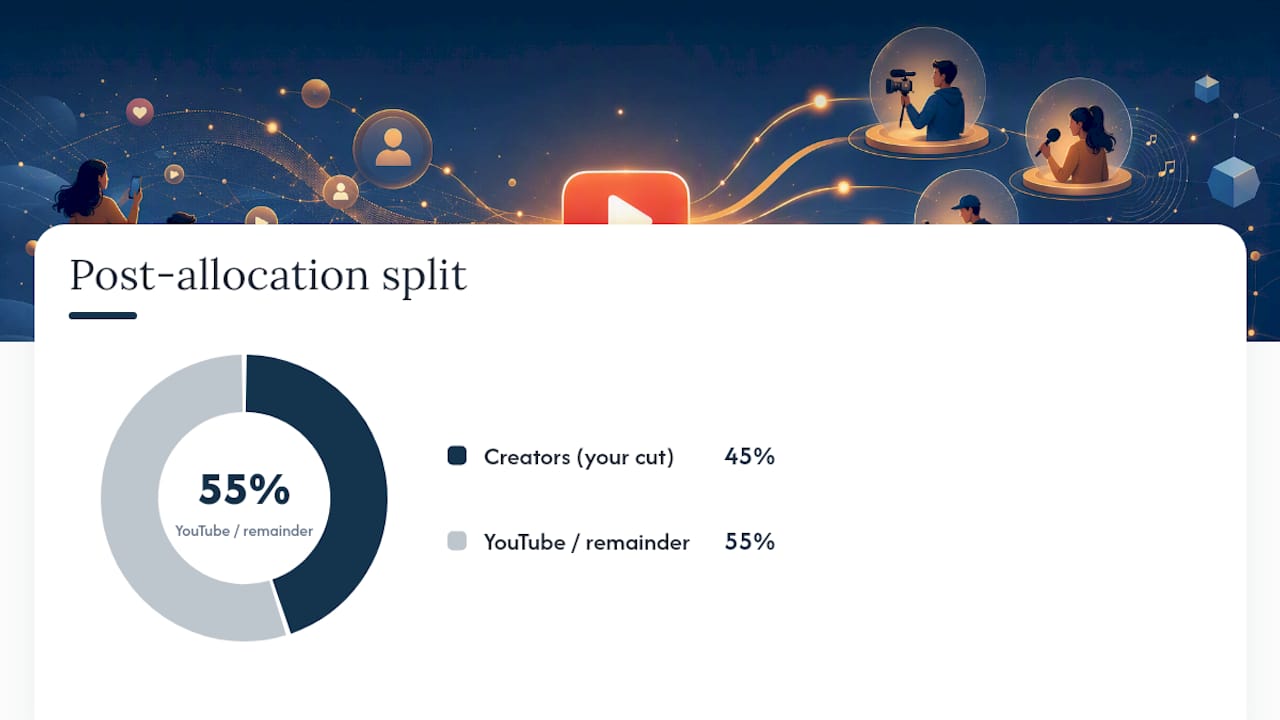
- 45% is your cut. After music licensing costs are deducted, creators keep 45% of their allocated share of that Creator Pool.
The catch that trips up most new creators: loops don’t count. Only “engaged views,” meaning viewers who watch past the opening seconds, factor into your payout share.
Key Takeaways
Shorts monetization pays out through a pooled Creator Pool where creators keep 45% of their allocated share, and that share depends entirely on engaged views and music licensing choices, not raw view counts.
| Point | Details |
|---|---|
| Two YPP paths exist | Full ad revenue sharing needs 1,000 subscribers plus 4,000 watch hours or 10 million Shorts views in 90 days. |
| Shorts watch time is separate | Shorts views never count toward the 4,000-hour long-form threshold; use the Shorts-views path instead. |
| Music choice changes your payout | One licensed track diverts roughly 50% of a Short’s contribution; two tracks divert roughly 66%. |
| RPM sets real expectations | Shorts RPM commonly runs $0.05 to $0.20 per 1,000 views, far below long-form’s $3 to $6 range. |
| Module acceptance is manual | YPP approval alone does not activate Shorts revenue sharing; accept the module separately in Studio. |
Table of Contents
- What Are the YouTube Shorts Monetization Requirements?
- How Does Shorts Ad Revenue Sharing Actually Work?
- What RPM Can You Realistically Expect From Shorts?
- How Much Does Music Choice Affect Your Shorts Earnings?
- How Do You Turn On Shorts Monetization?
- What Actually Moves the Needle on Shorts Earnings?
- Why Trust This Breakdown on Shorts Monetization
- The Real Story Behind Shorts Monetization
- Sources
- FAQ
What Are the YouTube Shorts Monetization Requirements?
YouTube runs two YPP tiers, and which one you hit determines what kind of money you can actually collect from Shorts.
The fan-funding tier requires 500 subscribers, three public uploads in the last 90 days, and either 3,000 valid public watch hours in the last 12 months or 3 million valid public Shorts views in the last 90 days. This tier unlocks Super Thanks, channel memberships, and the ability to sell merchandise on your channel, but not Shorts ad revenue sharing.
The full ad revenue tier requires 1,000 subscribers plus either 4,000 valid public watch hours in the past 12 months or 10 million valid public Shorts views in the last 90 days. Hit either combination, and you’re eligible for the full Shorts Monetization Module.
Here’s the part almost nobody reads carefully: Shorts watch time does not count toward the 4,000-hour long-form threshold. If your channel is Shorts-heavy, you have to qualify through the 10-million-views path, not the watch-hours path.
“Qualified” or “engaged” views matter just as much as the raw count. YouTube defines an engaged view as one where a viewer watches past the first few seconds of a Short, filtering out accidental swipes and instant scroll-throughs. Views generated through paid promotion, artificial engagement, or repeated loops from bots don’t count either.
Two mistakes cost creators real money:
- Assuming Shorts views somehow contribute to the long-form watch-hours requirement (they don’t).
- Racking up millions of views before accepting the Shorts Monetization Module. Those earlier views never retroactively qualify for revenue sharing.
Pro Tip: Check your eligibility status in YouTube Studio under Monetization the moment you cross either threshold. Approval doesn’t automatically switch on Shorts revenue sharing. You still have to accept the module separately, and every day you wait is a day of ineligible views.
How Does Shorts Ad Revenue Sharing Actually Work?
The mechanics behind your Shorts paycheck run through four stages, and skipping any one of them explains why your payout looks smaller than you expected.
- Ads run between Shorts in the feed. YouTube serves ads as viewers swipe through Shorts, and that ad revenue gets collected into a single monthly fund rather than tied to any individual video.
- Music licensing gets paid first. Before creators see a cent, YouTube pays out licensing costs for any music used across the pool of monetized Shorts.
- The remainder becomes the Creator Pool. What’s left after licensing costs is allocated by country, based on the total engaged Shorts views coming from monetizing creators in that market.
- Creators split their country’s pool by view share. Your slice depends on what percentage of eligible engaged views in your country came from your channel that month, and you keep 45% of that allocated amount.
The Creator Pool model means your earnings depend on two moving numbers you don’t control: total ad spend on Shorts that month, and how many other monetizing creators are competing for views in your country.
Here’s a simplified worked example. Say the Creator Pool for a given country totals $500,000 after music deductions, and monetizing creators in that market generated 2 billion eligible engaged views combined that month. Your gross allocation would be $1,000, and after the 45% creator share, you’d collect $450.
That’s a rough model, not a guarantee. Real pool sizes fluctuate with advertiser demand, seasonality, and how many creators in your country are monetizing that month.
What RPM Can You Realistically Expect From Shorts?
RPM (revenue per mille, or revenue per 1,000 views) is the number that actually matters to you, not CPM. CPM measures what advertisers pay per 1,000 ad impressions; RPM measures what you take home per 1,000 views after YouTube’s cut, pooling, and licensing deductions.
And Shorts RPM is low. Creator reports and industry benchmarks put typical Shorts RPM in the range of $0.05 to $0.20 per 1,000 views, with wide swings depending on niche and audience geography. Compare that to long-form video, where RPMs commonly land between $3 and $6 or higher in the same niche, and the gap becomes obvious fast.
Rough math using those benchmarks:
- 1,000 views: roughly $0.05 to $0.20
- 10,000 views: roughly $0.50 to $2.00
- 100,000 views: roughly $5 to $20
Finance, business, and tech-adjacent niches tend to sit at the higher end of that range because advertisers pay more to reach those audiences. Entertainment, comedy, and meme-style content usually lands at the lower end, and audiences concentrated in lower-CPM countries pull RPM down further regardless of niche.
Why is Shorts RPM so much lower than long-form? Three factors compound against you: the ad inventory in the Shorts feed is less valuable per impression than pre-roll or mid-roll on long-form, the revenue gets pooled and divided rather than tied to your specific video’s ad performance, and music licensing takes a cut before you ever see the Creator Pool total.

How Much Does Music Choice Affect Your Shorts Earnings?
Your audio choices quietly determine how much of a Short’s revenue potential actually reaches the Creator Pool.
- No music, or fully original audio: your Short contributes its full share to the pool with no licensing deduction.
- One licensed track: roughly 50% of that Short’s revenue contribution gets diverted to cover music licensing.
- Two licensed tracks: the diversion climbs to roughly 66%, leaving only about a third of that Short’s potential contribution in the pool.
Certain content categories get flagged as ineligible for Shorts monetization entirely: reused footage with no meaningful original commentary or editing, content carrying watermarks from other platforms, and Shorts with active copyright claims against them.
Pro Tip: Keep a simple log of every track you use and its licensing source. When a copyright claim hits mid-month, having proof of where the audio came from is the fastest way to get it resolved without losing that Short’s earnings.
Original audio and YouTube’s own royalty-free library preserve the largest share of your contribution. Trending licensed songs might help discovery, but they come with a real revenue cost attached.
How Do You Turn On Shorts Monetization?
Once you’ve cleared either YPP tier, activating revenue sharing takes a few concrete steps.
- Open YouTube Studio and go to the Monetization tab.
- Confirm you’ve been approved for YPP under either the fan-funding or full ad-revenue tier.
- Accept the terms for the Shorts Monetization Module specifically. Approval for YPP does not auto-enroll you in Shorts revenue sharing.
- Confirm the module status shows as active before assuming any Shorts views are being counted.
Practitioners report a common, expensive mistake here: creators get YPP approval, celebrate, and never circle back to accept the Shorts module specifically, then wonder months later why their Shorts revenue is zero.
Once it’s active, track your performance through a few specific reports in YouTube Analytics:
- The Revenue tab, which breaks out Shorts Feed ad revenue separately from long-form ad revenue.
- The engaged views metric, available in the Shorts-specific analytics view, which tells you how many of your total views actually counted toward your Creator Pool share.
- The Geography report, which shows where your engaged views are concentrated, directly relevant since country-level pool allocation affects your payout.
If revenue looks missing or unexpectedly low, check three things in order: whether the module is confirmed active, whether your recent Shorts carry copyright claims that would exclude them, and whether your view geography shifted toward lower-RPM markets that month.
What Actually Moves the Needle on Shorts Earnings?
Hoping for RPM to rise on its own is a losing strategy. A handful of concrete moves change your numbers faster.
- Pick a niche advertisers pay to reach. Personal finance, software, business tools, and tech commentary consistently draw higher advertiser demand than general entertainment content.
- Favor original or royalty-free audio. Every licensed track you skip is revenue that stays in the pool instead of getting diverted to music rights.
- Test longer Shorts. Content in the 2 to 3 minute range sometimes shows different engaged-view behavior than 15 second clips; run your own A/B comparison rather than assuming either length wins.
- Stack revenue streams instead of relying on ad share alone. Super Thanks, channel memberships, shopping affiliate links, and direct brand deals all pay independently of the Creator Pool.
- Funnel Shorts viewers into long-form. Since long-form RPM regularly outpaces Shorts RPM by 15 to 30 times, a Short’s real job is often to feed your higher-earning long-form videos rather than to earn on its own. TechVideoBlog’s guide to repurposing long-form content into Shorts covers this funneling approach in more detail.
Pro Tip: Run one variable at a time. Change only the audio, or only the length, or only the call-to-action in a given week, then compare engaged-view rate and RPM before and after. Changing everything at once tells you nothing about what actually worked.
Use the directory to compare workflow options, then confirm current features and terms with the provider.
Why Trust This Breakdown on Shorts Monetization
What that testing consistently confirms:
- Use the directory to compare workflow options, then confirm current features and terms with the provider.
- Direct workflow audits comparing original-audio Shorts against licensed-track Shorts for the same channel and niche.
- Ongoing monitoring of how Shorts length and format changes affect engaged-view rates.
Money in Shorts follows engaged views and clean audio rights, not follower count. Channels obsessing over subscriber growth while ignoring music licensing are leaving Creator Pool share on the table every month.
The Real Story Behind Shorts Monetization
Most advice on this topic treats Shorts like a smaller version of long-form monetization, just with worse math. That framing misses the point. Shorts were never built to replace long-form ad revenue; they’re a discovery engine that happens to carry a modest revenue-share bonus attached.
The creators doing well with Shorts income aren’t the ones squeezing every fraction of a cent out of RPM. They’re the ones treating engaged-view rate and music licensing as production decisions, not afterthoughts, then using Shorts to push viewers toward long-form content where the real RPM lives. That’s a fundamentally different mindset than optimizing a single video for maximum ad revenue.
If you take one thing from this guide, prioritize checking whether your Shorts Monetization Module is actually active before you do anything else. Every week it sits unaccepted after YPP approval is a week of permanently lost eligible views. After that, fix your audio choices before chasing niche pivots. Licensing deductions are the fastest lever you control directly, and they compound every single month.
Sources
- YouTube Shorts monetization policies
- YouTube Shorts RPM Benchmarks
- How YouTube Shorts revenue compares to long-form video revenue for creators
- What counts as qualified watch hours and Shorts views for YouTube monetization
- YouTube Shorts Monetization: Requirements & Pay (2026)
FAQ
How much money is 1,000 views on YouTube Shorts worth?
Based on typical Shorts RPM benchmarks of $0.05 to $0.20, 1,000 views usually generates somewhere between $0.05 and $0.20, though your actual payout depends on niche, audience geography, and music licensing deductions.
How many views do you need to make $100 on Shorts?
At typical RPM ranges of $0.05 to $0.20 per 1,000 views, reaching $100 generally requires somewhere between 500,000 and 2 million engaged views, depending on your niche and audience location.
How much can you earn from 10,000 views on YouTube Shorts?
Using the same $0.05 to $0.20 RPM range, 10,000 views typically generates roughly $0.50 to $2.00, though higher-value niches like finance or tech can push that figure higher.
How do you monetize YouTube Shorts?
Qualify through the YouTube Partner Program by meeting either the fan-funding or full ad-revenue tier thresholds, then manually accept the Shorts Monetization Module in YouTube Studio to start earning from your share of the Creator Pool.