Test UGCVideo.ai for avatar realism, CreateUGC for sub-minute turnaround, U-Gen for longer takes with built-in quality control, and Kapwing if you want brand-kit persistence baked into an editor you already use. Each solves a different bottleneck: realism, speed, consistency, or workflow. Generate a short hook clip in each before committing budget to a single vendor.
TL;DR:
- UGCVideo.ai excels in achieving realistic avatars with skin texture and imperfection controls, especially suited for product-in-hand ads.
- CreateUGC offers rapid generation from product links in under a minute, making it ideal for quick A/B testing and platform-specific templates.
- U-Gen provides longer clips with built-in quality assurance, automatically retrying until output meets quality standards, which reduces artifacts in extended videos.
- Retries and their associated costs are the most common budgeting pitfalls, so verifying refund policies and keeping retry counts low is essential before spending.
- Export formats like word-level captions and multiple aspect ratios should be confirmed in the trial phase to avoid re-rendering costs and ensure platform compatibility.
Table of Contents
- What Is the Best AI UGC Video Generator to Test First?
- How Does an AI UGC Video Generator Actually Work?
- How Do You Choose the Right AI UGC Tool on a Trial?
- What Formats Do You Need for Ad-Ready UGC Exports?
- What Do TechVideoBlog’s Tool Tests Actually Show?
- What Should You Expect From Support and Onboarding?
- When Should You Trust AI UGC Over Real Creators?
- How TechVideoBlog Helps You Pick the Right Tool Faster
- Where to Go Next for Vendor Details
- Sources
- FAQ
What Is the Best AI UGC Video Generator to Test First?
Six tools are worth your first trial credits, and each earns its spot for a distinct reason rather than a generic feature checklist. The right pick depends on what’s actually breaking in your current ad testing process.
- UGCVideo.ai — best for brands chasing avatar realism. Its skin texture controls and “real imperfections” settings target the uncanny-valley problem that kills conversion on product-in-hand ads. Pricing runs on a credit model typical of the category.
- CreateUGC — best for rapid A/B testing. The vendor advertises rapid generation from a product link in less than a minute, with templates already tuned for TikTok and Meta conversions, and a free trial to confirm the claim yourself.
- Hedra — best for teams that want variety. It supports multi-model generation from photos and existing footage, so you’re not locked into one avatar style across a whole campaign.
- Kreova — best for localized scale. It leans on a large licensed actor library to produce region-specific variations without separate shoots, a similar pitch to Topview’s conversion-focused templates.
- U-Gen — best for consistency on longer clips. It advertises continuous takes lasting up to approximately one and a half minutes with a built-in QA agent that retries automatically until the output clears a quality bar, which matters because longer generated clips are exactly where lip-sync and lighting artifacts tend to creep in.
- Kapwing — best for editor-first workflows. It bundles the UGC generator with brand kit persistence, SRT/VTT caption export, and multiple aspect ratios, plus a free tier to start.
Before you spend real budget on any of them, run this checklist on the free trial output:
- Export a caption file and confirm it’s word-level accurate, not just block-timed.
- Trigger a retry and check whether the vendor charges you again for it.
- Pull the file at 9:16 and check for cropping or subject placement issues before it ever reaches an ad manager.
Topview and CreatorKit round out the field for enterprise-volume and creator-tool use cases, and Arcads AI, Sendshort, and CapCut Web all compete on the same speed-and-templates territory as CreateUGC, worth a look once you know which axis (realism, speed, or QA) matters most for your funnel.
How Does an AI UGC Video Generator Actually Work?
Most tools follow the same five-step pipeline whether you’re generating from a product link or a written brief, and knowing each step tells you what to prepare versus what the software handles.
- Input. You supply a product URL, images, or a script. The tool extracts metadata like product name, price, and key features automatically.
- Avatar and voice selection. Pick an avatar style and voice, then apply your brand kit if the platform supports it, as Kapwing does for reusable custom creators.
- Render settings. Choose aspect ratio, caption style, and target length before generation starts, not after.
- QA and moderation. Some platforms, like U-Gen, run a built-in QA agent that retries until the clip clears a quality threshold, catching obvious lip-sync or lighting problems before you see the output.
- Export. Download as MP4, pull SRT/VTT caption files, or push directly into an ad manager depending on the platform’s integrations.
Pro Tip: Generate your first test clip at 15 seconds, not 30. Shorter clips render faster, cost fewer credits per iteration, and reveal artifact issues just as clearly as a full-length version.
Costs are typically driven by generation credits rather than filming overhead, which changes your unit economics entirely once you’re testing at volume.
How Do You Choose the Right AI UGC Tool on a Trial?
Run through this checklist before you swipe a card for a paid tier:
- Realism threshold. Does the avatar hold up at full screen on a phone, not just in a thumbnail preview?
- Retry policy. Are failed generations refunded in credits, or do you pay again for the same clip?
- Export formats. Can you pull SRT/VTT captions and multiple aspect ratios without an upgrade?
- Licensing. Do you own full commercial rights to the output, including the AI actor’s likeness?
- Integrations. Does the platform push directly to Meta Ads Manager or TikTok Ads, or is it manual upload only?
- Scale needs. Can the credit or subscription tier support 50 test variations a month without a surprise bill?
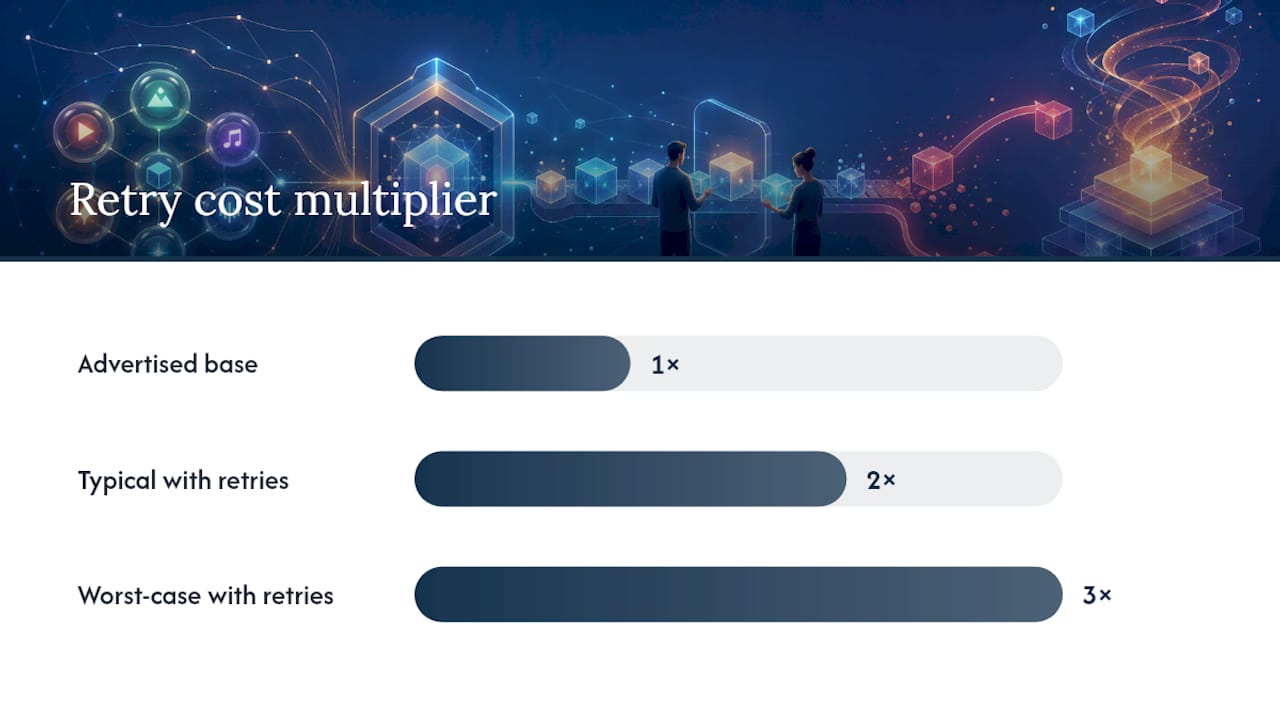
Retry fees are the single most common pricing trap. Some platforms charge per-clip on every retry regardless of whether the first attempt was usable, and render retries alone can push real costs 2 to 3 times higher than the advertised base rate. Envato’s own pricing notes make the mechanic explicit: heavier generation actions consume more credits than lighter edits, so a single ambitious render can burn through a monthly allotment fast.
Ask three questions in your trial call or onboarding chat: “Are retries refunded if the output fails QA?” “Can I export SRT/VTT without an upgrade?” “Who legally owns the generated asset, including the avatar’s likeness?” A vendor that hedges on the third question is a bigger problem than a slow render.
What Formats Do You Need for Ad-Ready UGC Exports?
Match your export settings to the platform before you generate, not after, since re-rendering for a different aspect ratio often costs another credit cycle.
- 9:16 for TikTok and Reels, the default for nearly all UGC-style hooks.
- 1:1 for Meta feed placements when you’re testing static-adjacent formats.
- 16:9 for YouTube in-stream ads.
- Word-level captions, not block captions, since SRT/VTT accuracy at the word level correlates with better retention on sound-off placements, which is most of them.
- CTA placement in the final three seconds, timed to your pixel event so the click-through maps cleanly to the right ad set.
What Do TechVideoBlog’s Tool Tests Actually Show?
Lip-sync drift and lighting shifts show up most often past the 20-second mark, which lines up with a broader pattern across the category: consistency degrades in longer generated clips unless the platform enforces short scene limits or runs dedicated QA logic. Shorter clips, or vendors with retry-until-threshold QA like U-Gen’s, sidestep the problem more reliably than longer single-take generations.
Pricing transparency varies more than the marketing pages suggest. A platform advertising a flat monthly rate can still nickel-and-dime you on retries, and that’s where most real-world cost overruns happen in testing.
- Retry fees are the most common source of budget surprise, not the base subscription.
- QA that refunds failed generations meaningfully lowers cost-per-usable-clip.
- Brand kit persistence, when available, saves real time across multi-creative campaigns.
Pro Tip: Set a hard approval gate before any AI UGC clip reaches your ad account: one human reviewer, five-minute check, looking specifically at lip-sync and hand interactions with the product. That single checkpoint catches most of what automated QA misses, as detailed in what approval gates marketing teams should keep when AI speeds up content production.
What Should You Expect From Support and Onboarding?
Onboarding quality splits along a predictable line: template-driven tools like CreateUGC and CapCut Web tend to get you to a first output within minutes, since there’s little to configure beyond picking a template and dropping in a product link. Platforms with more granular controls, like UGCVideo.ai’s texture settings or U-Gen’s longer-form QA agent, ask for more setup time upfront but reward it with fewer wasted retries later.
Editor-integrated tools such as Kapwing benefit from an existing support infrastructure built around the broader editing suite, so help documentation tends to cover captioning and export questions in more depth than niche UGC-only platforms. Enterprise-focused options like Topview typically offer more hands-on onboarding, including account rep support, which matters if you’re rolling out across multiple brand accounts at once.
Whatever the tier, test support responsiveness during the free trial itself. Send one real question, an export format issue or a billing question about retries, and time the response. A vendor that answers slowly on a free account often behaves the same way once you’re a paying customer at volume, and that gap becomes expensive once you’re running dozens of test creatives a week and something breaks mid-batch.
When Should You Trust AI UGC Over Real Creators?
Lean on AI UGC for volume: early funnel hooks, hook-testing at scale, and iterating on ten variations before lunch. Hire real creators when brand trust or a nuanced product demo carries the weight of the sale. Run your first ten AI UGC creatives as a clean A/B split against one proven human-shot control, and always disclose AI-generated content per platform policy before it runs as a paid ad.
— H
How TechVideoBlog Helps You Pick the Right Tool Faster
This directory cuts the trial-and-error out of choosing between a dozen AI UGC platforms that all claim the same thing on their landing pages. It features workflow tests, pricing verification, and flags retry costs to help avoid surprises on billing statements.

Instead of opening six trial accounts and burning a week comparing exports by hand, check the tested AI video generator comparisons first, and cross-reference realism notes against the avatar-focused tool breakdowns if lip-sync quality is your main filter. E-commerce teams specifically can start with the ecommerce-focused tool roundup to skip straight to vendors already tested against product-in-hand ad formats. Visit the TechVideoBlog tool directory to compare verified pricing and trial notes before you commit a credit budget to any single platform.
Where to Go Next for Vendor Details
- CreateUGC — pricing and template details
- U-Gen — QA agent and long-form specs
- Kapwing AI UGC Generator — free tier and export options
- OpenMontage — open-source agentic pipeline reference
Sources
- AI Video Generator for eCommerce Ads that Sell – CreateUGC
- AI UGC Generator — Make AI UGC Videos Online
- AI UGC Video Generator | Create UGC Ads – U-Gen
- OpenMontage — agentic video production (GitHub)
- AI Video Generator From Text & Images | Envato AI Video
FAQ
What Is an AI UGC Video Generator?
It’s software that produces user-generated-content-style ad clips using AI avatars, voices, and scripted or product-link inputs instead of a real filmed creator.
How Much Does an AI UGC Video Generator Cost?
Most platforms run on credit or subscription models, and heavier generation actions consume more credits than lighter edits, so real cost depends heavily on retry frequency.
Do AI UGC Videos Need an FTC Disclosure?
Yes. If the content is AI-generated and used in advertising, disclose that per platform ad policy before it runs live.
Which AI UGC Tool Has the Best Realism?
UGCVideo.ai focuses specifically on skin texture and imperfection controls for realism, while U-Gen prioritizes consistency across longer takes through its QA retry system.
Can I Export Captions for TikTok and Reels?
Yes, tools like Kapwing support SRT/VTT caption exports alongside 9:16, 1:1, and 16:9 aspect ratios in one workflow.