Make faceless videos with a practical workflow for scripts, narration, visuals, editing and captions. Check quality before publishing. Build one short video from a sourced script, narration and a shot list. Check factual accuracy, visual relevance, captions and rights. Time your own editing and review steps before planning a publishing schedule.
Monetization: An AI workflow or a faceless format does not guarantee earnings. Original value and platform eligibility still matter. Check YouTube’s channel monetization policies.
Research guide. Vendor information and third-party reports are distinct from our own test results. See how we evaluate tools. We may earn a commission from qualifying purchases through affiliate links. Affiliate disclosure.
TL;DR:
- Matching specific tools to each stage is crucial, with Canva and InVideo excelling in quick visual design, and ElevenLabs providing natural-sounding voice outputs.
- Testing tools with a short sample workflow helps verify caption accuracy, output quality, and automation capabilities before committing financially.
- Consistent branding through style sheets and batch production methods enable scaling faceless video creation into a reliable publishing schedule.
Table of Contents
- How Do You Make Faceless Videos From Script to Publish?
- Which AI Tools Handle Each Stage of the Pipeline?
- How Do You Choose the Right Tools for Your Workflow?
- Can You Really Make a Faceless Video in One Sitting?
- How Do You Scale From One Video to a Real Schedule?
- What Proof Should You Demand Before Trusting a Tool Review?
- When Should You Choose Faceless Over On-Camera Content?
- Ready to Build Your Faceless Video Stack?
- Sources
- FAQ
How Do You Make Faceless Videos From Script to Publish?
Every faceless video worth publishing moves through the same six jobs: script, voice, visuals, assembly, captions, and metadata. Trezalabs frames faceless production this way and recommends generating per-shot rather than rendering one long clip, since fixing a single bad shot beats re-rendering an entire video.
Here’s the sequence that actually works:
- Brief. Write one paragraph: topic, hook, and the takeaway you want viewers to leave with.
- Script and shot list. Break the brief into 4 to 8 short lines, each one a separate shot. Budget roughly 2.5 to 3 words per second of narration.
- Voice. Generate a text-to-speech track from the script. This sets your pacing for everything downstream.
- Visuals per scene. Generate or source one clip or image per line, matched to the voice track’s timing.
- Assemble and mix. Stitch shots to the narration, add background music at a low bed level, and balance audio.
- Captions and metadata. Burn in word-timed captions, then write a title, description, and thumbnail text before export.
Platform length matters here. Shorts, TikTok, and Reels reward 20 to 60 second vertical (9:16) videos, while YouTube long-form tolerates 3 to 10 minute horizontal cuts built from the same per-shot method. Keep your first frame legible even muted: a bold on-screen title beats a pretty establishing shot every time.
Pro Tip: Export captions as large, high-contrast text sized for a phone screen, not a desktop preview. What reads fine on your monitor often disappears on a 6-inch display.
Which AI Tools Handle Each Stage of the Pipeline?
Matching a tool to the right job matters more than picking one “best” platform. Here’s how the category breaks down.
- Script and ideation: Any capable LLM can draft a script and shot list from your brief. Test it against your own niche before trusting it. A generic prompt produces generic output.
- Video and image generation: Canva offers template-driven design with resizer tools that push one video into multiple aspect ratios fast, which suits creators who want quick builds over granular control. InVideo leans on a large preset library and a genuinely usable free tier, and both Capterra listings and G2 reviews rate it highly for ease of use. ReelForge and Seedance both push per-shot generation instead of single long renders, which shortens the fix cycle when one clip looks wrong.
- Voice: ElevenLabs delivers the more natural-sounding output of the major TTS options, while OpenAI TTS works as a lower-cost alternative for creators watching budget. Pick one voice and stick with it. Viewers recognize a channel’s sound faster than they recognize its editing style.
- Editing, captions, and automation: CapCut and VEED both burn in captions, resize for multiple platforms, and handle basic timeline editing without a steep learning curve. Faceless.video goes further, running AI agent workflows that draft and queue videos on a schedule, useful once you’ve moved past one-off production.
Before committing to any tool, pull a free-tier sample and check the caption timing against your own script. A tool that nails the demo video and stumbles on your actual footage isn’t worth the subscription.
How Do You Choose the Right Tools for Your Workflow?
Run every candidate tool through the same short checklist before you commit a subscription to it.
- Speed: how long from script input to finished draft?
- Voice quality: does it sound natural on longer sentences, not just short demo lines?
- Caption accuracy: do word timings match your actual narration pace?
- Export options: does it support the aspect ratio and format your platform needs?
- Pricing clarity: is the free tier genuinely usable, or a crippled trial?
- Automation depth: can it batch multiple videos or only handle one at a time?
The fastest validation method is a 3-shot test: take one short sample script, generate the voice track, generate matching visuals, and check whether captions land in sync. This tells you more in ten minutes than a week of reading review pages.
Pro Tip: Ask any tool for a sample output before you subscribe. If a vendor won’t show real footage, or the pricing page hides costs behind “contact sales,” treat that as a red flag rather than an oversight.
Can You Really Make a Faceless Video in One Sitting?
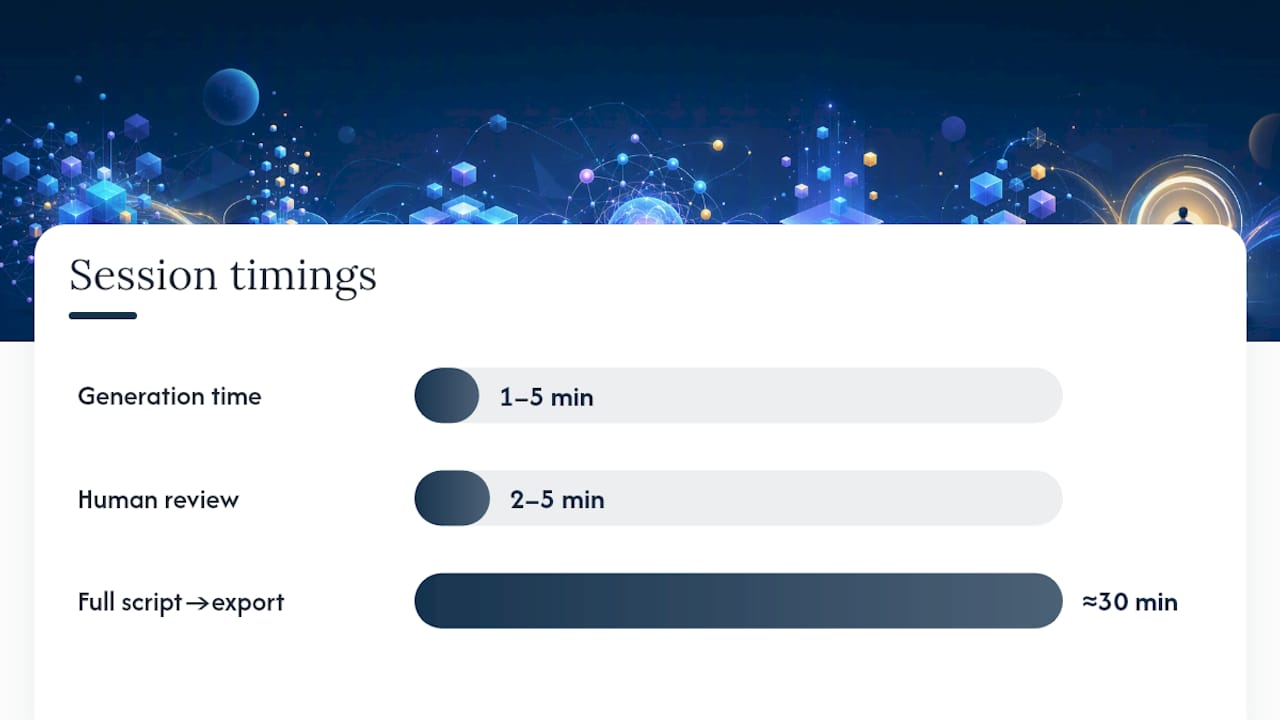
Here’s a full session, start to finish:
- Write the brief. Five lines: topic, hook, three supporting facts, and a closing takeaway.
- Convert to a shot list. Turn each line into one 8 to 12 word script line, roughly one shot per line.
- Generate voice. Feed the script into your TTS tool at a natural, unhurried pace setting.
- Generate visuals per shot. Match each clip or image to the timing of its corresponding script line.
- Assemble. Stitch shots to the voice track, add a low music bed, and check audio levels.
- Add captions and export. Burn in word-timed captions, then export at 1080×1920 for vertical platforms, H.264, a bitrate around 8 to 12 Mbps.
How Do You Scale From One Video to a Real Schedule?
Moving from one-off videos to a publishing cadence means building reusable pieces, not working harder on each new video. Saving a style sheet, meaning fixed visual prompt presets, a locked voice setting, and consistent caption styling, cuts rework dramatically and keeps every video looking like it belongs to the same channel.
- Batch your briefs in one sitting: write five or ten topic briefs at once instead of one at a time.
- Reuse a style sheet across every video so voice, captions, and visual tone stay consistent.
- Keep script review and final quality checks human. Automate generation, not judgment.
- Faceless.video and similar platforms now handle scheduling and optional auto-posting directly, which removes the manual upload step entirely.
- Spot-check output against platform policies regularly. Automation speeds production, but it doesn’t replace a compliance check.
What Proof Should You Demand Before Trusting a Tool Review?
When Should You Choose Faceless Over On-Camera Content?
Faceless formats win for education, facts, and data storytelling, where the information carries the video. On-camera wins where personal trust drives the sale. Test both formats on a small scale before committing your channel’s identity to either one.
Ready to Build Your Faceless Video Stack?
Most tool roundups provide a list of names and leave the testing to you. Running the actual pipeline, script through export, against each tool helps ensure that pricing, output quality, and caption accuracy reflect real workflow use rather than a vendor’s demo reel.

If you’re deciding between Canva, InVideo, ReelForge, Seedance, or the automation-heavy route through Faceless.video, the faceless video test category breaks down sample outputs and verified pricing side by side. Want a walkthrough with real prompts and shot lists? The step-by-step faceless YouTube guide covers the exact sequence used above, plus niche ideas worth testing if you haven’t picked a topic yet. Start with the category hub, pull a sample output, and run your own 3-shot test before you subscribe to anything.
Sources
Use the directory to compare workflow options, then confirm current features and terms with the provider.
- How to Make Faceless Videos | Step-by-Step Guide (2026)
- How to Make Faceless YouTube Videos with AI: Step by Step 2026
- InVideo product listing on Capterra
FAQ
Do Faceless Videos Make Money?
Faceless channels monetize the same way on-camera channels do, through ad revenue, sponsorships, and affiliate links, and niches like education and data storytelling tend to perform especially well without a host on screen. Success depends more on consistent scripting and niche fit than on whether a face appears.
Can ChatGPT Create a Video?
ChatGPT itself doesn’t generate video, but it handles the script and shot-list stage of the pipeline effectively when given a clear brief. You’ll still need a separate voice tool like ElevenLabs or OpenAI TTS, a visual generator, and an editor like CapCut or VEED to finish the video.
What Is the Best Free AI Faceless Video Generator?
InVideo offers one of the more usable free tiers for testing a template-driven workflow, and it’s rated highly for ease of use on Capterra and G2. Run a free-tier sample against your own script before committing to any paid plan, since demo footage rarely reflects real-world caption timing.