Open captions are burned directly into the video image and stay visible no matter what. Closed captions live in a separate file the viewer can switch on or off. If you need guaranteed visibility, on social feeds, autoplay reels, or a lobby TV with the sound off, open captions win. If you need flexibility, searchability, or multiple languages, closed captions are the better call.
TL;DR:
- Open captions are ideal for short-form social videos, signage, or environments where sound is off and guaranteed visibility is essential.
- Closed captions allow easy editing, translation, and searchability, making them suitable for long-term archives, educational content, and streaming platforms.
- Using both formats together ensures maximum accessibility and flexibility, with open captions on social clips and closed captions on master files for reuse.
- Caption quality and export reliability depend on selecting the right tools, especially for multi-language or high-compression workflows.
- Captions significantly enhance comprehension and legal compliance, with open captions benefiting sound-off environments and closed captions supporting search and editing needs.
Table of Contents
- Open Captions vs Closed Captions: What Open Captions Actually Are
- Closed Captions: The Format Behind Streaming and Compliance
- Open Vs Closed Captions at a Glance
- Deciding Between Open Captions and Closed Captions by Platform
- Why Captions Matter for Accessibility and the Law
- Production Tips: Keeping Captions Clean Through Compression
- A Quick Workflow for Adding Captions to Any Video
- The Workflow We Keep Coming Back To
- Where to Test and Compare Captioning Tools
- Sources
- FAQ
Open Captions vs Closed Captions: What Open Captions Actually Are
Open captions are text that’s been rendered permanently into the video frames themselves. There’s no toggle, no settings menu, no sidecar file. They’re baked into the pixels during export, which means what you see is what every viewer sees, on every platform, in every player.
That permanence is the whole selling point. Because open captions are burned into the video and are always visible, they solve the single biggest problem in social video: most people scroll with the sound off. An open-captioned clip communicates its message whether the viewer is on a crowded train or in a silent meeting.
The tradeoff shows up the moment you need to fix a typo, illustrating why visual content in marketing must balance clarity and accessibility effectively. Editing burned-in text means re-cutting and re-exporting the whole video, not swapping a line in a text file. Styling is locked at export time too, so if a platform’s dark mode clashes with your caption color, you’re stuck until the next render.
Closed Captions: The Format Behind Streaming and Compliance
Closed captions exist as a separate track, usually an SRT or WebVTT file, that a video player reads and displays on command. The viewer decides whether captions appear at all, which is the defining trait behind same-language subtitles designed for accessibility.
SRT is the plain-text workhorse most editors and platforms accept. WebVTT adds styling and positioning support, which makes it the standard for web video and streaming services. Most major platforms, YouTube, Vimeo, learning management systems, accept one or both.
The advantages compound over time. Because the text remains a separate, editable stream rather than part of the video image, you can fix a wrong name or update a translated line in seconds. That same text is indexable, which means viewers and search engines can find your video based on what’s actually said in it. Multi-language releases just mean stacking additional caption files on the same source video, no re-export required.
Open Vs Closed Captions at a Glance
The two formats solve different problems, and the table below breaks down where each one actually wins.
| Factor | Open captions | Closed captions |
|---|---|---|
| Visibility | Always on, cannot be hidden | Toggleable by the viewer |
| Technical delivery | Burned into video during export | Separate file (SRT, WebVTT) read by the player |
| Editability | Requires re-encoding the whole video | Edit the text file directly, no re-export |
| Localization | One language per exported file | Multiple language files on one video |
| Searchability | Not indexable as text | Indexable and searchable |
| Best fit | Social autoplay, signage, promo clips | Streaming libraries, courses, archives |
Neither format is universally better. Open captions guarantee visibility while closed captions maximize editing flexibility and searchability, which is exactly why so many creators end up using both.
Deciding Between Open Captions and Closed Captions by Platform
The right call usually comes down to where the video lives and how much control the viewer has over playback.
Reach for open captions when:
- You’re posting short-form content to social feeds where autoplay strips the sound by default.
- The video runs on digital signage in a lobby, gym, or storefront with no remote control nearby.
- You’re distributing a promo clip through email or a landing page where the platform’s caption support is unreliable.
Reach for closed captions when:
- The content lives in a streaming library or a video-on-demand catalog with long-term viewers.
- You’re publishing for a learning management system, where students may need to search transcripts or adjust caption size.
- The asset is archival or reference material that outlives the original platform it launched on.
Open captions solve the problem when platform support for closed captions is unreliable and visibility has to be guaranteed, but that guarantee costs you flexibility. A practical middle path: export an open-captioned version for the social cut, and keep the original master file paired with a closed-caption track for anywhere the video gets reused, translated, or archived.
Why Captions Matter for Accessibility and the Law
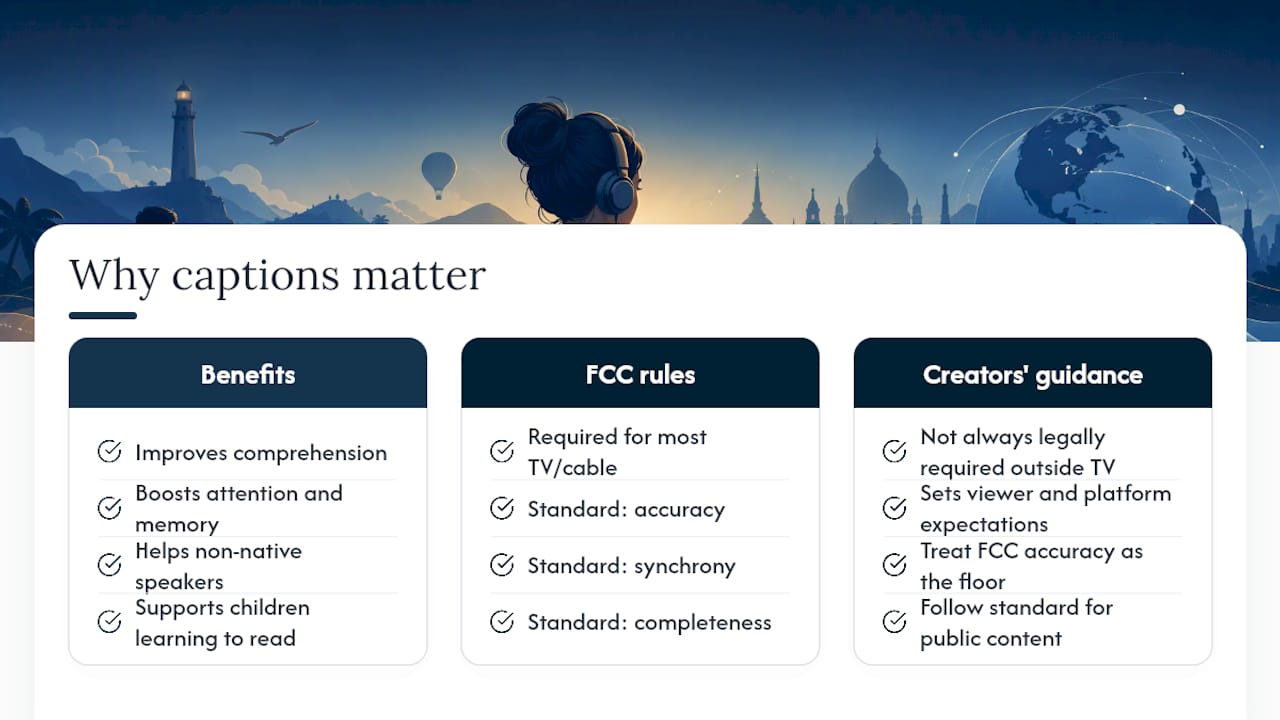
Captions aren’t a nice-to-have layered on top of video, they’re core to how a huge share of viewers actually consume it. More than 100 empirical studies show that captioning improves comprehension, attention, and memory for viewers of every age, including non-native speakers, children learning to read, and anyone watching in a noisy room.
On the regulatory side, the FCC requires closed captioning for most television programming and sets quality standards covering accuracy, synchronicity, completeness, and placement, rules that have applied to broadcast and cable distributors since the late 1990s and have expanded to cover more programming since. Live broadcasts get more tolerance for minor caption delay than prerecorded content, which is expected to sync tightly with dialogue.
For creators outside broadcast, these rules aren’t always a direct legal mandate, but they set the quality bar viewers and platforms have come to expect. If you’re producing educational content, corporate training, or anything distributed to a public audience, treating FCC-level accuracy as your floor, not your ceiling, keeps you out of trouble and keeps your content usable for everyone.
Production Tips: Keeping Captions Clean Through Compression
Open captions take a hit when you compress video hard, because the text gets rasterized into the same pixels as everything else. Test legibility at your actual export bitrate, not just at full resolution, and add a semi-transparent backplate behind the text if your footage has busy backgrounds.
Closed captions dodge that problem entirely. Because the text lives as its own stream rather than getting flattened into the video, it stays sharp no matter how aggressively you compress the picture, and it doubles as a searchable transcript for archiving.
The workflow that saves the most headaches: keep one master caption file in WebVTT or SRT format and generate any burned-in social variant from that same source. Edit the master, not the video.
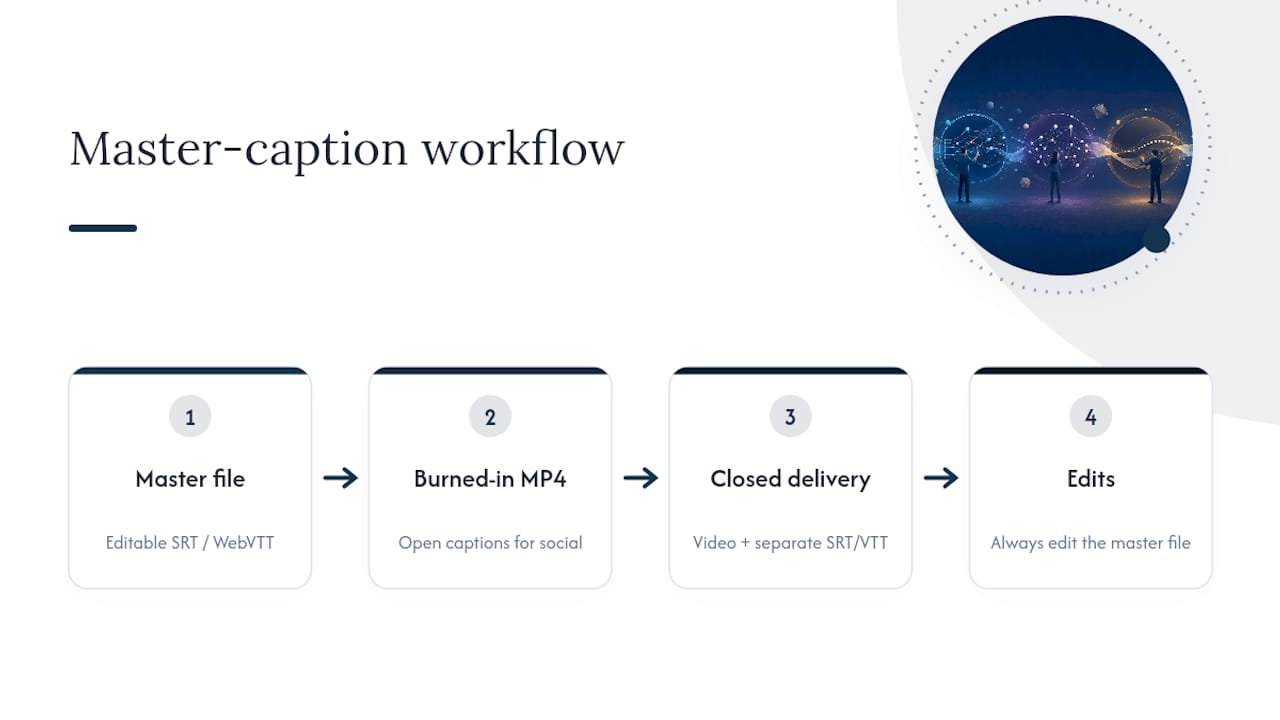
Pro Tip: Publish both versions when a video is going multiple places, an open-captioned MP4 for the social feed, and the closed-caption master with its SRT or VTT file for the platform where the video actually lives long-term. You get guaranteed visibility on one and full editability on the other.
A Quick Workflow for Adding Captions to Any Video
Getting captions onto a video reliably comes down to five steps, whether you’re doing it by hand or with automated tools.
- Transcribe the audio. Use an automated speech-to-text tool for a first pass, then have a human review it for names, jargon, and punctuation.
- Edit for accuracy. Fix misheard words and break long sentences into readable caption chunks, typically under 42 characters per line.
- Sync the timecodes. Match each caption line to when it’s actually spoken, not just close enough.
- Export the file. Save a master SRT or WebVTT file, then burn a copy into the video if you need an open-captioned social version.
- Test on the actual platform. Upload and preview, since caption rendering can shift between YouTube, LinkedIn, and a streaming service.
For a deeper walkthrough of the burned-in side of this process, Techvideoblog’s guide to creating burned-in captions covers export settings and legibility testing. If you’re publishing to LinkedIn or similar platforms that reward both formats, the two-layer caption workflow shows how to deliver an MP4 with burned-in text alongside a standalone SRT.
The Workflow We Keep Coming Back To
Most creators overthink this choice. The pattern that actually holds up across platforms is simple: keep a closed-caption master file for every long-form piece of content, and reserve open captions for the handful of contexts where visibility can’t be left to chance, short social clips, signage, autoplay feeds.
The mistake we see most often is treating open captions as the default because they’re easier to knock out fast. That’s a short-term win that creates long-term maintenance debt the moment you need to fix a caption or add a second language. Tools built for fast auto-subtitle generation on short clips make the open-caption side quick enough that skipping the master file is never worth the tradeoff.
— H
Where to Test and Compare Captioning Tools
Choosing between burned-in and toggleable captions is only half the job, the other half is picking software that exports both formats cleanly without mangling your timecodes. A reputable source tests captioning and subtitle tools hands-on, checking real export quality, accuracy, and pricing rather than repeating vendor marketing copy.

If you’re building a workflow that needs both a burned-in social cut and a closed-caption master, our AI captions and subtitles category breaks down which tools handle SRT and WebVTT exports well, and which ones are better suited for quick open-caption turnarounds. For multilingual releases, the guide to multi-language subtitles walks through managing several caption files against one source video. Start by checking which tools on the site match your platform mix, then run a test export before committing to a subscription.
Sources
- Open vs Closed Caption: What’s the difference? | AccessiblyApp
- Research review showing captions improve video comprehension (PMC article)
- Captions for deaf and hard-of-hearing viewers | NIDCD
- Captions/Subtitles | Web Accessibility Initiative (WAI) | W3C
- Open vs. Closed Captions: The difference and how it impacts distribution | Verbit
FAQ
Are Open or Closed Captions Better?
Neither format is better across the board, they solve different problems. Open captions guarantee visibility since they can’t be turned off, which makes them ideal for social autoplay, while closed captions offer editing, searchability, and multi-language flexibility that open captions can’t match.
What Does “Open Caption” Mean in Theaters?
In a theater setting, open captions refer to text displayed on screen for everyone in the room, rather than through individual assistive devices some venues offer. It’s the same underlying idea as burned-in video captions: the text is part of the presentation and every viewer sees it, whether they need it or not.
Who Benefits Most From Open Captions?
Viewers in sound-off environments, on public transit, in offices, scrolling social media without headphones, benefit most from open captions because the text can’t be missed. They also help anyone to rely on a platform or embed that doesn’t reliably support closed caption files.
Why Does Gen Z Like Closed Captioning?
Younger viewers frequently watch with captions on by choice, not necessity, often to catch dialogue in noisy environments or follow along while multitasking. That habit lines up with what decades of research on captioning show: captions improve comprehension and retention for viewers of every age, not just those who are deaf or hard of hearing.