Canva wins for fast, branded templates. Predis.ai wins if you need a faceless spokesperson or voice cloning. VEED wins on captions and translation. InVideo wins for style variety. HeyGen wins for lifelike AI avatars with synced narration.
Try any of these free first: type one prompt into each tool’s editor and compare what comes back before you commit to a paid plan. Instagram still ranks Reels primarily on watch time, so no AI tool replaces a strong hook or tight pacing. It just gets you to a first draft faster.
- Canva — best for templates and one-click platform export
- Predis.ai — best for faceless creators and multi-language dubbing
- VEED — best for captions, translation, and manual edit control
- InVideo — best for varied styles (UGC, cinematic, product)
- HeyGen — best for realistic AI spokespeople
Key Takeaways
Picking the right AI reel tool depends on your format (faceless, avatar-led, or template-driven), and testing one prompt across two tools before committing beats trusting any single features page.
| Point | Details |
|---|---|
| Match tool to format | Choose Predis.ai or HeyGen for avatars, Canva or InVideo for templates, VEED for captions. |
| Test before upgrading | Check caption accuracy, voice quality, and export resolution on your own script during the free trial. |
| Hook still decides watch time | The first three seconds determine completion rate more than any AI polish applied after. |
| Disclose realistic AI media | Meta requires disclosure for realistic AI-generated or altered people, especially with avatar tools. |
| Compare real output, not marketing | Techvideoblog runs the same prompt across tools like Canva, Predis.ai, and HeyGen to test actual results. |
Table of Contents
- Instagram Reels With AI: Comparing the Top Tools
- How to Create an Instagram Reel With AI, Step by Step
- Getting Your AI Reel to Actually Perform
- What AI Reels Actually Cost You
- How TechVideoBlog Tests AI Reel Tools
- Using AI Effects and Transitions Without Making It Look Fake
- Letting AI Point You Toward What to Post Next
- Which Numbers Actually Tell You an AI Reel Worked
- What the Law Actually Says About AI-Generated Reels
- Why the “Set It and Forget It” AI Reel Advice Is Wrong
- Find Tested AI Reel Tools and Sample Outputs on Techvideoblog
- Sources
- FAQ
Instagram Reels With AI: Comparing the Top Tools
Ten tools currently dominate this category, and they split into two camps: editors that generate video from a prompt, and avatar-driven platforms built around a synthetic presenter. Knowing which camp a tool belongs to matters more than any feature checklist, because it determines whether you’re editing footage or scripting a spokesperson.
Canva built its AI Reel Maker on top of the platform millions of marketers already use for graphics, so the learning curve is close to zero if you’ve touched Canva before. Type a prompt, get a draft, drop it into a branded template, and export straight to a 9:16 preset. Predis.ai goes further into automation: feed it a product URL or blog post and it writes the script, picks visuals, generates a voiceover from a library of 400+ AI voices, and adds subtitles automatically, with AI avatars available for creators who don’t want to appear on camera. VEED leans into the editing side. Its AI reel generator can build narration and select footage from a text description, but its real strength is what happens after generation: caption styling, multi-language translation, and manual trim controls that give you more say over the final cut than most prompt-to-video tools allow. InVideo targets creators juggling multiple content styles. Its reel maker offers dedicated templates for UGC-style testimonials, cinematic product shots, and straightforward promos, so you’re not fighting one generic template into five different formats. HeyGen is the specialist for talking-head content without a human on set. Its reel generator builds a full storyboard from text, script, or a link, then produces a lip-synced avatar with narration that matches the mouth movements convincingly enough to pass a casual scroll.
The remaining five tools round out the shortlist for specific jobs. CapCut remains a strong pick for creators who want AI-assisted effects and transitions layered onto their own footage rather than fully generated video. Kapwing suits teams that need a browser-based, collaborative editor with AI trimming baked in. Synthesia targets corporate and training content more than social virality, but its avatar quality holds up on Reels. Pika Labs is built for short, stylized AI video clips rather than full narrated reels. Opus Clip flips the workflow entirely, pulling clips out of long-form video instead of generating from scratch, which makes it the better fit if you already have a podcast or webinar to repurpose.
A few things to check before you rely on any free tier for real work:
- Most free plans stamp a visible watermark on exports, which rules them out for client-facing content.
- Minute caps are common. Some tools limit you to a handful of generated minutes per month before you hit a paywall.
- Export resolution on free tiers is often capped below 1080p, which shows on a full-screen Reels view.
- Test the caption accuracy and avatar lip-sync on your own script before upgrading. Marketing demos always look better than your actual footage.
How to Create an Instagram Reel With AI, Step by Step
The workflow is the same across nearly every tool on this list, even though the interfaces look different. Once you’ve done it twice, it takes less time to produce a Reel than to schedule a filming day.
- Choose your input. A text prompt works for quick concepts (“30 second reel about morning skincare routine, upbeat tone”). A blog post or product URL works well in Predis.ai for turning existing content into video. Your own raw clips work best in CapCut or VEED if you want AI to handle transitions rather than full generation.
- Pick a style and generate a draft. Be specific about tone, pacing, and audience in your prompt. Vague prompts produce generic output. “Fast-paced, three cuts, bold on-screen text” beats “make it engaging” every time.
- Edit the draft. Trim dead air, sync captions to the beat of any music, and burn in your logo or handle. Vendors themselves frame AI drafts as a starting point, not a finished product, and that’s the right way to treat them.
- Export and post. Most tools default to 9:16 vertical MP4 with platform-ready presets already sized for Reels. Decide whether you want captions burned into the video or added natively through Instagram, since burned-in captions survive reposting to other platforms but native captions are more accessible.
Pro Tip: Generate two or three voiceover takes from the same script before picking one. AI voice models vary run to run, and the difference between a flat read and a natural one is often just a matter of regenerating.
Getting Your AI Reel to Actually Perform
A technically clean AI-generated Reel with a weak hook still gets scrolled past. The first three seconds decide whether anyone watches the rest, and that hasn’t changed just because a machine built the footage.
Three hook patterns consistently outperform a slow intro: a visual flip (start mid-action, not with a title card), bold on-screen text that states the payoff immediately (“3 mistakes killing your engagement”), and an open question that creates a knowledge gap. Since a large share of viewers watch with sound off, caption size and contrast matter as much as the words themselves. Keep captions large enough to read on a phone at arm’s length, and avoid burying key text near the edges where Instagram’s UI overlaps it.
Pacing matters more in a 15 to 30 second Reel than in longer formats. Aim for a new beat, cut, or on-screen change every 2 to 3 seconds to hold attention through the middle, where most drop-off happens.
- Test hooks, not whole edits. Swap only the first three seconds across two versions and post both.
- Try two thumbnail frames if your tool lets you choose a custom cover.
- Test one audio track against a second for the same visual cut.
Instagram’s own creator guidance points to watch time and completion rate as the metrics that most influence how widely a Reel gets distributed, more than likes or shares alone.
What AI Reels Actually Cost You
Every tool on this list offers a free entry point, but “free” rarely means “usable for real content.” Expect a watermark, a resolution cap, and a monthly minute allowance on the no-cost tier of Canva, CapCut, Kapwing, and most others.
Features that almost always sit behind a paywall: AI avatars, voice cloning, commercial usage rights, and HD or watermark-free export. HeyGen and Synthesia in particular gate their strongest avatar realism behind paid plans, since that’s the core value they’re selling.
Before upgrading, use your free trial to test the three things that actually vary by tool: caption accuracy on your own script, voice quality on a real sentence you’d use, and export resolution on a finished clip. A tool that nails your specific niche often beats one with a longer feature list.
How TechVideoBlog Tests AI Reel Tools
We run the same prompt across every tool in a comparison, then score the outputs blind before checking which tool produced which result. That removes the bias of already knowing a brand’s reputation going in.
- Ease of use: time to first usable draft, no tutorial
- Output realism: does footage or avatar lip-sync hold up on a real phone screen
- Caption accuracy: word-for-word transcription check against the spoken script
- Speed: generation time from prompt to downloadable file
- Export fidelity: resolution and format match what the tool advertises
- Pricing clarity: whether the advertised free tier matches what you actually get
The same prompt produces noticeably different pacing, voice quality, and caption accuracy depending on the tool, which is exactly why side-by-side testing matters more than reading a features page.
Full breakdowns and sample outputs live on our tested AI tools for Instagram Reels page.
Using AI Effects and Transitions Without Making It Look Fake
AI-driven effects and transitions solve a real production problem: manually keyframing a zoom, a whip pan, or a color grade takes editing skill most creators don’t have time to build. Tools like CapCut and Kapwing now detect beat drops in your audio track and auto-place cuts or transitions on the beat, which used to require manually marking every hit point on a timeline.

The risk is overuse. A Reel with a transition every second reads as noisy rather than polished, and viewers notice when effects exist to fill time rather than to make a point. The better approach is choosing one or two transition styles per Reel and applying them consistently. A hard cut on the beat for pacing, plus a single zoom for emphasis on your key line, usually outperforms five different effects stacked into 20 seconds.
Color grading is where AI genuinely saves time without a visible tradeoff. Auto-grading tools built into most of these editors match footage from different sources (a screen recording, a phone clip, and AI-generated video) into a consistent look, which matters more than it sounds when you’re mixing generated and real footage in the same Reel. Without it, an AI-generated segment sitting next to your own selfie footage looks jarringly different in brightness and color temperature.
Transitions and effects work best as invisible support for pacing, not as the feature of the Reel. If a viewer notices the transition before they notice the message, cut it.
Letting AI Point You Toward What to Post Next
Deciding what to make is usually harder than making it. Several tools in this category now build trend detection directly into the workflow, surfacing trending audio, common hook formats, or topic gaps based on what’s currently performing in your niche.
This works best as a starting point, not a script. An AI trend suggestion tells you that a format or audio is currently getting traction; it doesn’t know whether that format fits your brand voice or your audience’s actual interests. Treat trend recommendations the way you’d treat a junior researcher’s first pass: useful for narrowing the field, not a final decision.
A practical way to use this without over-relying on it: pull three trend suggestions from your tool of choice, then filter them against your last 90 days of Reels performance. If a suggested format resembles something that already flopped for your account, skip it regardless of how well it’s trending elsewhere. If it resembles something that already worked, that’s a stronger signal than the trend data alone.
The tools that pair generation with analytics, rather than treating trend spotting as a separate feature, save the most time here because you’re not exporting data between two different platforms to make the comparison yourself.
Which Numbers Actually Tell You an AI Reel Worked
Watch time and completion rate matter more than any other metric for Reels distribution, which means your analytics review should start there, not with likes. A Reel with modest likes but a high completion rate often gets pushed to more accounts than one with heavy engagement but a fast drop-off in the first five seconds.
Track these in order of priority: average watch time, completion rate (the percentage of viewers who watch to the end), and rewatch rate, which signals content strong enough that people watch it twice. Shares matter for reach beyond your existing followers, but they lag behind watch time as a ranking signal.
For AI-generated content specifically, compare completion rates across tools if you’re testing more than one. A Reel generated by an avatar tool like HeyGen might get strong completion if the narration is tight, while a template-driven Reel from Canva might win on shares because it’s more visually snackable. There’s no universal winner here. Track your own account’s numbers per tool over a few weeks before deciding which approach fits your specific audience.
What the Law Actually Says About AI-Generated Reels
Instagram does not ban AI-generated content, but Meta requires disclosure when a Reel contains realistic AI-generated or AI-altered media, particularly anything showing a realistic person doing or saying something they didn’t. That covers avatar-based tools like HeyGen and Synthesia more directly than template-based generators like Canva, since the disclosure requirement centers on realism, not on whether AI was involved at all.
Copyright is murkier. Fully AI-generated video without meaningful human creative input may not qualify for copyright protection in some jurisdictions, which matters if you’re building a content library you intend to license or resell. Voice cloning adds another layer: cloning a real person’s voice without consent, including your own likeness licensed to a third party, can create liability separate from copyright entirely.
The safest practice is treating AI output the way you’d treat a stock footage license: know what usage rights your plan actually grants (commercial use is often paywalled, as noted earlier), disclose realistic synthetic media per Instagram’s policy, and avoid cloning any voice or likeness you don’t have explicit permission to use.
Why the “Set It and Forget It” AI Reel Advice Is Wrong
The most common bad advice on this topic treats AI reel tools as a way to stop thinking about content strategy. Generate a batch, schedule them, move on. That approach produces a lot of Reels and very little performance, because the tools are genuinely good at drafting and genuinely bad at judgment.
What the testing data actually supports is narrower: AI tools compress the time between an idea and a rough cut, sometimes from hours to minutes, demonstrating significant productivity gains when agencies adopt AI workflows. They don’t compress the time it takes to know whether a hook works or a caption reads clearly on a small screen. That part still requires a human watching the output on an actual phone before it goes live.
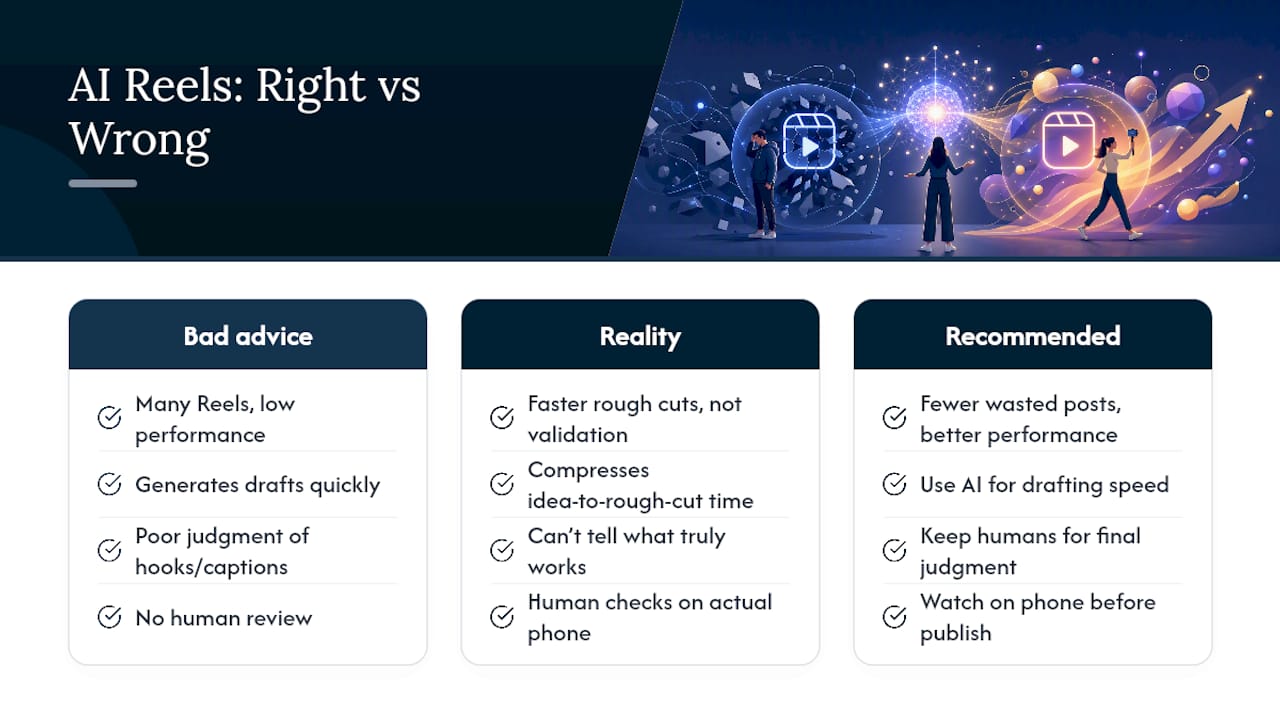
The overrated feature across this entire category is full automation end to end. The underrated one is caption accuracy, because a single garbled auto-caption on a silent-viewing platform kills a Reel faster than a mediocre transition ever will. If you prioritize one thing when testing these tools, check the captions against your actual script word for word before you check anything else.
Run the same prompt through two or three tools before picking a default. The differences in pacing, voice quality, and caption accuracy are larger than the marketing pages suggest, and they only show up when you compare real output side by side.
— H
Find Tested AI Reel Tools and Sample Outputs on Techvideoblog
Every tool on this list looks strong in a demo video. Techvideoblog exists because demo videos and your actual footage rarely match, so we run hands-on tests with real prompts, verified pricing, and sample outputs before any tool earns a recommendation.

If you want to see how Canva, Predis.ai, VEED, InVideo, and HeyGen actually perform on the same script side by side, our tested AI tools for Instagram Reels breakdown has the full comparison and sample clips. Creators managing captions across languages should also check our auto captions guide for tool-specific accuracy notes. Browse the directory, compare pricing tiers against what each tool actually delivers, and pick your next test based on results instead of a features page.
Sources
Product pages: HeyGen, Canva, Predis, VEED, InVideo. See also AI video generators.
- AI Reel Generator for Viral Short-Form Videos | HeyGen
- Free AI reel maker: Create reels online | Canva
- Free AI Reel Maker | Create Instagram Reels in Seconds
- AI Reel Generator – Create Instagram Reels | VEED
- Free Instagram Reels Maker – Create Reels with AI | Invideo
FAQ
Does Instagram allow AI-generated Reels?
Yes. Instagram permits AI-generated content but requires disclosure when a Reel contains realistic AI-generated or altered media, particularly footage depicting a real person.
How do I make an Instagram Reel with AI?
Choose an input (prompt, blog post, or your own clips), generate a draft in a tool like Canva or Predis.ai, edit for pacing and captions, then export in the 9:16 format Instagram expects.
Is there an AI that creates Instagram Reels automatically?
Several tools do this, including Predis.ai, which turns a prompt or URL into a finished reel with script, visuals, voiceover, and subtitles, and HeyGen, which builds a full storyboard with a lip-synced avatar.
What is the three-second rule on Instagram?
It refers to the idea that a Reel has roughly three seconds to hook a viewer before they scroll past, which is why the opening visual or line matters more than any other single edit you make.
Which AI tool is best for faceless Reels?
Predis.ai is built specifically for faceless creators, offering AI avatars and a library of over 400 voices so you never need to appear on camera.