Pictory Review
Pictory is a Script to video tool for Marketers turning scripts, articles, and educational content into videos. This TechVideoBlog review focuses on workflow fit, pricing limits, data-use notes, alternatives, and what to verify before paying.
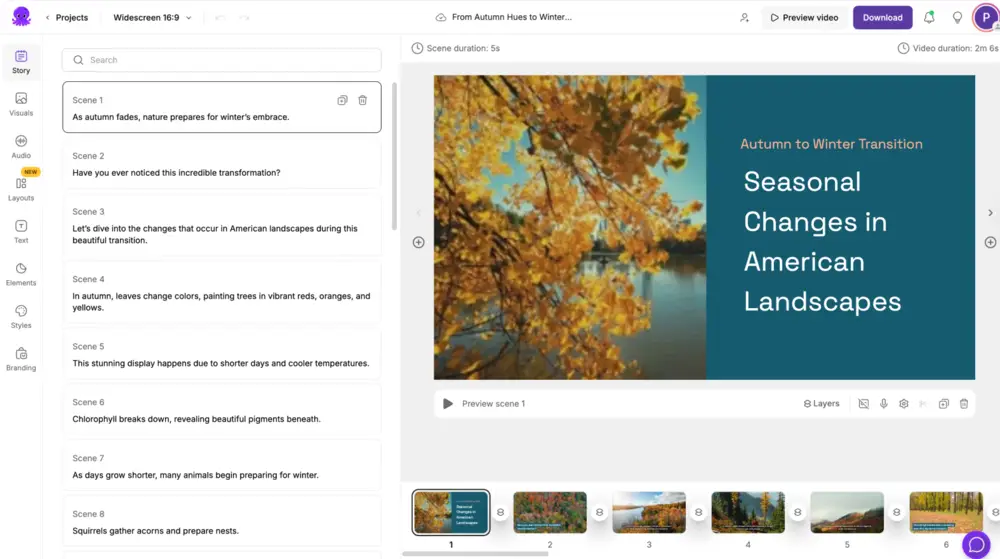
Quick verdict
Should creators use Pictory?
Pictory is worth shortlisting if you need Marketers turning scripts, articles, and educational content into videos. It should not be your first pick if the real job is Creators who need cinematic generative video or advanced timeline control.
Directory database
What TechVideoBlog Tracks for Pictory
Our directory database is designed to compare tools by workflow fit, pricing limits, client-work risk, owner experience, and affiliate availability instead of repeating vendor copy.
Pricing rows
4 plan snapshots tracked.
Policy status
Needs recheck. Checked 2026-11-10.
Owner experience
No owner usage notes yet.
Affiliate status
No approved affiliate link yet.
Experience status
TechVideoBlog Research Status
This page currently combines official pricing, policy research, affiliate availability, and workflow analysis from the TechVideoBlog directory database. First-hand owner notes still need to be added before making strong performance claims.
Workflow fit
Best For and Not Best For
Best for
Marketers turning scripts, articles, and educational content into videos
Not best for
Creators who need cinematic generative video or advanced timeline control
Pros and cons
What Stands Out
Pros
- Clear fit for Marketers turning scripts, articles, and educational content into videos.
- Useful category position: Script to video.
- Pricing and plan limits are captured in the TechVideoBlog research database.
- A 14-day trial is available for initial testing — there is no permanent free plan.
- Privacy and data-use notes are tracked for buyer risk review.
Cons
- Not ideal for Creators who need cinematic generative video or advanced timeline control.
- Plan limits, credits, exports, and annual discounts should be checked before buying.
- AI training or uploaded-content language is not fully clear yet.
- Hands-on test scores should be added before making strong performance claims.
Pricing snapshot
Pictory Pricing
Pricing changes often, so verify the latest details on the official pricing page before buying. This snapshot was checked on 2026-11-10.
What changed in October 2026: Pictory merged video minutes and AI credits into a single credit pool on October 26, 2026. Starter is now 2,000 credits a month (up to 30 minutes of video), Professional 6,000 credits (up to 90 minutes), and Teams 18,000 credits (up to 300 minutes). Annual plans grant the full year's credits upfront; monthly plans refresh each month. If you are comparing an older review, its minute and credit figures are from the old system.
| Plan | Monthly | Annual note | Limits | Watermark/export notes |
|---|---|---|---|---|
| Free Trial | $0/mo | Not listed | 14-day trial only — no permanent free plan. 3 video projects; trial exports are branded. Check pictory.ai/pricing for current trial limits. | Verify exports |
| Starter | $29/mo | 25 effective monthly billed annually | 2,000 credits/month, up to 30 min video/month; 5GB storage, 1 brand kit, 60 minutes ElevenLabs voices, stock assets | Watermark-free exports: true; 1080p |
| Professional | $59/mo | 35 effective monthly billed annually in current offer | 6,000 credits/month, up to 90 min video/month; 20GB storage, 5 brand kits, advanced AI tools, long video summarization | Watermark-free exports: true; 1080p |
| Teams | $199/mo | 119 effective monthly billed annually in current offer | 18,000 credits/month, up to 300 min video/month; 100GB storage, team workspace, onboarding, and training | Watermark-free exports: true; 1080p |
Source: Pictory pricing page.
Buyer risk notes
Data, Privacy, and Client Work Notes
| AI training language | unclear |
|---|---|
| Opt-out | privacy rights available |
| Retention note | retention notes need verification |
| Client-work risk | medium |
| Policy checked | 2026-11-10 |
Source: Pictory privacy page. Policy checked: 2026-11-10.
Try the tool
Try Pictory for Your Workflow
Use Pictory when the workflow fit, pricing limits, and client-work notes match your project. Start with a small test before committing to an annual plan.
Alternatives
Best Pictory Alternatives
| Alternative | Best for | Why compare it |
|---|---|---|
| InVideo | Marketers creating explainer, promo, and social videos from prompts or scripts | Compare it when Pictory does not match the workflow, pricing, export, or control needs for the project. |
| Lumen5 | marketers turning articles, briefs, and educational content into templated videos | Compare it when Pictory does not match the workflow, pricing, export, or control needs for the project. |
| Synthesia | Training, enablement, and business teams scaling avatar-led video | Compare it when Pictory does not match the workflow, pricing, export, or control needs for the project. |
| Canva Video | Marketers and creators making social videos, thumbnails, presentations, and brand assets | Compare it when Pictory does not match the workflow, pricing, export, or control needs for the project. |
Methodology
How TechVideoBlog Reviews AI Video Tools
We evaluate tools by workflow fit, pricing limits, export constraints, creator usefulness, policy risk, and how clearly the product solves a real video-production job. We separate official-source facts from hands-on testing notes so buyer pages stay useful as pricing and features change.
Read the full process on How We Test AI Tools. Some links may be affiliate links. Read the affiliate disclosure.
What Other People Are Saying About Pictory
TechVideoBlog has not hands-on tested Pictory for this review, so here is what verified reviewers say, quoted verbatim with sources:
“The final outcomes are satisfying. AI script writer is far more helpful in segregating the prompt into multiple scenes than other tools I've tried.”
“I've been using Pictory.ai for over a year and recently renewed my subscription. It's a powerful tool for my faceless channel.”
Aggregate ratings point the same way: Tooliverse's consensus score for Pictory is 9.02/10 across 410 verified reviews, crediting the Storyblocks footage, accurate auto-captions, and a learning curve non-editors clear in minutes — while noting the AI sometimes picks stock clips unrelated to the sentence, 4K exports render slowly, and advanced editors find the interface restrictive. (Source: Tooliverse, Pictory review, read November 10, 2026.)
The consistent watch-out across reviewers is clip matching: the AI matches keywords to clips rather than understanding the script, so footage can look generic or miss the intent on niche topics — expect to swap some scenes by hand.
FAQ
Pictory FAQ
Is Pictory free?
No — Pictory has no permanent free plan. It offers a 14-day trial (3 video projects, branded exports). Check the current pricing page because trial limits, watermarks, and credits can change.
Who is Pictory best for?
Pictory is best for Marketers turning scripts, articles, and educational content into videos.
What should I compare Pictory against?
Compare Pictory with InVideo, Lumen5, Synthesia before buying. The best choice depends on source footage, export needs, pricing limits, and review workflow.
How do Pictory credits work?
Since October 26, 2026, Pictory uses one credit pool instead of separate video minutes and AI credits. Starter gets 2,000 credits a month (up to 30 minutes of video), Professional 6,000 credits (up to 90 minutes), and Teams 18,000 credits (up to 300 minutes). Annual plans grant the full year's credits upfront.
What happens to my videos if I cancel Pictory?
Download your videos before cancelling — Pictory permanently deletes video projects on cancellation, according to its own help documentation as reported by Tooliverse. Paid plans are non-refundable, so use the 14-day trial before committing to an annual plan.
Does Pictory export in 4K?
Pictory exports at 1080p on paid plans. Reviewers report 4K exports render slowly where available, and the standard workflow is 1080p — if 4K is a hard requirement, check the current plan page and test it during the trial.