How to translate YouTube videos quickly using AI tools
Translate YouTube videos with subtitles or AI dubbing. Review names, timing and meaning before publishing another language version. Use a clip with names, punctuation and a change of speaker. Correct the transcript, watch the timing, and check readability on a phone. Export the subtitle format you actually need before paying for a plan.
Research guide. Vendor information and third-party reports are distinct from our own test results. See how we evaluate tools. We may earn a commission from qualifying purchases through affiliate links. Affiliate disclosure.
Here is what that workflow looks like in practice:
- Paste the YouTube URL into your chosen AI translation tool. Most platforms accept direct links from YouTube, TikTok, Google Drive, and Zoom.
- Select source and target languages. Many tools auto-detect the original language, so you only need to pick where you want to go, whether that is Spanish, Japanese, Arabic, or one of 100-plus other options.
- Choose subtitles, dubbing, or both. Subtitles generate faster and cost less. AI dubbing replaces the original audio with a translated voice track, sometimes with lip-sync.
- Review and edit the transcript. AI is accurate but not perfect. A quick proofread catches errors before they compound in the final output.
- Export or publish. Download an SRT, VTT, or TXT file to upload directly to YouTube Studio, or export the fully dubbed video file.
Compared to manual translation, AI tools cut turnaround from days to minutes and scale across dozens of languages without proportional cost increases. YouTube’s native tools are fragmented: auto-translated captions handle text, creators must upload dubbed audio manually, and on-screen text translation is not automated at all. Third-party AI platforms fill every one of those gaps.
Table of Contents
- Step-by-step: translating YouTube videos with subtitles or dubbing
- Top AI tools for translating YouTube videos in the United States
- Expert tips for accurate YouTube video translation
- Key takeaways
- The gap between what AI translation promises and what creators actually need
Step-by-step: translating YouTube videos with subtitles or dubbing
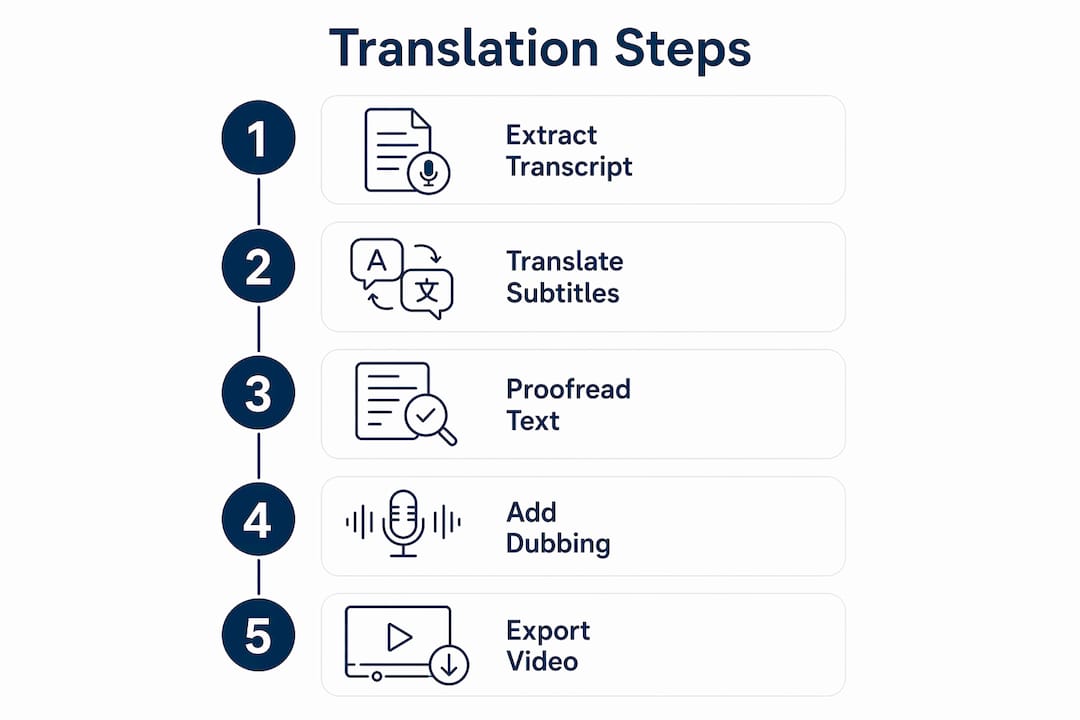
Step 1: Extract a clean transcript
Do not rely on YouTube’s auto-generated captions as your translation source. Auto-captions compound errors with accented speech, background noise, or technical vocabulary, and those errors carry directly into the translated output. Instead, paste your YouTube URL into a dedicated transcript extractor or your AI translation platform. Most tools run Whisper-based speech recognition to produce a cleaner base text.
Step 2: Generate translated subtitles
Once the transcript is clean, select your target language. The AI translates the text and maps each line to the original timestamps, producing a synced subtitle file. For European and major Asian languages, tools that use DeepL’s translation engine consistently outperform standard machine translation in accuracy. Export as SRT for YouTube Studio upload, or VTT for web embedding.

Step 3: Proofread before publishing
Run a quick review pass. Check for mistranslated proper nouns, broken sentence breaks, and timing gaps where subtitles appear too early or too late. Most AI platforms let you edit the transcript inline before export, which saves a separate editing round.
Step 4: Add AI dubbing and lip-sync (optional)
If you want viewers to hear the translation rather than read it, select the dubbing option. The AI generates a new audio track in the target language using either a generic voice or a cloned version of the original speaker’s voice. Voice cloning and lip-syncing significantly increase localization authenticity, but the generation process takes longer than subtitle-only export. For tonal languages like Mandarin or Vietnamese, a multi-pass workflow that adjusts speech tempo and phrasing produces far better lip-sync than a single-pass audio stretch.

Step 5: Export and publish
Download the subtitle file and upload it in YouTube Studio under Subtitles. For dubbed videos, export the full video file and upload it as a separate language version of your channel, or use YouTube’s multi-language audio track feature where available. On-screen text within the video itself, such as lower-thirds or title cards, currently requires manual editing in a video editor. No AI platform fully automates that step yet.
Statistic callout: AI subtitle generators that use Whisper-based transcription report approximately 95% accuracy with clear audio, though accuracy drops with heavy accents, background noise, or specialized terminology.
Top AI tools for translating YouTube videos in the United States
The tools below cover the main use cases: subtitle generation, full dubbing, and transcript extraction. Each fits a different workflow and budget.
1. Vozo Video Translator
Vozo is one of the most capable AI video dubbing platforms available for YouTube creators. It supports many languages and combines three distinct technologies: VoiceREAL for studio-quality dubbing, LipREAL for natural lip-sync across multiple speakers, and an AI Shorts Generator that clips long videos into short-form content. The workflow is direct: paste a YouTube URL, select source and target languages, choose between subtitle-only or full dub with cloned voice, then proofread the editable transcript before export. Lip-sync generation takes longer than a basic dub, often around an hour for a full video, so plan accordingly. Best for creators who need realistic localization, not just readable captions.
2. RecCloud YouTube Video Translator
RecCloud handles the full pipeline from transcript extraction to translated subtitle export. It accepts YouTube URLs directly, auto-detects the source language, and outputs SRT or TXT files ready for YouTube Studio. The interface is straightforward enough for creators who are not technically inclined, and it covers the most common language pairs without requiring API configuration. A solid mid-tier option when you need reliable subtitles without the overhead of a full dubbing platform.
3. YouTube Translator Chrome Extension
Browser extensions like Language Reactor (formerly “Language Learning with YouTube”) overlay dual subtitles directly on the YouTube player, showing both the original language and your chosen translation simultaneously. This approach requires no file export and no separate platform, making it the lowest-friction option for viewers who want to understand foreign-language content while watching. It does not produce downloadable subtitle files or dubbed audio, so it is a viewer tool rather than a creator tool.
4. Synthesys Video Translate
Synthesys positions itself as a full localization platform with extensive language support, high-precision voice cloning, and automatic lip-sync. The workflow follows a simple upload-translate-publish pattern. It is built for creators and businesses scaling content globally, not for one-off subtitle jobs. If you are managing a multi-language channel and need consistent voice quality across languages, Synthesys is worth evaluating.
5. VideoDubber AI Subtitle Generator
Use the directory to compare workflow options, then confirm current features and terms with the provider.
6. DeepL-powered transcript translation
For creators who prefer a manual-control workflow, extracting the transcript with a tool like Lynote or a Whisper-based script and then running it through DeepL produces high-accuracy translations for European and major Asian languages. DeepL supports 30-plus languages and consistently outperforms standard machine translation for nuance and fluency. You then re-import the translated text as a subtitle file. More steps, but more control over the final output.
7. VidScribe AI and Whisper-based pipelines
High-volume creators producing frequent content benefit from desktop or automated pipelines. VidScribe AI and custom Whisper-based scripts offer a better long-term cost structure than cloud credit systems for channels translating dozens of videos per month. The trade-off is a steeper technical setup compared to browser-based tools.
| Tool | Best For | Language Support | Dubbing | Lip-Sync | Export Formats |
|---|---|---|---|---|---|
| Vozo Video Translator | Creator localization | 110+ | Yes | Yes (LipREAL) | Video, SRT |
| RecCloud | Subtitle generation | Common pairs | No | No | SRT, TXT |
| YouTube Translator Extension | Viewer comprehension | 100+ | No | No | On-screen only |
| Synthesys Video Translate | Global channel scaling | 140+ | Yes | Yes | Video, SRT |
| VideoDubber | Free subtitle export | 50+ | No | No | SRT, VTT, TXT |
| DeepL + Whisper pipeline | High-accuracy subtitles | 30+ | No | No | TXT, SRT |
| VidScribe AI / Whisper scripts | High-volume automation | Varies | Partial | No | SRT, Video |
Expert tips for accurate YouTube video translation
Getting a usable translation out of an AI tool is straightforward. Getting a good one requires a few deliberate choices.
Choose subtitles or dubbing based on your audience, not your preference. Subtitles are more accessible for quick understanding and work well for educational or informational content. AI dubbing with lip-sync delivers a more immersive, native-language experience but demands more processing time and budget. If your audience is watching on mobile with sound off, subtitles win every time.
Never use auto-captions as your translation source. YouTube’s auto-generated captions introduce errors with accented speech, background noise, and specialized vocabulary. Those errors compound when fed into a machine translator. Always extract a clean transcript first.
- Optimize subtitle timing: Keep each subtitle line to two lines maximum, display each line for at least one second, and avoid breaking a line mid-phrase. Poorly timed subtitles frustrate viewers even when the translation is accurate.
- Handle on-screen text manually: Lower-thirds, title cards, and graphics embedded in the video require manual editing in a timeline editor. No current AI platform translates on-screen text automatically.
- Evaluate tools by content type: Technical or jargon-heavy content benefits from DeepL-powered workflows with human review. Casual vlogs or entertainment content can go straight through a one-click dubbing platform with minimal editing.
Pro Tip: For tonal languages like Mandarin, Cantonese, or Vietnamese, use a multi-pass lip-sync workflow that adjusts speech tempo before generating the final render. Single-pass audio stretching produces visible lip-sync drift that viewers notice immediately.
Key takeaways
AI-powered tools are the most practical way to translate YouTube videos at scale, but transcript quality and tool selection determine whether the output is publish-ready or needs heavy editing.
| Point | Details |
|---|---|
| Start with a clean transcript | Auto-captions compound errors; extract a clean transcript before translating to protect output quality. |
| Match the method to the goal | Subtitles suit accessibility and speed; AI dubbing with lip-sync suits immersive, native-language experiences. |
| Lip-sync needs multi-pass workflows | Tonal languages require tempo-adjusted, multi-pass rendering for accurate lip-sync, not simple audio stretching. |
| Free tools cover basic subtitle needs | Platforms like VideoDubber export SRT and VTT files at no cost, with approximately 95% accuracy on clear audio. |
| On-screen text still requires manual work | No current AI platform automates translation of lower-thirds or title cards embedded in video footage. |
The gap between what AI translation promises and what creators actually need
AI video translation has moved faster in the past two years than most creators realize. Voice cloning that sounded robotic in 2023 now passes casual listening tests in 2026. Lip-sync that required expensive post-production studios is now a checkbox in a browser-based platform. The technology is genuinely impressive.
What the marketing rarely says clearly: the output quality ceiling is set by your transcript, not the AI model. A noisy recording with heavy accents fed into even the best dubbing platform produces a mediocre result. The creators getting the most out of these tools are the ones who treat transcript extraction and cleaning as a non-negotiable first step, not an afterthought.
Run a small pilot using your own inputs. Check the exported result, the corrections it needs and the total cost before changing your production workflow.
For creators building multi-language channels, the practical advice is to start with subtitles, validate the translation quality with native speakers in your target market, and only invest in full dubbing once you have confirmed the audience is there. Dubbing is expensive relative to subtitles, and a dubbed video in a language your audience does not actually prefer is wasted budget. The best AI tools for YouTube are the ones that fit your actual workflow volume, not the ones with the longest feature list.